



Skip to content
View in the app

A better way to browse. Learn more.

ZeiGames

A full-screen app on your home screen with push notifications, badges and more.

To install this app on iOS and iPadOS
  1. Tap the Share icon in Safari
  2. Scroll the menu and tap Add to Home Screen.
  3. Tap Add in the top-right corner.
To install this app on Android
  1. Tap the 3-dot menu (โ‹ฎ) in the top-right corner of the browser.
  2. Tap Add to Home screen or Install app.
  3. Confirm by tapping Install.

ARK: Survival Evolved Free Download (v361.8 + ALL DLC)
Featured Replies

header.webp

Game Details

Release Name:ย ARK: Survival Evolved

Game Version:ย v361.8 | Build 21291776

Release Date: 27 Aug, 2017

Publisher: Studio Wildcard, Snail Games USA

Developer: Studio Wildcard, Instinct Games, Efecto Studios, Virtual Basement LLC

Based On:ย CSF & Goldberg

ARK: Survival Evolved Direct Download - Game Review

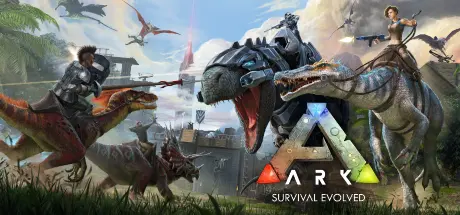
As a man or woman stranded naked, freezing and starving on the shores of a mysterious island called ARK, you must hunt, harvest resources, craft items, grow crops, research technologies, and build shelters to withstand the elements. Use your cunning and resources to kill or tame & breed the leviathan dinosaurs and other primeval creatures roaming the land, and team up with or prey on hundreds of other players to survive, dominate... and escape!

Dinosaurs, Creatures, & Breeding! -- over 100+ creatures can be tamed using a challenging capture-&-affinity process, involving weakening a feral creature to knock it unconscious, and then nursing it back to health with appropriate food. Once tamed, you can issue commands to your tames, which it may follow depending on how well youโ€™ve tamed and trained it. Tames, which can continue to level-up and consume food, can also carry Inventory and Equipment such as Armor, carry prey back to your settlement depending on their strength, and larger tames can be ridden and directly controlled! Fly a Pterodactyl over the snow-capped mountains, lift allies over enemy walls, race through the jungle with a pack of Raptors, tromp through an enemy base along a gigantic brontosaurus, or chase down prey on the back of a raging T-Rex! Take part in a dynamic ecosystem life-cycle with its own predator & prey hierarchies, where you are just one creature among many species struggling for dominance and survival. Tames can also be mated with the opposite gender, to selectively breed successive generations using a trait system based on recombinant genetic inheritance. This process includes both egg-based incubation and mammalian gestation lifecycles! Or put more simply, raise babies!


Game Screenshots

screenshot screenshot screenshot screenshot


Game Trailer


System Requirements

Minimum Requirements

Recommended Requirements

OS

Windows 7/8.1/10 (64-bit versions)

-

Processor

Intel Core i5-2400/AMD FX-8320 or better

-

Memory

8 GB RAM

-

Graphics

NVIDIA GTX 670 2GB/AMD Radeon HD 7870 2GB or better

-

DirectX

Version 10

-

Storage

60 GB available space

-


Installation Guide

  1. No Installation Needed: The game is pre-installed. Just download and extract.

  2. Extract: Right-click the .zip or .rar file and select "Extract Here" or "Extract to folder".

  3. Run: Find ShooterGame\Binaries\Win64\ShooterGame.ex inside the folder and run it.

Game Data & Settings

  • Change Language: Edit the file located at steam_settings/Configs.user.ini

Important Notes

DLC List

Added DLCs

Aquatica - ARK Expansion Map (ARK: Aquatica)

Fjordur - ARK Expansion Map

Lost Island - ARK Expansion Map

Crystal Isles - ARK Expansion Map

ARK: Genesis Season Pass

Valguero - ARK Expansion Map

ARK: Extinction - Expansion Pack

ARK: Aberration - Expansion Pack

ARK: Survival Evolved Season Pass

Ragnarok - ARK Expansion Map

ARK: Scorched Earth - Expansion Pack

Primitive+ - ARK Total Conversion

The Center - ARK Expansion Map

๐Ÿ”ฅDOWNLOAD AREA๐Ÿ”ฅ

๐Ÿ”น70.94 GB๐Ÿ”น

Select the server you want to download with ZeiLink.

Download

DLC Files

Download

  • Replies 19
  • Views 7.1k
  • Created
  • Last Reply

Top Posters In This Topic

Posted Images

Hey, me and my friend got this how do I join my friend ?

  • Author
11 hours ago, hazam said:

Hey, me and my friend got this how do I join my friend ?

Connecting:

Join Game Non-Dedicated Find your friend's server and connect to it.

Creating a server:

Create or Resume game Non-Dedicated Accept Wait for other players to connect.

  • 5 weeks later...

Game is freezing 5-10 seconds after starting, any idea? Freezes and shows as not responding on task manager but music is still running

18 hours ago, BouncezNasty said:

Game is freezing 5-10 seconds after starting, any idea? Freezes and shows as not responding on task manager but music is still running

game bug, corrupted game files, hardware compatibility issues, or outdated drivers i think is your driver need update

  • 3 weeks later...
On 11/5/2025 at 2:13 AM, MikeQc said:

game bug, corrupted game files, hardware compatibility issues, or outdated drivers i think is your driver need update

I have the same issue, drivers aren't out of date and have no problem running any other game (older, newer, with higher requirements etc).

I downloaded another version of this game and that one runs fine so I'm pretty sure there's an issue with this specific one.

  • Author
5 minutes ago, M137 said:

I have the same issue, drivers aren't out of date and have no problem running any other game (older, newer, with higher requirements etc).

I downloaded another version of this game and that one runs fine so I'm pretty sure there's an issue with this specific one.

Hmm a little bit weird, i update and upload newest version soon. I Hope this problem fixed monkaStoned

  • 2 weeks later...

Okay, so like me and friend tried to just download the base game without dlc's just to try multiplayer and it doesn't work. And after we changed steamid it showed up in the non-dedicated server but when my friend joined a crash occured, any ideas please?:

VERSION: 360.35 steam_api64.dll!UnknownFunction (0x00007ffbb74766e0) + 0 bytes [UnknownFile:0] steam_api64.dll!UnknownFunction (0x00007ffbb700e56f) + 0 bytes [UnknownFile:0] ShooterGame.exe!FOnlineSessionSteam::RegisterPlayers() (0x00007ff60490e1d3) + 0 bytes [d:\ase\engine\source\runtime\online\onlinesubsystemsteam\private\onlinesessioninterfacesteam.cpp:1872] ShooterGame.exe!FOnlineSessionSteam::RegisterPlayer() (0x00007ff60490dff9) + 26 bytes [d:\ase\engine\source\runtime\online\onlinesubsystemsteam\private\onlinesessioninterfacesteam.cpp:1834] ShooterGame.exe!APlayerState::RegisterPlayerWithSession() (0x00007ff603a90c08) + 48 bytes [d:\ase\engine\source\runtime\engine\private\playerstate.cpp:279] ShooterGame.exe!AGameSession::RegisterPlayer() (0x00007ff603950a10) + 0 bytes [d:\ase\engine\source\runtime\engine\private\gamesession.cpp:165] ShooterGame.exe!AShooterGameMode::InitNewPlayer() (0x00007ff601e3f0a2) + 344 bytes [d:\ase\projects\shootergame\source\shootergame\private\shootergamemode.cpp:6361] ShooterGame.exe!AGameMode::Login() (0x00007ff603943bbc) + 38 bytes [d:\ase\engine\source\runtime\engine\private\gamemode.cpp:1053] ShooterGame.exe!UWorld::SpawnPlayActor() (0x00007ff603a0abb4) + 148 bytes [d:\ase\engine\source\runtime\engine\private\levelactor.cpp:610] ShooterGame.exe!UWorld::NotifyControlMessage() (0x00007ff603c2e7e4) + 0 bytes [d:\ase\engine\source\runtime\engine\private\world.cpp:4277] ShooterGame.exe!UControlChannel::ReceivedBunch() (0x00007ff6038d87ea) + 0 bytes [d:\ase\engine\source\runtime\engine\private\datachannel.cpp:1071] ShooterGame.exe!UChannel::ReceivedSequencedBunch() (0x00007ff6038d6a5f) + 0 bytes [d:\ase\engine\source\runtime\engine\private\datachannel.cpp:248] ShooterGame.exe!UChannel::ReceivedNextBunch() (0x00007ff6038d71bf) + 11 bytes [d:\ase\engine\source\runtime\engine\private\datachannel.cpp:533] ShooterGame.exe!UChannel::ReceivedRawBunch() (0x00007ff6038d6c8d) + 0 bytes [d:\ase\engine\source\runtime\engine\private\datachannel.cpp:330] ShooterGame.exe!UNetConnection::ReceivedPacket() (0x00007ff603a3f2ae) + 0 bytes [d:\ase\engine\source\runtime\engine\private\netconnection.cpp:1247] ShooterGame.exe!UNetConnection::ReceivedRawPacket() (0x00007ff603a3dce8) + 13 bytes [d:\ase\engine\source\runtime\engine\private\netconnection.cpp:659] ShooterGame.exe!UIpNetDriver::TickDispatch() (0x00007ff6037dd1e3) + 24 bytes [d:\ase\engine\source\runtime\online\onlinesubsystemutils\private\ipnetdriver.cpp:458] ShooterGame.exe!TBaseUObjectMethodDelegateInstance_OneParam::ExecuteIfSafe() (0x00007ff60371163a) + 0 bytes [d:\ase\engine\source\runtime\core\public\delegates\delegateinstancesimpl.inl:555] ShooterGame.exe!TBaseMulticastDelegate_OneParam::Broadcast() (0x00007ff603a1bbe7) + 14 bytes [d:\ase\engine\source\runtime\core\public\delegates\delegatesignatureimpl.inl:1871] ShooterGame.exe!UWorld::Tick() (0x00007ff603a12e59) + 0 bytes [d:\ase\engine\source\runtime\engine\private\leveltick.cpp:1101] ShooterGame.exe!UGameEngine::Tick() (0x00007ff60393d5a6) + 0 bytes [d:\ase\engine\source\runtime\engine\private\gameengine.cpp:1195] ShooterGame.exe!FEngineLoop::Tick() (0x00007ff600f9c989) + 0 bytes [d:\ase\engine\source\runtime\launch\private\launchengineloop.cpp:2647] ShooterGame.exe!GuardedMain() (0x00007ff600f9719c) + 0 bytes [d:\ase\engine\source\runtime\launch\private\launch.cpp:140] ShooterGame.exe!GuardedMainWrapper() (0x00007ff600f9deba) + 5 bytes [d:\ase\engine\source\runtime\launch\private\windows\launchwindows.cpp:125] ShooterGame.exe!WinMain() (0x00007ff600f9e009) + 8 bytes [d:\ase\engine\source\runtime\launch\private\windows\launchwindows.cpp:213] ShooterGame.exe!__tmainCRTStartup() (0x00007ff604d2d861) + 21 bytes [f:\dd\vctools\crt\crtw32\dllstuff\crtexe.c:618] KERNEL32.DLL!UnknownFunction (0x00007ffc3dfee8d7) + 0 bytes [UnknownFile:0] ntdll.dll!UnknownFunction (0x00007ffc3f2cc53c) + 0 bytes [UnknownFile:0] ntdll.dll!UnknownFunction (0x00007ffc3f2cc53c) + 0 bytes [UnknownFile:0]

  • Author
31 minutes ago, Dont said:

Okay, so like me and friend tried to just download the base game without dlc's just to try multiplayer and it doesn't work. And after we changed steamid it showed up in the non-dedicated server but when my friend joined a crash occured, any ideas please?:

Game not work online, download ascended version.

47 minutes ago, DicDale said:

Game not work online, download ascended version.

Nah, ascended is crashing after few minutes with access_violation. But I've figured it out and now ASE works multiplayer.

For anyone wondering how I did it.

  1. Open your Ark folder, Engine, Binaries, ThirdParty, Steamworks, Steamv132, Win64, steam_settings, configs.user - here you have to change your account name and steamid, every friend of yours have to have unique id so you can just delete the last number and change it for another one.

  2. Download the latest TEK Launcher

  3. Launch Steam

  4. Launch TEK and select Launcher settings, and select your game folder.

  5. Then select Game options and click on "Validate"

  6. After successfully validating click on Play and "Play" again. - It should start your game normally.

In-game if you click on join you can see unofficial servers - that means it worked, and you can then host a non-dedicated server and to join you have to find non-dedicated server of your friend too.

Hope it helps.

Create an account or sign in to comment

Recently Browsing 0

  • No registered users viewing this page.

Account

Navigation

Search

Search

๐Ÿ”Ž Search Tip
For exact results, search using "game name" .
Without quotes, results may include unrelated titles.

Configure browser push notifications

Chrome (Android)
  1. Tap the lock icon next to the address bar.
  2. Tap Permissions โ†’ Notifications.
  3. Adjust your preference.
Chrome (Desktop)
  1. Click the padlock icon in the address bar.
  2. Select Site settings.
  3. Find Notifications and adjust your preference.
