How to Play Games Online?
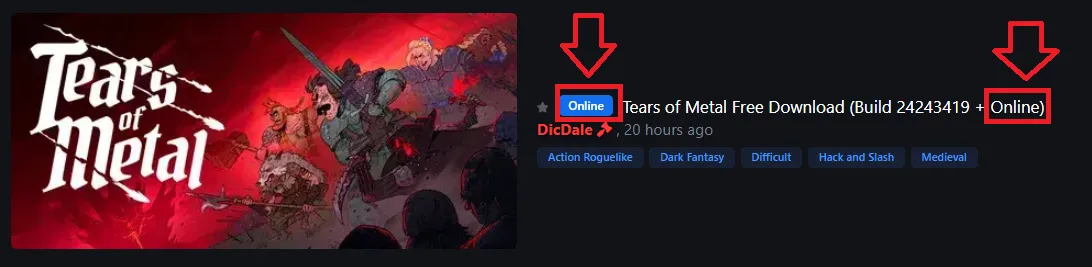
How to Play Online GamesMany games on ZeiGames support online multiplayer through community fixes. If a game supports online play, it will have the Online tag in the topic title.You can also browse all online-compatible games here:📂 Online GamesStep 1 – Download the Online FixDownload the Online Fix archive for your game.You can usually find it in one of these locations:At the bottom of the game page.In the Downloads section under the Online Fix category.Step 2 – Extract the ArchiveAfter downloading the Online Fix archive:Right-click the archive.Select WinRAR → Extract to folder (recommended).Archive Password: zeigames.comStep 3 – Copy the FilesOpen the extracted folder and copy all files.Paste them into the folder where the game is installed (the folder containing the game's executable file).Step 4 – Replace Existing FilesIf Windows asks whether you want to replace existing files:Select "Replace the files in the destination."Step 5 – Sign in to SteamBefore launching the game:Open the Steam client.Sign in to your Steam account.Keep Steam running in the background.Step 6 – Launch the GameStart the game normally.If the Online Fix was installed correctly, the multiplayer features should now be available.Step 7 – Invite Your FriendsTo play together:Create or host a lobby inside the game.Open the Steam Friends list.Right-click your friend.Select Invite to Game (or Invite to Play Spacewar, depending on the game).Your friend must:Install the same game version.Install the same Online Fix.Sign in to Steam.Accept your invitation from the Steam overlay or Steam Friends list.NotesSome games use Spacewar to provide online multiplayer. Seeing Spacewar in your Steam status is completely normal.If Shift + Tab (Steam Overlay) doesn't work, you can still invite friends directly from the Steam Friends window.Everyone must use the same game version, same Online Fix version, and same game language (if required by the fix).Some games require all DLCs to match between players.TroubleshootingIf multiplayer doesn't work:Make sure Steam is running.Verify that every player is using the same game version.Re-copy the Online Fix files if necessary.Disable antivirus software if it quarantined any Online Fix files.Restart Steam after installing the fix.If one Online Fix doesn't work, check the game page for an updated version.

- 0 replies