



Skip to content
View in the app

A better way to browse. Learn more.

ZeiGames

A full-screen app on your home screen with push notifications, badges and more.

To install this app on iOS and iPadOS
  1. Tap the Share icon in Safari
  2. Scroll the menu and tap Add to Home Screen.
  3. Tap Add in the top-right corner.
To install this app on Android
  1. Tap the 3-dot menu (⋮) in the top-right corner of the browser.
  2. Tap Add to Home screen or Install app.
  3. Confirm by tapping Install.

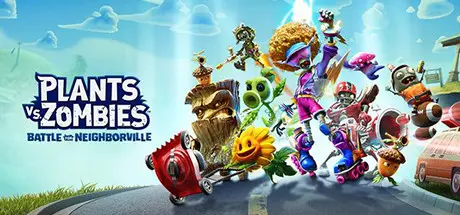
Plants vs. Zombies: Battle for Neighborville Free Download (v1.0.0.0 + Online)
Featured Replies

header.webp

Game Details

Release Name: Plants vs. Zombies: Battle for Neighborville

Game Version: v1.0.0.0

Release Date: 4 Jun, 2020

Publisher: Electronic Arts

Developer: PopCap

Based On: OFME

Plants vs. Zombies: Battle for Neighborville Direct Download - Game Review

Welcome to Neighborville, where all is well. Except that a crazy, new, coniferous conflict between brain-less and botanicals is brewing! What are you gonna do, call the crops? Soil your plants? Prepare to kick some grass in a plant-on-zombie conflict that will take you to the outer edges of Neighborville and back again.

KEY FEATURES

  • Go All Out in Online Multiplayer - Jump into the fray with up to 24 players in online multiplayer across a gigantic suburban skirmish. Bring the unique abilities of each character class to 6 PvP modes–including the new Battle Arena–and experience the unbeleafable thrills of combat.

  • Venture to the Outer Edges of Neighborville - The tension across the terra has expanded with free-roam regions that extend beyond the town of Neighborville. Squad up with up to 3 friends in the Giddy Park social region and take back Weirding Woods, Mount Steep and Neighborville Town Centre. It’s grow time!

  • Customize Every Character for Battle - Join the newest bloom in the age-old battle between plants and zombies with 20 fully customizable classes at launch, including a Team Play class for each faction. Deck every character out with ludicrous looks and wacky weapons that show off your unique personality.


Game Screenshots

screenshot screenshot screenshot screenshot


Game Trailer


System Requirements

Minimum Requirements

Recommended Requirements

OS

64-bit Windows 10

64-bit Windows 10

Processor

AMD: FX-4350 or Equivalent/ Intel: i3-3220 or Equivalent

AMD: FX-6100 or Equivalent/ Intel: i5-3570 or Equivalent

Memory

4 GB RAM

8 GB RAM

Graphics

AMD: Radeon HD 7730 or Equivalent/ NVIDIA: GeForce GT 640 or Equivalent

AMD: Radeon R9 285 or Equivalent/ NVIDIA: GeForce GTX 970 or Equivalent

DirectX

Version 11

Version 11

Storage

15 GB available space

15 GB available space


Installation Guide

  1. No Installation Needed: The game is pre-installed. Just download and extract.

  2. Extract: Right-click the .zip or .rar file and select "Extract Here" or "Extract to folder".

  3. Run: Find CypressLauncher.exe inside the folder and run it. Login with your Electronic Arts account.

  4. Choose Battle for Neighborville in Launcher and set Game path where BFN.PreEAAC.exe is located.

Important Notes

🔥DOWNLOAD AREA🔥

🔹17.64 GB🔹

Select the server you want to download with ZeiLink.

Download

  • Views 560
  • Created
  • Last Reply

Posted Images

Create an account or sign in to comment

Recently Browsing 0

  • No registered users viewing this page.

Account

Navigation

Search

Search

🔎 Search Tip
For exact results, search using "game name" .
Without quotes, results may include unrelated titles.

Configure browser push notifications

Chrome (Android)
  1. Tap the lock icon next to the address bar.
  2. Tap Permissions → Notifications.
  3. Adjust your preference.
Chrome (Desktop)
  1. Click the padlock icon in the address bar.
  2. Select Site settings.
  3. Find Notifications and adjust your preference.
