



Skip to content
View in the app

A better way to browse. Learn more.

ZeiGames

A full-screen app on your home screen with push notifications, badges and more.

To install this app on iOS and iPadOS
  1. Tap the Share icon in Safari
  2. Scroll the menu and tap Add to Home Screen.
  3. Tap Add in the top-right corner.
To install this app on Android
  1. Tap the 3-dot menu (โ‹ฎ) in the top-right corner of the browser.
  2. Tap Add to Home screen or Install app.
  3. Confirm by tapping Install.

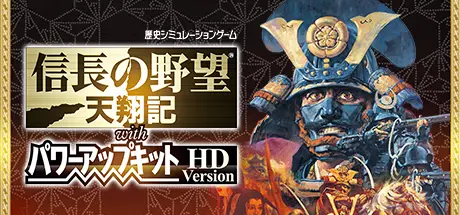
NOBUNAGA'S AMBITION: Tenshouki with Power Up Kit HD Version Free Download (Build 878090 + ALL DLC)

Featured Replies

header.webp

Game Details

Release Name:ย NOBUNAGA'S AMBITION: Tenshouki with Power Up Kit HD Version

Game Version:ย Build 878090

Release Date: 11 Nov, 2015

Publisher: KOEI TECMO GAMES CO., LTD.

Developer: KOEI TECMO GAMES CO., LTD.

Based On:ย CSF & Goldberg

NOBUNAGA'S AMBITION: Tenshouki with Power Up Kit HD Version Direct Download - Game Review

The 6th release of the "Nobunaga's Ambition" historical simulation game series has been reborn at the STEAM store as "NOBUNAGA'S AMBITION: Tenshouki with Power-up Kit HD Version." Players become the rulers of their clans and aim to unify the country under their leadership.
Along with the incredible graphics, the information screens and command positioning have been optimized for current PCs to increase player control.
Players will enjoy all the distinctive NA game elements, including a learning system that allows players to create strong retainers through training, a battle system that focuses on a commanding overview to challenge tactical and strategic skill, and an army system incorporating the concept of divide and rule with retainers.


Game Screenshots

screenshot screenshot screenshot screenshot


System Requirements

Minimum Requirements

Recommended Requirements

OS

Windowsยฎ 10

Windowsยฎ 10

Processor

Pentiumยฎ4 1.0GHz over

Core2 Duo 2.0GHz over

Memory

1 GB RAM

2 GB RAM

Graphics

1024*768 pixel over or 1280*720 pixel over

1024*768 pixel over or 1280*720 pixel over

DirectX

Version 9.0c

Version 9.0c

Storage

2 GB available space

2 GB available space


Installation Guide

  1. No Installation Needed: The game is pre-installed. Just download and extract.

  2. Extract: Right-click the .zip or .rar file and select "Extract Here" or "Extract to folder".

  3. Run: Find NOBU6HD_JP.exe inside the folder and run it.

Game Data & Settings

  • Change Language: Edit the file located at steam_settings/Configs.user.ini

  • Save Data Location: %USERPROFILE%/My Documents/KoeiTecmo/NOBU6HD

Important Notes

DLC List

Added DLCs

NA: Tenshouki - Game City Coin (NOBUNAGA'S AMBITION: Tenshouki WPK HD Version - my GAMECITY GCใ‚ณใ‚คใƒณใ‚ทใƒชใ‚ขใƒซ)

NA: Tenshouki - GC Online Registration Key (NOBUNAGA'S AMBITION: Tenshouki WPK HD Version - GAMECITYใ‚ชใƒณใƒฉใ‚คใƒณใƒฆใƒผใ‚ถใƒผ็™ป้Œฒใ‚ทใƒชใ‚ขใƒซ)

NA: Tenshouki - Face CG Set (NA: Tenshouki WPK HD - Face CG Set /ๆœ‰ๅๆญฆๅฐ† ่ฟฝๅŠ ้ก”CG๏ผˆ60็‚นใ‚ปใƒƒใƒˆ๏ผ‰)

๐Ÿ”ฅDOWNLOAD AREA๐Ÿ”ฅ

๐Ÿ”น643 MB๐Ÿ”น

Select the server you want to download with ZeiLink.

Download

  • Views 217
  • Created
  • Last Reply

Posted Images

Create an account or sign in to comment

Recently Browsing 0

  • No registered users viewing this page.

Account

Navigation

Search

Search

๐Ÿ”Ž Search Tip
For exact results, search using "game name" .
Without quotes, results may include unrelated titles.

Configure browser push notifications

Chrome (Android)
  1. Tap the lock icon next to the address bar.
  2. Tap Permissions โ†’ Notifications.
  3. Adjust your preference.
Chrome (Desktop)
  1. Click the padlock icon in the address bar.
  2. Select Site settings.
  3. Find Notifications and adjust your preference.