



Skip to content
View in the app

A better way to browse. Learn more.

ZeiGames

A full-screen app on your home screen with push notifications, badges and more.

To install this app on iOS and iPadOS
  1. Tap the Share icon in Safari
  2. Scroll the menu and tap Add to Home Screen.
  3. Tap Add in the top-right corner.
To install this app on Android
  1. Tap the 3-dot menu (โ‹ฎ) in the top-right corner of the browser.
  2. Tap Add to Home screen or Install app.
  3. Confirm by tapping Install.

Invincible VS Free Download (v0.9.9108.0 + ALL DLC + Online)
Featured Replies

header.webp

Game Details

Release Name:ย Invincible VS

Game Version:ย Build 22844029

Release Date: 30 Apr, 2026

Publisher: Skybound Games

Developer: Quarter Up

Based On:ย CSF & Goldberg + OFME

Invincible VS Direct Download - Game Review

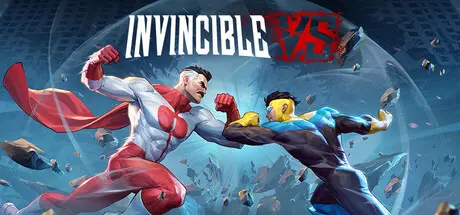
Invincible VS is a brutal superhero 3v3 tag fighting game set in the Invincible universe, where you can battle to the death as a team of fan-favorite characters in iconic locations. Unleash bone-breaking combos through fast combat and smart defensive tactics to leave a trail of blood and destruction. Land vicious Super moves and Ultimates to leave your opponents in a mess of blood.ย 

Invincible VS features a variety of game modes including a captivating cinematic story mode with an original narrative from a writer of the animated series. Jump into Arcade and battle with your team, hone your combos in Training mode, and test your skills against the world in competitive and casual multiplayer. Show, comic fans, and fighting game lovers will experience unparalleled heroic brutality, where every earth-shattering blow will leave you feeling... Invincible.

This is the debut title from the newly formed Quarter Upโ„ขโ€”the first in-house studio at Skyboundโ€”led by former members of the core Killer Instinct (2013) dev team.


Game Screenshots

screenshot screenshot screenshot screenshot


Game Trailer


System Requirements

Minimum Requirements

Recommended Requirements

OS

Windows 10

Windows 11

Processor

Intel Core i5-9700F / Ryzen 5 2600

Intel Core i7-12700K / Ryzen 7 7700

Memory

16 GB RAM

16 GB RAM

Graphics

GeForce RTX 2070 (VRAM 8GB) / Radeon RX 7800 (VRAM 8GB)

GeForce RTX 3070 (VRAM 8GB) / Radeon RX 6800 (VRAM 8GB)

DirectX

Version 12

Version 12

Storage

15 GB available space

25 GB available space


Installation Guide

  1. No Installation Needed: The game is pre-installed. Just download and extract.

  2. Extract: Right-click the .zip or .rar file and select "Extract Here" or "Extract to folder".

  3. Run: Find InvincibleVS.exe inside the folder and run it.

How to Play Online

  1. Run GDK_Helper.bat, which is located in the game folder. (Do this once)

  2. Enable Developer Mode. (Restart your PC if necessary) (Do this once)

  3. Before enabling Developer Mode, please research what it is online.

  4. Install the game. (Do this once)

  5. Disable Developer Mode. (Do this once)

  6. Launch the game from the Start menu.

Game Data & Settings

  • Change Language: Edit the file located at steam_settings/Configs.user.ini

Important Notes

DLC List

Added DLCs

Battle Beast Invincible Universe (Invincible VS: Battle Beast - Invincible Universe Skin)

Allen COP (Invincible VS: Allen the Alien - C.O.P. Skin)

Ella Mental Diamond (Invincible VS: Ella Mental - Diamond Skin)

Mark Movincihawk Atom Eve #646 (Invincible VS: Double Dimensions - Skin Bundle)

Conquest Breakout (Invincible VS: Conquest - Breakout Skin)

Digital Deluxe Upgrade (Invincible VS - Digital Deluxe Upgrade)

๐Ÿ”ฅDOWNLOAD AREA๐Ÿ”ฅ

๐Ÿ”น9.67 GB๐Ÿ”น

Select the server you want to download with ZeiLink.

Download

Online Version (v0.9.9108.0) - (8.92 GB)

Download

  • DicDale changed the title to Invincible VS Free Download (Build 22844029 + ALL DLC + Online)
  • Replies 3
  • Views 3.2k
  • Created
  • Last Reply

Top Posters In This Topic

Posted Images

  • DicDale changed the title to Invincible VS Free Download (v0.9.9108.0 + ALL DLC + Online)

Is this the latest version, with the hotfix? or only the online version is the latest?

Create an account or sign in to comment

Recently Browsing 0

  • No registered users viewing this page.

Account

Navigation

Search

Search

๐Ÿ”Ž Search Tip
For exact results, search using "game name" .
Without quotes, results may include unrelated titles.

Configure browser push notifications

Chrome (Android)
  1. Tap the lock icon next to the address bar.
  2. Tap Permissions โ†’ Notifications.
  3. Adjust your preference.
Chrome (Desktop)
  1. Click the padlock icon in the address bar.
  2. Select Site settings.
  3. Find Notifications and adjust your preference.