



Skip to content
View in the app

A better way to browse. Learn more.

ZeiGames

A full-screen app on your home screen with push notifications, badges and more.

To install this app on iOS and iPadOS
  1. Tap the Share icon in Safari
  2. Scroll the menu and tap Add to Home Screen.
  3. Tap Add in the top-right corner.
To install this app on Android
  1. Tap the 3-dot menu (โ‹ฎ) in the top-right corner of the browser.
  2. Tap Add to Home screen or Install app.
  3. Confirm by tapping Install.

Welcome to ParadiZe Free Download (Build 16014527 + ALL DLC)
Featured Replies

header.webp

Game Details

Release Name:ย Welcome to ParadiZe

Game Version:ย Build 16014527

Release Date: 29 Feb, 2024

Publisher: Nacon

Developer: Eko Software

Based On:ย CSF & Goldberg

Welcome to ParadiZe Direct Download - Game Review

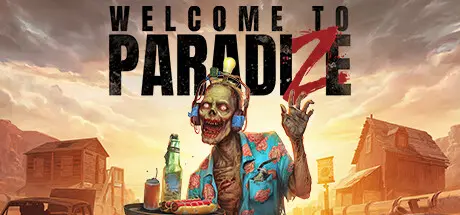
Do you want your very own zombie companion? A faithful friend that protects you from its peers and accompanies you on all your adventures? At ParadiZe, we make it happen! Here, the zombies do all the dirty work.


In the beautiful country of ParadiZe, ingenious survivors are testing a technology that can be used to control the zombies that have overrun the world. Once hacked, they become invaluable allies, even though they are not that smart and sometimes rather unstable.
It's not all rosy in ParadiZe, but if you're reasonably clever and handy, maybe you'll manage to surviveโ€ฆ


Explore ParadiZe and meet a colourful cast of extraordinary characters. The unusual flora and fauna will surprise you at every turn. Set out on adventure, in the snow or desert, alone or with your Zombot companions, and feel free to get rid of any pests that try to disturb your stay with us.
Fancy an expedition into the wilderness or would you prefer to laze about at your camp? It's your choice, so tailor your stay as you see fit!
However, we recommend not getting too close to the locals: they can be somewhatโ€ฆ aggressive.

You can be a loner during your stay or more sociable.
Invite up to three of your friends so they can enjoy this unforgettable experience with you.
ParadiZe welcomes everyone with open arms!


Game Screenshots

screenshot screenshot screenshot screenshot


Game Trailer


System Requirements

Minimum Requirements

Recommended Requirements

OS

Windows 10

Windows 10

Processor

Intel Core i7-3770 or AMD Ryzen 5 1400

Intel Core i5-8600K or AMD Ryzen 5 3600X

Memory

12 GB RAM

12 GB RAM

Graphics

NVIDIA GeForce GTX 1050 Ti, 4 GB or AMD Radeon RX 6400, 6 GB or Intel Arc A380, 6 GB

NVIDIA GeForce RTX 2060, 6 GB or AMD Radeon RX 5700, 8 GB or Intel Arc A750, 8 GB

DirectX

Version 12

Version 12

Storage

30 GB available space

30 GB available space


Installation Guide

  1. No Installation Needed: The game is pre-installed. Just download and extract.

  2. Extract: Right-click the .zip or .rar file and select "Extract Here" or "Extract to folder".

  3. Run: Find Exe/Zombie3.exe inside the folder and run it.

Game Data & Settings

  • Change Language: Edit the file located at steam_settings/Configs.user.ini

  • Save Data Location: */Data/Save

Important Notes

DLC List

Added DLCs

Welcome to ParadiZe - 4K Textures

Welcome to ParadiZe - ParadiZe Zombot Skin

Welcome to ParadiZe - Archeology Quest

Welcome to ParadiZe - Uniforms Cosmetic Pack

Welcome to ParadiZe - Dark Fantasy Cosmetic Pack

Welcome to ParadiZe - Phantasm Cosmetic Pack

Welcome to ParadiZe - Holidays Cosmetic Pack

Welcome to ParadiZe - Military Cosmetic Pack

๐Ÿ”ฅDOWNLOAD AREA๐Ÿ”ฅ

๐Ÿ”น16.51 GB๐Ÿ”น

Select the server you want to download with ZeiLink.

Download

  • Replies 2
  • Views 595
  • Created
  • Last Reply

Top Posters In This Topic

Most Popular Posts

Posted Images

Create an account or sign in to comment

Recently Browsing 0

  • No registered users viewing this page.

Account

Navigation

Search

Search

๐Ÿ”Ž Search Tip
For exact results, search using "game name" .
Without quotes, results may include unrelated titles.

Configure browser push notifications

Chrome (Android)
  1. Tap the lock icon next to the address bar.
  2. Tap Permissions โ†’ Notifications.
  3. Adjust your preference.
Chrome (Desktop)
  1. Click the padlock icon in the address bar.
  2. Select Site settings.
  3. Find Notifications and adjust your preference.
