



Skip to content
View in the app

A better way to browse. Learn more.

ZeiGames

A full-screen app on your home screen with push notifications, badges and more.

To install this app on iOS and iPadOS
  1. Tap the Share icon in Safari
  2. Scroll the menu and tap Add to Home Screen.
  3. Tap Add in the top-right corner.
To install this app on Android
  1. Tap the 3-dot menu (โ‹ฎ) in the top-right corner of the browser.
  2. Tap Add to Home screen or Install app.
  3. Confirm by tapping Install.

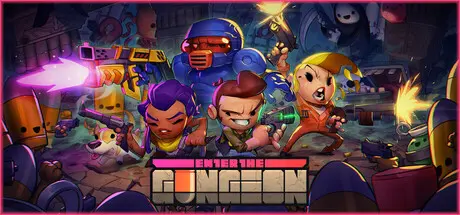
Enter the Gungeon Free Download (v2.1.9 + ALL DLC)
Featured Replies

header.webp

Game Details

Release Name:ย Enter the Gungeon

Game Version:ย v2.1.9 | Build 3829397

Release Date: 5 Apr, 2016

Publisher: Devolver Digital

Developer: Dodge Roll

Based On:ย CSF & Goldberg

Enter the Gungeon Direct Download - Game Review

Enter the Gungeon is a bullet hell dungeon crawler following a band of misfits seeking to shoot, loot, dodge roll and table-flip their way to personal absolution by reaching the legendary Gungeonโ€™s ultimate treasure: the gun that can kill the past. Select a hero [or team up in co-op] and battle your way to the bottom of the Gungeon by surviving a challenging and evolving series of floors filled with the dangerously adorable Gundead and fearsome Gungeon bosses armed to the teeth. Gather precious loot, discover hidden secrets, and chat with opportunistic merchants and shopkeepers to purchase powerful items to gain an edge.

The Gungeon: Enter the Gungeon โ€“ a constantly evolving bullet hell fortress that elegantly blends meticulously hand-designed rooms within a procedurally-generated labyrinth bent on destroying all that enter its walls. But beware โ€“ the Gungeon responds to even the most modest victory against its sentries and traps by raising the stakes and the challenges found within!

The Cult of the Gundead: The Gungeon isnโ€™t just traps and chasms โ€“ calm your nerves and steady your aim as you face down the gun-totting Cult of the Gundead. These disciples of the gun will stop at nothing to put down the heroes in their tracks and employ any tactics necessary to defend their temple.

The Gungeoneers: Choose between one of several unlikely heroes, each burdened by a deep regret and in search of a way to change their past, no matter the cost. Filled with equal parts courage and desperation, these adventurers wonโ€™t hesitate to dive across flaming walls, roll through a wall of bullets, or take cover behind whatever is around to make it to their goal alive!

The Guns: Discover and unlock scores of uniquely fantastic guns to annihilate all that oppose you in the Gungeon โ€“ each carrying their own unique tactics and ammunition. Unleash everything from the tried and true medley of missiles, lasers, and cannonballs to the bizarrely effective volley of rainbows, fish, foam darts, and bees! Yep, bees.


Game Screenshots

screenshot screenshot screenshot screenshot


Game Trailer


System Requirements

Minimum Requirements

Recommended Requirements

OS

Windows 7 or later

-

Processor

Intel Core 2 Duo E6320 (2*1866) or equivalent

-

Memory

2 GB RAM

-

Graphics

GeForce 7600 GS (512 MB) or equivalent

-

DirectX

-

-

Storage

2 GB available space

-


Installation Guide

  1. No Installation Needed: The game is pre-installed. Just download and extract.

  2. Extract: Right-click the .zip or .rar file and select "Extract Here" or "Extract to folder".

  3. Run: Find Launcher.exe inside the folder and run it.

Game Data & Settings

  • Change Language: Edit the file located at steam_settings/Configs.user.ini

  • Save Data Location: %USERPROFILE%/AppData/LocalLow/Dodge Roll/Enter the Gungeon

Important Notes

DLC List

Added DLCs

Enter the Gungeon - Cobalt Hammer

Enter the Gungeon - Microtransaction Gun

Enter the Gungeon - Digital Comic

๐Ÿ”ฅDOWNLOAD AREA๐Ÿ”ฅ

๐Ÿ”น288 MB๐Ÿ”น

Select the server you want to download with ZeiLink.

Download

  • 1 month later...
  • Replies 2
  • Views 558
  • Created
  • Last Reply

Top Posters In This Topic

Posted Images

When launched the game closes and steam tells me i dont have the licenses. What should i do?

Create an account or sign in to comment

Recently Browsing 0

  • No registered users viewing this page.

Account

Navigation

Search

Search

๐Ÿ”Ž Search Tip
For exact results, search using "game name" .
Without quotes, results may include unrelated titles.

Configure browser push notifications

Chrome (Android)
  1. Tap the lock icon next to the address bar.
  2. Tap Permissions โ†’ Notifications.
  3. Adjust your preference.
Chrome (Desktop)
  1. Click the padlock icon in the address bar.
  2. Select Site settings.
  3. Find Notifications and adjust your preference.
