



Skip to content
View in the app

A better way to browse. Learn more.

ZeiGames

A full-screen app on your home screen with push notifications, badges and more.

To install this app on iOS and iPadOS
  1. Tap the Share icon in Safari
  2. Scroll the menu and tap Add to Home Screen.
  3. Tap Add in the top-right corner.
To install this app on Android
  1. Tap the 3-dot menu (โ‹ฎ) in the top-right corner of the browser.
  2. Tap Add to Home screen or Install app.
  3. Confirm by tapping Install.

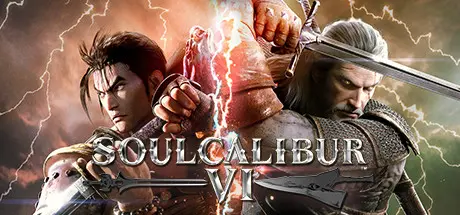
SOULCALIBUR VI Free Download (v02.31.01 + ALL DLC + Online)
Featured Replies

header.webp

Game Details

Release Name:ย SOULCALIBUR VI

Game Version:ย v02.31.01 | Build 7575299

Release Date: 18 Oct, 2018

Publisher: BANDAI NAMCO Entertainment

Developer: BANDAI NAMCO Studios Inc., Dimps Corporation

Based On:ย CSF & Goldberg

SOULCALIBUR VI Direct Download - Game Review

Introducing the newest entry in the SOULCALIBUR series!
Experience all-new gameplay mechanics with the most beautiful graphics the weapons-based fighting genre has ever seen!

โ– All-New Battle Mechanics!
Reversal Edge: Block your opponentโ€™s assault and counterattack! A fusion of offense and defense.
Soul Charge: Enjoy a temporary power-up to turn the tide of the battle. Unleash additional attacks in this state!
Wield Lethal Hits to deal huge combo damage and take down fearsome opponents!

โ– A full assortment of single-player modes!
STORY: Taking place in the 16th century, revisit the events of the very first SOULCALIBUR in Soul Chronicle mode.

โ–  A wide variety of game modes!
Clash with players around the world in Online mode!
Create your own character to suit your tastes in Creation mode!

โ– Guest Character
Geralt from CD Projekt Redโ€™s Witcher series joins the fray!


Game Screenshots

screenshot screenshot screenshot screenshot


Game Trailer


System Requirements

Minimum Requirements

Recommended Requirements

OS

Windows 7, 8.1, 10 (64-bit)

Windows 7, 8.1, 10 (64-bit)

Processor

Windows 7, 8.1, 10 (64-bit)

Windows 7, 8.1, 10 (64-bit)

Memory

6 GB RAM

8 GB RAM

Graphics

NVIDIA GeForce GTX 1050

GeForce GTX 1060 or equivalent

DirectX

Version 11

Version 11

Storage

20 GB available space

20 GB available space


Installation Guide

  1. No Installation Needed: The game is pre-installed. Just download and extract.

  2. Extract: Right-click the .zip or .rar file and select "Extract Here" or "Extract to folder".

  3. Run: Find SoulcaliburVI/Binaries/Win64/SoulcaliburVI.exe inside the folder and run it.

Multiplayer & Online (Optional)

  • Play Online: Download the Online Fix file and apply it to the game folder.

  • Guide: Don't know how? Check: [How to Play Games Online?]

Game Data & Settings

  • Change Language: Edit the file located at steam_settings/Configs.user.ini

  • Save Data Location: %USERPROFILE%/AppData/Local/SoulcaliburVI/Saved/SaveGames/

Important Notes

DLC List

Added DLCs

SOULCALIBUR VI Season Pass 2 Bonus: SCIV and SCV Music Tracks

SOULCALIBUR VI Season Pass 2

SOULCALIBUR VIย - DLC14:ย Character Creation Set F

SOULCALIBUR VIย - DLC13: Hwang

SOULCALIBUR VIย - DLC12:ย Character Creation Set E

SOULCALIBUR VIย - DLC11: Setsuka

SOULCALIBUR VIย - DLC10:ย Character Creation Set D

SOULCALIBUR VIย - DLC9:ย Haohmaru

SOULCALIBUR VI - DLC8: Character Creation Set C

SOULCALIBUR VIย - DLC7:ย Hilde

SOULCALIBUR VI Season Pass

SOULCALIBUR VI - DLC1: Tira

SOULCALIBUR VI - DLC2: 2B

SOULCALIBUR VI - DLC5: Character Creation Set B

SOULCALIBUR VIย - DLC6:ย Cassandra

SOULCALIBUR VI - DLC3: Character Creation Set A

SOULCALIBUR VI - DLC4: Amy

๐Ÿ”ฅDOWNLOAD AREA๐Ÿ”ฅ

๐Ÿ”น18.47 GB๐Ÿ”น

Select the server you want to download with ZeiLink.

Download

Online Fix - (RAR pass: rexagames.com)

  • Views 1.1k
  • Created
  • Last Reply

Posted Images

Create an account or sign in to comment

Recently Browsing 0

  • No registered users viewing this page.

Account

Navigation

Search

Search

๐Ÿ”Ž Search Tip
For exact results, search using "game name" .
Without quotes, results may include unrelated titles.

Configure browser push notifications

Chrome (Android)
  1. Tap the lock icon next to the address bar.
  2. Tap Permissions โ†’ Notifications.
  3. Adjust your preference.
Chrome (Desktop)
  1. Click the padlock icon in the address bar.
  2. Select Site settings.
  3. Find Notifications and adjust your preference.
