



Skip to content
View in the app

A better way to browse. Learn more.

ZeiGames

A full-screen app on your home screen with push notifications, badges and more.

To install this app on iOS and iPadOS
  1. Tap the Share icon in Safari
  2. Scroll the menu and tap Add to Home Screen.
  3. Tap Add in the top-right corner.
To install this app on Android
  1. Tap the 3-dot menu (โ‹ฎ) in the top-right corner of the browser.
  2. Tap Add to Home screen or Install app.
  3. Confirm by tapping Install.

Hi-Fi RUSH Free Download (Build 20567064 + ALL DLC)
Featured Replies

header.webp

Game Details

Release Name:ย Hi-Fi RUSH

Game Version:ย Build 20567064

Release Date: 25 Jan, 2023

Publisher: KRAFTON, Inc.

Developer: Tango Gameworks

Based On:ย CSF & Goldberg

Hi-Fi RUSH Direct Download - Game Review

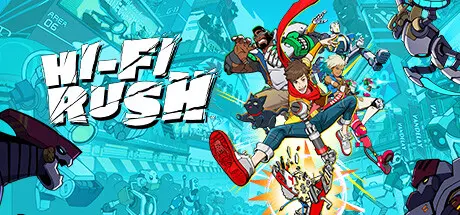
Feel the beat as wannabe rockstar Chai and his ragtag team of allies rebel against an evil robotics enhancement megacorp with raucous rhythm combat! From Tango Gameworks, the studio that brought you The Evil Withinยฎ and Ghostwireยฎ:Tokyo (no, really) comes Hi-Fi RUSH, an all-new action game where the characters, world and combat stylishly sync to the music!

Test your abilities in two new game modes, uncover new rewards and even a few secrets in this free update to Hi-Fi RUSH, The Arcade Challenge! Update!

BPM RUSH tasks players to battle waves of enemies to music with a steadily increasing BPM or beats per minute. As you defeat each wave and tackle toughened-up new foes, the BPM will speed up to the next level, up to a whopping 200 BPM in the final stages!

Power Up! Tower Up! is a twist on the Rhythm Tower mode that players unlock after their first playthrough. Youโ€™ll be climbing up floors and defeating waves of enemies, but this time youโ€™ll be powering up a downgraded Chai with randomized Upgrades!

The Arcade Challenge! Update! also contains additional content for players to earn through challenges and discover in-game, including poses for Photo Mode, t-shirts for Chai, Photo Mode stickers, extra outfits and even Special Attacks starring CNMN and Smidge, everybody's favorite mechanical friends.


Game Screenshots

screenshot screenshot screenshot screenshot


Game Trailer


System Requirements

Minimum Requirements

Recommended Requirements

OS

Windows 10 64-bit

Windows 10 64-bit

Processor

Intel Core i5-6500, Ryzen 3 1200

Intel Core i7-6700, Ryzen 5 1500X

Memory

8 GB RAM

8 GB RAM

Graphics

GTX 1050, RX 560

RTX 2070, RX 6600, Arc A750*

DirectX

Version 12

Version 12

Storage

20 GB available space

20 GB available space


Installation Guide

  1. No Installation Needed: The game is pre-installed. Just download and extract.

  2. Extract: Right-click the .zip or .rar file and select "Extract Here" or "Extract to folder".

  3. Run: Find Hi-Fi RUSH.exe inside the folder and run it.

Game Data & Settings

  • Change Language: Edit the file located at steam_settings/Configs.user.ini

  • Save Data Location: %USERPROFILE%/Saved Games/TangoGameworks/Hi-Fi RUSH (STEAM)/Saved/SaveGames

Important Notes

DLC List

Added DLCs

Hi-Fi RUSH: Traditional Garb Costume Pack

Hi-Fi RUSH: Teamplay Costume Pack

Hi-Fi RUSH: Bossplay Costume Pack

Hi-Fi RUSH Deluxe Edition Upgrade Pack

๐Ÿ”ฅDOWNLOAD AREA๐Ÿ”ฅ

๐Ÿ”น16.17 GB๐Ÿ”น

Select the server you want to download with ZeiLink.

Download

  • Views 1.3k
  • Created
  • Last Reply

Posted Images

Create an account or sign in to comment

Recently Browsing 0

  • No registered users viewing this page.

Account

Navigation

Search

Search

๐Ÿ”Ž Search Tip
For exact results, search using "game name" .
Without quotes, results may include unrelated titles.

Configure browser push notifications

Chrome (Android)
  1. Tap the lock icon next to the address bar.
  2. Tap Permissions โ†’ Notifications.
  3. Adjust your preference.
Chrome (Desktop)
  1. Click the padlock icon in the address bar.
  2. Select Site settings.
  3. Find Notifications and adjust your preference.
