



Skip to content
View in the app

A better way to browse. Learn more.

ZeiGames

A full-screen app on your home screen with push notifications, badges and more.

To install this app on iOS and iPadOS
  1. Tap the Share icon in Safari
  2. Scroll the menu and tap Add to Home Screen.
  3. Tap Add in the top-right corner.
To install this app on Android
  1. Tap the 3-dot menu (⋮) in the top-right corner of the browser.
  2. Tap Add to Home screen or Install app.
  3. Confirm by tapping Install.

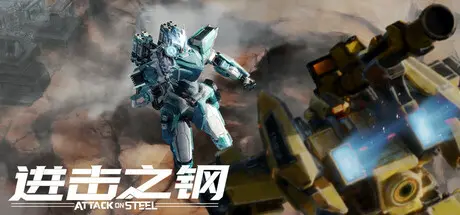
Attack on Steel Free Download (Build 19213693 + Online)
Featured Replies

header.webp

Game Details

Release Name: Attack on Steel

Game Version: Build 19213693

Release Date: 24 Jun, 2025

Publisher: Filet Studio

Developer: Filet Studio

Based On: CSF & Goldberg

Attack on Steel Direct Download - Game Review

Core gameplay and highlights
1. As a PVP third-person mecha shooting game, the core gameplay is mainly reflected in firearms. You can win the game by defeating the opponent player by shooting. Because the character controlled by the player is a huge mecha that can fly, and the addition of the z-axis depth and automatic aiming system, the shooting feel, mobile operation and other aspects can bring a unique experience to the player.
2. Destructible terrain and base buildings: Rocks in the wild and buildings in the base can be used as bunkers, but buildings, bungalows and even street light pipes can be destroyed, and some boulders have falling damage, encouraging players to think about how to use the battlefield environment while engaging in fast-paced combat
3. Destructible bodies: All bodies can fly and have automatic aiming systems. Each body can be destroyed by parts (hands, feet, head) and have different effects, for example: hands: weapons fall, heads: The core parts of most mechas are difficult to destroy due to blurred vision for a period of time, etc. However, the limbs are relatively fragile and require players to take advantage of them.
4. Skills and weapons: Each machine has three unique weapons and one ultimate skill. After destroying other people’s body parts, they can pick up other people’s weapons and use them, allowing players to feel the pleasure of using other people’s weapons.
5. Data Tower: Players who occupy the data tower can obtain gains, such as: attack power, blood volume, ultimate energy, etc.
6. Environmental interaction design: environmental changes, promotion of auxiliary devices


Game Screenshots

screenshot screenshot screenshot screenshot


System Requirements

Minimum Requirements

Recommended Requirements

OS

Windows 10 64-bit

Windows 10 64-bit

Processor

Intel Core i5-8400 / AMD Ryzen 5 1600

Intel Core i7-9700 / AMD Ryzen 5 5500

Memory

8 GB RAM

16 GB RAM

Graphics

NVIDIA GeForce GTX 1060 6GB / AMD Radeon RX 580 8GB

NVIDIA GeForce RTX 2060 / AMD Radeon RX 5700 XT / INTEL Arc A750

DirectX

Version 12

Version 12

Storage

10 GB available space

10 GB available space


Installation Guide

  1. No Installation Needed: The game is pre-installed. Just download and extract.

  2. Extract: Right-click the .zip or .rar file and select "Extract Here" or "Extract to folder".

  3. Run: Find StormSteam.exe inside the folder and run it.

Game Data & Settings

  • Change Language: Edit the file located at steam_settings/Configs.user.ini

Important Notes

🔥DOWNLOAD AREA🔥

🔹6.63 GB🔹

Select the server you want to download with ZeiLink.

Download

  • Views 765
  • Created
  • Last Reply

Posted Images

Create an account or sign in to comment

Recently Browsing 0

  • No registered users viewing this page.

Account

Navigation

Search

Search

🔎 Search Tip
For exact results, search using "game name" .
Without quotes, results may include unrelated titles.

Configure browser push notifications

Chrome (Android)
  1. Tap the lock icon next to the address bar.
  2. Tap Permissions → Notifications.
  3. Adjust your preference.
Chrome (Desktop)
  1. Click the padlock icon in the address bar.
  2. Select Site settings.
  3. Find Notifications and adjust your preference.
