



Skip to content
View in the app

A better way to browse. Learn more.

ZeiGames

A full-screen app on your home screen with push notifications, badges and more.

To install this app on iOS and iPadOS
  1. Tap the Share icon in Safari
  2. Scroll the menu and tap Add to Home Screen.
  3. Tap Add in the top-right corner.
To install this app on Android
  1. Tap the 3-dot menu (โ‹ฎ) in the top-right corner of the browser.
  2. Tap Add to Home screen or Install app.
  3. Confirm by tapping Install.

Hyper Light Breaker Free Download (v0.7.2.132556 + Online)
Featured Replies

header.webp

Game Details

Release Name:ย Hyper Light Breaker

Game Version:ย v0.7.2.132556 | Build 20096794

Release Date: 14 Jan, 2025

Publisher: Arc Games

Developer: Heart Machine

Based On:ย CSF & Goldberg

Hyper Light Breaker Direct Download - Game Review

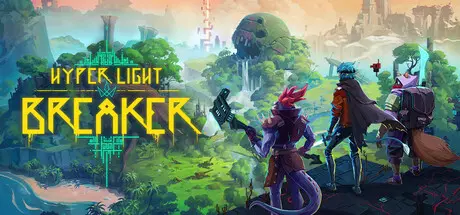
A brand-new entry in the Hyper Light franchise, Hyper Light Breaker is an open world rogue-like with a unique world fully realized in 3D for the first time.

Enter the Overgrowth alone or with friends to explore open worlds, create new builds, rip through hordes and overcome the Crowns and the Abyss King.

Choose your Breaker and SyCom loadout for distinct builds and playstyles.

  • Battle through the Overgrowth alone or as a team in online co-operative play.

  • Face hordes of enemies and brutal bosses in frenetic third-person combat.

  • Put your Breakerโ€™s skills to the test by increasing the difficulty of the Overgrowth โ€“ the greater the challenge, the better the rewards.

  • A world in disarray, with mysteries to solve, vicious enemies to fight, and fully 3D environments to explore.

  • A vast, ever-changing world awaits with large scale open biomes and deep labyrinths.

  • Traverse landscapes with incredible freedom with a variety of abilities; wall-dashing, hoverboard, glider and more.

  • Experience a unique playthrough in every run, with one life to spare, the Overgrowth and the worlds within reset after death โ€“ bringing a new world to explore.

  • Learn more about the Overgrowth from the fragmented memories of its mysterious defenders, the Crowns.

  • Discover and unlock a wide arsenal of weapons, items and upgrades โ€“ take on quests to unlock even more rewards to evolve your Breaker and the Overgrowth further.

  • Bring back resources back to the Settlement to unlock permanent upgrades that will persist across your playthroughs.

  • Get a better understanding of the game mechanics โ€“ from the basics to advanced combat techniques โ€“ in an in-depth tutorial.


Game Screenshots

screenshot screenshot screenshot screenshot


Game Trailer


System Requirements

Minimum Requirements

Recommended Requirements

OS

-

-

Processor

2+ cores, 2.4Ghz+

4+ cores, 3.6Ghz+

Memory

16 GB RAM

16 GB RAM

Graphics

Nvidia GTX 1050/1650 or AMD RX 560

Nvidia GTX 2080ti, GTX 3060ti, AMD RX 6700 XT

DirectX

-

-

Storage

-

-


Installation Guide

  1. No Installation Needed: The game is pre-installed. Just download and extract.

  2. Extract: Right-click the .zip or .rar file and select "Extract Here" or "Extract to folder".

  3. Run: Find Breaker.exe inside the folder and run it.

Multiplayer & Online (Optional)

  • Play Online: Download the Online Fix file and apply it to the game folder.

  • Please go to the online fix page and read the guide.

Game Data & Settings

  • Change Language: Edit the file located at steam_settings/Configs.user.ini

  • Save Data Location: */Breaker/Saved

Important Notes

๐Ÿ”ฅDOWNLOAD AREA๐Ÿ”ฅ

๐Ÿ”น5.91 GB๐Ÿ”น

Select the server you want to download with ZeiLink.

Download

Hyper Light Breaker Online Fix - (RAR Pass: zeigames.com)

  • DicDale changed the title to Hyper Light Breaker Free Download (v0.7.2.132556 + Online)

  • Views 1.3k
  • Created
  • Last Reply

Posted Images

Create an account or sign in to comment

Recently Browsing 0

  • No registered users viewing this page.

Account

Navigation

Search

Search

๐Ÿ”Ž Search Tip
For exact results, search using "game name" .
Without quotes, results may include unrelated titles.

Configure browser push notifications

Chrome (Android)
  1. Tap the lock icon next to the address bar.
  2. Tap Permissions โ†’ Notifications.
  3. Adjust your preference.
Chrome (Desktop)
  1. Click the padlock icon in the address bar.
  2. Select Site settings.
  3. Find Notifications and adjust your preference.