Theme
Language

Layout
Skip to content
View in the app

A better way to browse. Learn more.

ZeiGames

A full-screen app on your home screen with push notifications, badges and more.

To install this app on iOS and iPadOS
  1. Tap the Share icon in Safari
  2. Scroll the menu and tap Add to Home Screen.
  3. Tap Add in the top-right corner.
To install this app on Android
  1. Tap the 3-dot menu (โ‹ฎ) in the top-right corner of the browser.
  2. Tap Add to Home screen or Install app.
  3. Confirm by tapping Install.

Featured Replies

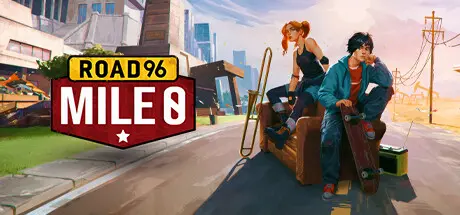
Road 96: Mile 0 cover art

Road 96: Mile 0 Game Details

Release Name:ย Road 96: Mile 0

Game Version:ย v1536 | Build 11909568

Release Date: 4 Apr, 2023

Publisher: Digixart, THQ Nordic

Developer: Digixart

Based On:ย CSF & Goldberg

Road 96: Mile 0 Direct Download - Game Overview

Road 96: Mile 0 is a Narrative-Adventure game with a musical component created by DigixArt, the French studio behind the successful Road 96, 11-11 Memories Retold and 5 Pegases Awards winner. Published by Ravenscourt, players will alternate between the roles of Zoe and Kaito, two teenagers with different backgrounds and beliefs. They live and explore White Sands, a luxurious condominium where Petriaยดs elite reside and where Kaitoยดs parents work.

Zoe is one of the characters of Road 96. She comes from the rich side of the city and her father works for the government. Kaito, a character from Lost in Harmony, lives in the less privileged area. They're good friends, but that could all change quite soon.
Their journey in Road 96: Mile 0 will challenge their friendship and everything they believe in. They say money doesnโ€™t buy happiness, nor friendship. These teens are dreamers and they are going to learn where they belong. Will they remain friends?

Understand the previous event of Road 96 and what made Zoe flee from her home. Play as Zoe and Kaito to shape the evolution of their fate. Besides this, you will run into many of the colorful characters from Road 96. Get to experience another side of the troubled country of Petria.

This is a story about conflict and difference of opinion between two friends. Zoe and Kaito come from two different worlds, but they are unified by a powerful friendship. They will face many challenges, can they overcome them?

The musical segments of the game are a real emotional experience that put you into inner worlds of Zoe and Kaito. You will have to make choices and ride and dodge to find your way through these beautiful psychedelic trips.


Road 96: Mile 0 Screenshots

Road 96: Mile 0 screenshot 1 Road 96: Mile 0 screenshot 2 Road 96: Mile 0 screenshot 3 Road 96: Mile 0 screenshot 4


Road 96: Mile 0 Trailer


Road 96: Mile 0 System Requirements

Minimum Requirements

Recommended Requirements

OS

Windows 10

Windows 10

Processor

Intel Core i5 - 6th Gen/ AMD Ryzen 5 3600 6 Core 3.6GHz

Intel Core i7 - 6th Gen/ AMD Ryzen 7 3700X 3.6GHz

Memory

8 GB RAM

16 GB RAM

Graphics

NVIDIA GeForce GTX 1060 3GB/ AMD Radeon RX 570 4GB

NVIDIA GeForce GTX 1660/ AMD Radeon RX Vega56 8GB

DirectX

Version 11

Version 12

Storage

10 GB available space

10 GB available space


How to Install Road 96: Mile 0

  1. No Installation Needed: The game is pre-installed. Just download and extract.

  2. Extract: Right-click the .zip or .rar file and select "Extract Here" or "Extract to folder".

  3. Run: Find Road96-Mile0.exe inside the folder and run it.

Game Data & Settings

  • Change Language: Edit the file located at steam_settings/Configs.user.ini

  • Save Data Location: %USERPROFILE%/AppData/LocalLow/DigixArt/Road96-Mile0/Saves

Important Notes

DLC List

Added DLCs

Road 96: Mile 0 - About a Girl

๐Ÿ”ฅDOWNLOAD AREA๐Ÿ”ฅ

๐Ÿ”น4.78 GB๐Ÿ”น

Select the server you want to download with ZeiLink.

Download

  • Views 349
  • Created
  • Last Reply

Posted Images

Create an account or sign in to comment

Recently Browsing 0

  • No registered users viewing this page.

Account

Navigation

Search

Search

๐Ÿ”Ž Search Tip
For exact results, search using "game name" .
Without quotes, results may include unrelated titles.

Configure browser push notifications

Chrome (Android)
  1. Tap the lock icon next to the address bar.
  2. Tap Permissions โ†’ Notifications.
  3. Adjust your preference.
Chrome (Desktop)
  1. Click the padlock icon in the address bar.
  2. Select Site settings.
  3. Find Notifications and adjust your preference.