



Theme
Language

Layout
Skip to content
View in the app

A better way to browse. Learn more.

ZeiGames

A full-screen app on your home screen with push notifications, badges and more.

To install this app on iOS and iPadOS
  1. Tap the Share icon in Safari
  2. Scroll the menu and tap Add to Home Screen.
  3. Tap Add in the top-right corner.
To install this app on Android
  1. Tap the 3-dot menu (⋮) in the top-right corner of the browser.
  2. Tap Add to Home screen or Install app.
  3. Confirm by tapping Install.

Horror Night with Tung Tung Tung Sahur Free Download (Build 19455462)
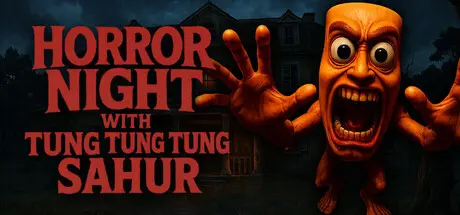
Horror Night with Tung Tung Tung Sahur

Featured Replies

Horror Night with Tung Tung Tung Sahur cover art

Horror Night with Tung Tung Tung Sahur Game Details

Release Name: Horror Night with Tung Tung Tung Sahur

Game Version: Build 19455462

Release Date: 30 Jul, 2025

Publisher: Source Byte

Developer: Source Byte, Nikodem Świder

Based On: CSF & Goldberg

Horror Night with Tung Tung Tung Sahur Direct Download - Game Overview

Your car broke down. Middle of the forest. No signal. You spot a creepy mansion up the hill. You knock. No answer. Just as you turn to leave—CREAK—the door opens by itself.

- You step in.

- Bad idea.

Now you’re trapped. No windows open. No doors unlock. But something is inside. And it’s not happy.

From the shadows, you hear it:

- “TUNG. TUNG. TUNG. SAHUR.”

He’s coming. He’s got games. And you’re the main player.

Meet Tung Tung Tung Sahur, a drum-beating nightmare with a twisted sense of fun. He doesn't want to kill you right away—he wants to play. If you want to survive, you’ll need to solve every cursed puzzle, dodge every jumpscare, and outsmart his chaotic friends, including the one and only Tralalero Tralala, who might be your only hope… if he stops spinning in circles for five seconds.

- Explore a Haunted Mansion full of traps, cursed hallways, and basements.

- Solve Deadly Puzzles before the next round of TUNG TUNG begins.

- Snap Creepy Photos to reveal secrets (and maybe unlock a screaming ghost or two).

- Use a Pistol to slow Tung Tung down when he gets too close for comfort.

Survive Brainrot Mayhem featuring a cast of cursed icons like Ballerina Cappuccina, Tralalero Tralala, and the caffeinated specter known as Assassino Cappuccino

There’s only one rule in this mansion: Play the game, or the game plays you.

And remember…

TUNG.

TUNG.

TUNG. SAHUR.

You knocked. Now you’re stuck.

Good luck.


Horror Night with Tung Tung Tung Sahur Screenshots

Horror Night with Tung Tung Tung Sahur screenshot 1 Horror Night with Tung Tung Tung Sahur screenshot 2 Horror Night with Tung Tung Tung Sahur screenshot 3 Horror Night with Tung Tung Tung Sahur screenshot 4


Horror Night with Tung Tung Tung Sahur Trailer


Horror Night with Tung Tung Tung Sahur System Requirements

Minimum Requirements

Recommended Requirements

OS

Microsoft® Windows® 10/11 64bit

Microsoft® Windows® 11

Processor

Intel Core2 Duo or better

Intel Core i3

Memory

4 GB RAM

8 GB RAM

Graphics

GTX 1050

RTX 3060

DirectX

-

-

Storage

2 GB available space

-


How to Install Horror Night with Tung Tung Tung Sahur

  1. No Installation Needed: The game is pre-installed. Just download and extract.

  2. Extract: Right-click the .zip or .rar file and select "Extract Here" or "Extract to folder".

  3. Run: Find TungTungTerror.exe inside the folder and run it.

Game Data & Settings

  • Change Language: Edit the file located at steam_settings/Configs.user.ini

  • Save Data Location: %USERPROFILE%/AppData/Local/TungTungTerror

Important Notes

🔥DOWNLOAD AREA🔥

🔹1.84 GB🔹

Select the server you want to download with ZeiLink.

Download

  • DicDale changed the title to Horror Night with Tung Tung Tung Sahur Free Download (Build 19455462)

  • Views 448
  • Created
  • Last Reply

Posted Images

Create an account or sign in to comment

Recently Browsing 0

  • No registered users viewing this page.

Account

Navigation

Search

Search

🔎 Search Tip
For exact results, search using "game name" .
Without quotes, results may include unrelated titles.

Configure browser push notifications

Chrome (Android)
  1. Tap the lock icon next to the address bar.
  2. Tap Permissions → Notifications.
  3. Adjust your preference.
Chrome (Desktop)
  1. Click the padlock icon in the address bar.
  2. Select Site settings.
  3. Find Notifications and adjust your preference.