



Theme
Language

Layout
Skip to content
View in the app

A better way to browse. Learn more.

ZeiGames

A full-screen app on your home screen with push notifications, badges and more.

To install this app on iOS and iPadOS
  1. Tap the Share icon in Safari
  2. Scroll the menu and tap Add to Home Screen.
  3. Tap Add in the top-right corner.
To install this app on Android
  1. Tap the 3-dot menu (โ‹ฎ) in the top-right corner of the browser.
  2. Tap Add to Home screen or Install app.
  3. Confirm by tapping Install.

Sovereign Tower Free Download (v1.0.8 + Artbook DLC)
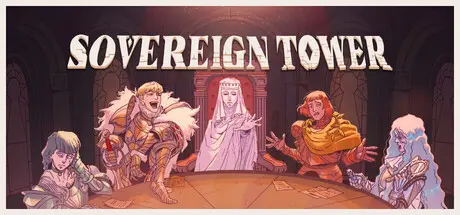
Sovereign Tower

Featured Replies

Sovereign Tower cover art

Sovereign Tower Game Details

Release Name:ย Sovereign Tower

Game Version:ย v1.0.8 | Build 24657497

Release Date: 6 Aug, 2026

Publisher: Curve Games

Developer: WILD WITS GAMES

Based On:ย CSF & Goldberg

Sovereign Tower Direct Download - Game Overview

- Your Reign, Your Rules - Every choice you make defines your legacy and the fate of your Kingdom...ย 

- Recruit eccentric Knights - Manage a court of unpredictable heroes with big egos and even bigger problems.ย 

- Manage Your Round Table - Send Knights on quests where success or disaster hinges on your judgment.ย 

- Bend Time and Tempt Fate - Rewind decisions, uncover secrets, and pursue forbidden romances.ย 

- Expand Your Tower - Build new annexes, acquire upgrades, and outwit rival rulers.ย 

Ah, finally - a suitable Sovereign for the job. Yes, you, right there, come sit on this comfy throne. Ah you like the feel of that, donโ€™t you? Congratulations, youโ€™re hired! My name is Arlin and Iโ€™m your advisor. Welcome to your first day, and please, allow me to provide thee with a day in the life of a Sovereign and you can then decide how will you rule, my liege...

- In the morning you must tend to your subjects and listen to the problems that plague the Kingdom. From gardening to exorcisms - thereโ€™s never a boring day on the throne.ย 

- Each decision you make will shape your kingdom and relationships with individuals, collectives and other rulers. Every interaction will play a part in defining your legacy.ย 

- Balance your affinity with the Merchants, Mystics, Scholars, Nobles and People, as well as the Treasury, or spend it all and backstab everyone. Either way works, my grace.ย 

- Recruit eccentric Knights with strong personalities and questionable morals to serve at your Round Table. Unfortunately for you, these are the jesters youโ€™re relying on to keep your Kingdom running smoothly.ย 

- With great egos, comes great drama! These Knights arenโ€™t going to be a walk in the Towerโ€™s Garden, sire. Thereโ€™s always advice to be taken, grievances to be shared and romance to be explored.ย 

-ย You must keep your Knights satisfied otherwise they may just leave your court for good. Maybe thatโ€™s sometimes for the best though...ย 

- Manage your Knights from the Round Table. Here you can view all the requests from your subjects that you obliged to earlier in the day. Assign the most equipped Knight for the job to reduce chances of failure.ย 

-ย Your Knights possess stats: Strength, Agility, Charisma, Magic and Wit. Each Quest requires a different skill set. Need a Charismatic approach? Maybe we shouldnโ€™t send Ursula, your grace.ย 

-ย After they return from their Quests, youโ€™ll be debriefed with the results of their venture. Did their efforts result in Critical Failure or Critical Success? Or did they experience a completely Unexpected Outcome?ย 

-ย In the Crypts of the Tower dwells a Demon who can turn back time. So, if it all goes wrong, you can go back with all the knowledge youโ€™ve learned, make alternate decisions and change fate.ย 

-ย Of course, you have me, your main advisor at your service, but there are others. For example, The Intendant has a nosy habit of collecting secrets about your Knights. Sheโ€™ll provide the juicy gossip as you require it it!ย 

-ย If you like romancing stone statues, then youโ€™ve come to the right place. No, really, go speak to the Lady of the Tower and find out.ย 

- Prove your worthiness against opposers by joining hands with neighbouring counties and forging great alliances.ย 

- Expand your Tower by adding new Annexes which in turn will allow for more positions to open amongst your court.ย 

-ย From Carinaโ€™s Forge to the Witchโ€™s Alchemy Room, each of these new Annexes gives you the ability to craft new items to assist your Knights on their Quests.ย 


Sovereign Tower Screenshots

Sovereign Tower screenshot 1 Sovereign Tower screenshot 2 Sovereign Tower screenshot 3 Sovereign Tower screenshot 4


Sovereign Tower Trailer


Sovereign Tower System Requirements

Minimum Requirements

Recommended Requirements

OS

Windows 10

11

Processor

Intel Core i5-4670K

Intel Core i5-9600K

Memory

4 GB RAM

8 GB RAM

Graphics

GeForce GT 1030 (2048 MB)

GTX 1060, 6GB VRAM

DirectX

Version 12

Version 12

Storage

3 GB available space

3 GB available space


How to Install Sovereign Tower

  1. No Installation Needed: The game is pre-installed. Just download and extract.

  2. Extract: Right-click the .zip or .rar file and select "Extract Here" or "Extract to folder".

  3. Run: Find Launcher.exe inside the folder and run it.

Game Data & Settings

  • Change Language: Edit the file located at steam_settings/Configs.user.ini

  • Save Data Location: %USERPROFILE%/AppData/Roaming/Godot\app_userdata\Sovereign Tower (VS)\saved_games

Important Notes

DLC List

Added DLCs

Sovereign Tower: Artbook

๐Ÿ”ฅDOWNLOAD AREA๐Ÿ”ฅ

๐Ÿ”น964 MB๐Ÿ”น

Select the server you want to download with ZeiLink.

Download

  • DicDale changed the title to Sovereign Tower Free Download (v1.0.8 + Artbook DLC)

  • Views 1.3k
  • Created
  • Last Reply

Posted Images

Create an account or sign in to comment

Recently Browsing 0

  • No registered users viewing this page.

Account

Navigation

Search

Search

๐Ÿ”Ž Search Tip
For exact results, search using "game name" .
Without quotes, results may include unrelated titles.

Configure browser push notifications

Chrome (Android)
  1. Tap the lock icon next to the address bar.
  2. Tap Permissions โ†’ Notifications.
  3. Adjust your preference.
Chrome (Desktop)
  1. Click the padlock icon in the address bar.
  2. Select Site settings.
  3. Find Notifications and adjust your preference.