



Theme
Language

Layout
Skip to content
View in the app

A better way to browse. Learn more.

ZeiGames

A full-screen app on your home screen with push notifications, badges and more.

To install this app on iOS and iPadOS
  1. Tap the Share icon in Safari
  2. Scroll the menu and tap Add to Home Screen.
  3. Tap Add in the top-right corner.
To install this app on Android
  1. Tap the 3-dot menu (โ‹ฎ) in the top-right corner of the browser.
  2. Tap Add to Home screen or Install app.
  3. Confirm by tapping Install.

Celestial Return Free Download (v1.0.5 + ARTBOOKLET DLC)
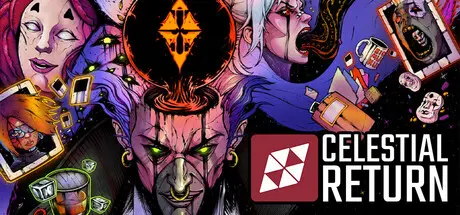
Celestial Return

Featured Replies

Celestial Return cover art

Celestial Return Game Details

Release Name:ย Celestial Return

Game Version:ย v1.0.5 | Build 24286726

Release Date: 14 Jul, 2026

Publisher: Shoreline Games

Developer: Metaphor Games

Based On:ย CSF & Goldberg

Celestial Return Direct Download - Game Overview

Netherveil City eats the weak. Its streets bleed neon, its corpses crawl back to life, and its secrets? They'll gnaw through your sanity.ย  Step into the worn boots of Detective Howard. Armed with a rusted badge, a sentient rose that won't shut up, and a pocketful of stolen dice.

Explore the city. Interrogate the dead. Expose the c*rpos.
Investigate. Make choices. Loot the dice. Roll the dice.
And survive. (Optional.)

Dice are oxygen. They keep you alive. Earn 'em, spend 'em, lose 'em. Hoard too long, and opportunities vanish. Roll recklessly, and resources burn.

Thereโ€™s no perfect build. No power fantasies. Just survival... barely.

Your choices build character. Your character builds choices.

Intelligence picks locks in silence. Virtue pleads for mercy. Foolishness laughs at the abyss.
These fragments clash, corrupt, and rewrite your path mid-conversation. Choose your poison and deal with the consequences.

A hand-shattered art style. Where mangaโ€™s precision meets the raw nerve of American comics. Ripping pages from legends like Blame!, Biomega, Akira, and Berserk. Our artistry aims to evoke the same depth and intensity that made these series iconic.

Gear up for an auditory assault. Noir Jazz, Cyberpunk Techno, Death Metal. This isn't background noise. Sonic warfare.

Heroes don't last long in Netherveil. This is a manifesto for the forgotten, the erased, the expendable, those never given a chance. Itโ€™s about those who were never meant to survive, yet somehow still do. Itโ€™s about the existential terror of being alive in a world ruled by forces you canโ€™t see. Itโ€™s about resistance.

โ€œIโ€™m here, and I wonโ€™t go quietly.โ€


Celestial Return Screenshots

Celestial Return screenshot 1 Celestial Return screenshot 2 Celestial Return screenshot 3 Celestial Return screenshot 4


Celestial Return Trailer


Celestial Return System Requirements

Minimum Requirements

Recommended Requirements

OS

Windows 10

Windows 10

Processor

1.8GHz Dual-Core CPU

1.8GHz Dual-Core CPU

Memory

8 GB RAM

8 GB RAM

Graphics

Integrated Graphics

Integrated Graphics

DirectX

-

-

Storage

8 GB available space

8 GB available space


How to Install Celestial Return

  1. No Installation Needed: The game is pre-installed. Just download and extract.

  2. Extract: Right-click the .zip or .rar file and select "Extract Here" or "Extract to folder".

  3. Run: Find Celestial Return.exe inside the folder and run it.

Game Data & Settings

  • Change Language: Edit the file located at steam_settings/Configs.user.ini

  • Save Data Location: %USERPROFILE%/AppData/LocalLow/Metaphor Games/Celestial Return

Important Notes

DLC List

Added DLCs

Celestial Return - ARTBOOKLET (Celestial Return - Artbook)

๐Ÿ”ฅDOWNLOAD AREA๐Ÿ”ฅ

๐Ÿ”น6.41 GB๐Ÿ”น

Select the server you want to download with ZeiLink.

Download

  • Views 357
  • Created
  • Last Reply

Posted Images

Create an account or sign in to comment

Recently Browsing 0

  • No registered users viewing this page.

Account

Navigation

Search

Search

๐Ÿ”Ž Search Tip
For exact results, search using "game name" .
Without quotes, results may include unrelated titles.

Configure browser push notifications

Chrome (Android)
  1. Tap the lock icon next to the address bar.
  2. Tap Permissions โ†’ Notifications.
  3. Adjust your preference.
Chrome (Desktop)
  1. Click the padlock icon in the address bar.
  2. Select Site settings.
  3. Find Notifications and adjust your preference.
