



Skip to content
View in the app

A better way to browse. Learn more.

ZeiGames

A full-screen app on your home screen with push notifications, badges and more.

To install this app on iOS and iPadOS
  1. Tap the Share icon in Safari
  2. Scroll the menu and tap Add to Home Screen.
  3. Tap Add in the top-right corner.
To install this app on Android
  1. Tap the 3-dot menu (โ‹ฎ) in the top-right corner of the browser.
  2. Tap Add to Home screen or Install app.
  3. Confirm by tapping Install.

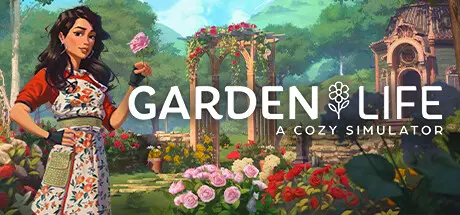
Garden Life: A Cozy Simulator Free Download (Build 17090884 + ALL DLC)
Featured Replies

header.webp

Game Details

Release Name:ย Garden Life: A Cozy Simulator

Game Version:ย Build 17090884

Release Date: 22 Feb, 2024

Publisher: Nacon

Developer: stillalive studios

Based On:ย CSF & Goldberg

Garden Life: A Cozy Simulator Direct Download - Game Review

Plant and nurture your dream garden using gardening techniques based in real life and adapted for everyone to enjoy:

  • Plant seeds, leaving them enough space to thrive

  • Water, fertilize, and clip your plants to enhance their natural beauty and nurture them to health

  • Discover different colourful varieties and unlock the full potential of each plant

  • Pull out all weeds or choose to leave some to protect plants from pests

  • Admire your plants in full bloom even through the changing seasons : in Garden Life, all plants thrive no matter the time of year!

  • Play the story mode or the creative mode


You are in charge of an abandoned community garden and decide to roll up your sleeves to restore it to its former glory. Complete tasks given to you by your neighbours to earn rewards, unlock new tools, seeds, ornaments and areas of the garden, and learn more about what lies behind this secluded spot.
Instantly unlock every corner of your garden, including all the seeds and ornaments, and give free rein to your creativity: in this restriction-free mode, you can bring your dream designs to life!
Procedural growth simulation developed specifically for the game ensures each plant grows in its own way! Each and every plant grows procedurally, and some even adapt to their environment by climbing if planted close to certain objects.
In Garden Life, you are not restricted by a grid: place plants and objects freely to create your designs!

Head to the village square to sell flowers and bouquets at your stall and use the earnings to buy new seeds, ornaments and tools in the shop. You can also donates flowers to help create huge floral sculptures in the pavilion and win adorable prizes!

Add Garden Life to your wishlist, follow us, and join our discord community so you don't miss out on any news!


Game Screenshots

screenshot screenshot screenshot screenshot


Game Trailer


System Requirements

Minimum Requirements

Recommended Requirements

OS

Windows 10

Windows 10

Processor

Intel Core i7-4790 or AM D Ryzen 5 1400

Intel Core i5-8600K or AMD Ryzen 5 3600X

Memory

8 GB RAM

16 GB RAM

Graphics

NVIDIA GeForce GTX 760, 2 GB or AMD Radeon R9 280X, 3 GB

NVIDIA GeForce RTX 2080, 8 GB or AMD Radeon RX 6800 XT, 16 GB

DirectX

Version 11

Version 11

Storage

-

-


Installation Guide

  1. No Installation Needed: The game is pre-installed. Just download and extract.

  2. Extract: Right-click the .zip or .rar file and select "Extract Here" or "Extract to folder".

  3. Run: Find GardenLife.exe inside the folder and run it.

Game Data & Settings

  • Change Language: Edit the file located at steam_settings/Configs.user.ini

  • Save Data Location: %USERPROFILE%/AppData/Local/GardenLife/Saved/SaveGames

Important Notes

DLC List

Added DLCs

Garden Life - Supporter Pack

Garden Life - Eco-friendly Decoration Set

๐Ÿ”ฅDOWNLOAD AREA๐Ÿ”ฅ

๐Ÿ”น4.21 GB๐Ÿ”น

Select the server you want to download with ZeiLink.

Download

  • Replies 1
  • Views 439
  • Created
  • Last Reply

Top Posters In This Topic

Most Popular Posts

Posted Images

Create an account or sign in to comment

Recently Browsing 0

  • No registered users viewing this page.

Account

Navigation

Search

Search

๐Ÿ”Ž Search Tip
For exact results, search using "game name" .
Without quotes, results may include unrelated titles.

Configure browser push notifications

Chrome (Android)
  1. Tap the lock icon next to the address bar.
  2. Tap Permissions โ†’ Notifications.
  3. Adjust your preference.
Chrome (Desktop)
  1. Click the padlock icon in the address bar.
  2. Select Site settings.
  3. Find Notifications and adjust your preference.
