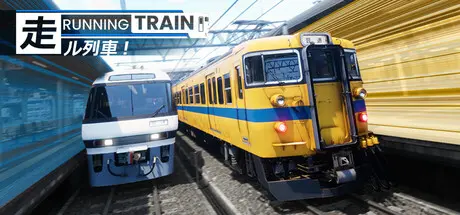
May 25May 25 RUNNING TRAIN | 走ル列車! Game DetailsRelease Name: RUNNING TRAIN | 走ル列車!Game Version: v0.9.2b | Build 23480758Release Date: 24 May, 2026Publisher: Novatetsu GamesDeveloper: Novatetsu GamesBased On: CSF & GoldbergRUNNING TRAIN | 走ル列車! Direct Download - Game OverviewStart your journey along Coastal Hayamori Railway and Rural Kofuku Railway. both routes have distinct operational pattern and characteristic. Make sure that your passengers get from station to station safely!Love the challenge? turn on HARD-MODE, or NO-UI, or even NO-SPEEDOMETER mode for extra score!Tired of driving and got punishing too much in scoring mode? Set back and relax, let AI driver drive the train and you can enjoy breathtaking environment along coastal and rural Japanese as both passenger and trainspotter.Your vision, your train. Customize your liveries with open textures and bring your designs to life!4 Train type with different characteristic2 Fictional Railway operator spanning 40km of meticulously handcrafted fully detailed routeRailway Safety system such as Vigilance and Automatic Train Stop implementedRealistic physics and train motionFeatures over 40 diagrams both local and express train spanning early morning, afternoon, and nighttime operation.2 seasons available: Sakura Spring and Snowy WinterSelectable weather and environment settingsMaster controller supportAuto-drive mode, let you enjoy route scenery as passenger or trainspotterOpen livery editorPhoto modeRUNNING TRAIN | 走ル列車! Screenshots RUNNING TRAIN | 走ル列車! TrailerRUNNING TRAIN | 走ル列車! System RequirementsMinimum RequirementsRecommended RequirementsOSWindows 10, 11 (64-bit)Windows 10, 11 (64-bit)ProcessorIntel Core i7-7700HQ or AMD Ryzen 5 1500XIntel Core i5-12400F or AMD Ryzen 5 5600XMemory8 GB RAM16 GB RAMGraphicsNVIDIA GeForce GTX 1050M (4 GB VRAM)NVIDIA GeForce RTX 3060 (8 GB VRAM or better)DirectXVersion 12Version 12Storage4 GB available space4 GB available spaceHow to Install RUNNING TRAIN | 走ル列車!No Installation Needed: The game is pre-installed. Just download and extract.Extract: Right-click the .zip or .rar file and select "Extract Here" or "Extract to folder".Run: Find RunningTrain.exe inside the folder and run it.Game Data & SettingsChange Language: Edit the file located at steam_settings/Configs.user.iniSave Data Location: %USERPROFILE%/AppData/Local/RunningTrain/Saved/SaveGamesImportant NotesTo support the Game Developer, Get It On Steam.🔥DOWNLOAD AREA🔥🔹2.37 GB🔹Select the server you want to download with ZeiLink.Download





Create an account or sign in to comment