



Skip to content
View in the app

A better way to browse. Learn more.

ZeiGames

A full-screen app on your home screen with push notifications, badges and more.

To install this app on iOS and iPadOS
  1. Tap the Share icon in Safari
  2. Scroll the menu and tap Add to Home Screen.
  3. Tap Add in the top-right corner.
To install this app on Android
  1. Tap the 3-dot menu (⋮) in the top-right corner of the browser.
  2. Tap Add to Home screen or Install app.
  3. Confirm by tapping Install.

Život Není Krásný: Poslední Exekuce Free Download (Build 23242123)
Featured Replies

header.webp

Game Details

Release Name: Život Není Krásný: Poslední Exekuce

Game Version: Build 23242123

Release Date: 13 May, 2026

Publisher: ZNK Studio

Developer: ZNK Studio

Based On: CSF & Goldberg

Život Není Krásný: Poslední Exekuce Direct Download - Game Review

This game is only in the Czech language. Sorry, our international friends!

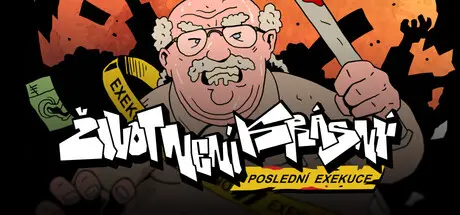
Life is good — your name is Vladimír Brehowski, you’re 63 years old, you love booze, greasy food, and you never shy away from throwing a punch. You’re a seasoned bailiff, and today is your last day at work before retirement, which you plan to spend alongside your overweight wife Jitka.
But when you wake up with a massive hangover, you discover that Jitka is gone - she couldn’t stand your excessive drinking anymore and left behind only a farewell letter.

Instead of dealing with your marital crisis, you have to go to work - because your boss is an even bigger bastard than you are, and the only things he hates more than kindness and goodwill are disobedience and slacking. So you grab your bailiff gear and head out to brutally collect money from the most vulnerable - the socially unadaptable, the mentally slow, and even a little boy from an orphanage who inherited debt from his deceased parents. There’s nothing you can do - work is work, and the law is clear: you have to squeeze the money out of those poor souls no matter what!

The game Život Není Krásný: Poslední Exekuce loosely follows the cult ZNK game series. This time, however, under the direction of Marty Pohl, an experienced creative team took over development and elevated the originally freeware project into a full-fledged game. It’s a hand‑drawn, old‑school point‑and‑click adventure full of dark humor and politically incorrect violence.

The game features 40 playable screens and over 30 fully voiced characters. The main character is voiced by actor Leoš Noha, and the supporting cast includes Radim Neuvirt, Matěj Ruppert, Bruno Ferrari, Necrocock, James Cole, Hugo Toxxx, Zuzana Truplová, Oto Klempíř, and many more! Classic adventure gameplay is complemented by cutscenes and minigames - the bailiff sequences are especially spicy! And for sharp‑eyed players, there’s even a hidden second ending.

So - are you ready to help Brehowski with his “Last Execution”?


Game Screenshots

screenshot screenshot screenshot screenshot


Game Trailer


System Requirements

Minimum Requirements

Recommended Requirements

OS

Windows 10

-

Processor

Intel Core i3 (5th generation) or AMD alternative

-

Memory

4 GB RAM

-

Graphics

Yes

-

DirectX

Version 11

-

Storage

3 GB available space

-


Installation Guide

  1. No Installation Needed: The game is pre-installed. Just download and extract.

  2. Extract: Right-click the .zip or .rar file and select "Extract Here" or "Extract to folder".

  3. Run: Find ZNK Poslední exekuce.exe inside the folder and run it.

Important Notes

🔥DOWNLOAD AREA🔥

🔹707 MB🔹

Select the server you want to download with ZeiLink.

Download

  • Replies 1
  • Views 413
  • Created
  • Last Reply

Top Posters In This Topic

Posted Images

Create an account or sign in to comment

Recently Browsing 0

  • No registered users viewing this page.

Account

Navigation

Search

Search

🔎 Search Tip
For exact results, search using "game name" .
Without quotes, results may include unrelated titles.

Configure browser push notifications

Chrome (Android)
  1. Tap the lock icon next to the address bar.
  2. Tap Permissions → Notifications.
  3. Adjust your preference.
Chrome (Desktop)
  1. Click the padlock icon in the address bar.
  2. Select Site settings.
  3. Find Notifications and adjust your preference.
