



Skip to content
View in the app

A better way to browse. Learn more.

ZeiGames

A full-screen app on your home screen with push notifications, badges and more.

To install this app on iOS and iPadOS
  1. Tap the Share icon in Safari
  2. Scroll the menu and tap Add to Home Screen.
  3. Tap Add in the top-right corner.
To install this app on Android
  1. Tap the 3-dot menu (โ‹ฎ) in the top-right corner of the browser.
  2. Tap Add to Home screen or Install app.
  3. Confirm by tapping Install.

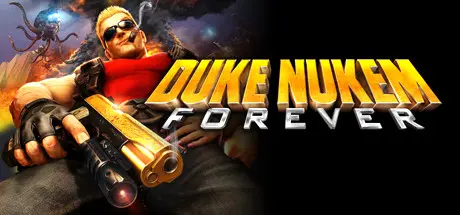
Duke Nukem Forever Free Download (Build 66061 + ALL DLC)
Featured Replies

header.webp

Game Details

Release Name:ย Duke Nukem Forever

Game Version:ย Build 66061

Release Date: 9 Jun, 2011

Publisher: 2K

Developer: Gearbox Software

Based On:ย CSF & PLAZA

Duke Nukem Forever Direct Download - Game Review

Cocked, loaded and ready for action, Duke delivers epic ass-kicking, massive weapons, giant explosions and pure unadulterated fun!

Put on your shades and step into the boots of Duke Nukem. The alien hordes are invading and only Duke can save the world. Pig cops, alien shrink rays and enormous alien bosses canโ€™t stop this epic hero from accomplishing his goal: to save the world, save the babes and to be a bad-ass while doing it.

The King arrives with an arsenal of over-the-top weapons, non-stop action, and unprecedented levels of interactivity. With hours and hours of action, and a range of bodacious multiplayer modes, rest assured knowing the fun goes on and on.

Did the Alien bastards not learn their lesson the first time? Duke has been on hiatus for some time now, kicking back and franchising himself on the fame he gained from saving Earth from the first invasion. The Aliens have returned to Earth yet again, messing up Dukeโ€™s sweet routine of dirty leisure habits.

The Alien invaders are stealing Earthโ€™s women, especially the hot ones! And they drank Dukeโ€™s beer. This. Wonโ€™t. Stand. As Duke battles his way through waves of aliens, the once beautiful gambling haven and Duke Nukem franchise chains are crumbling before his eyes. Time to bring the pain!

  • Bust a Gut: Duke pulls no punches. Dukeโ€™s constant stream of hilarious one-liners throughout the game make this an out loud good time.

  • World Interactivity: Spend as much time as you want shooting hoops, lifting weights, playing pinball, pool, air hockey, and slots.

  • Scale & Variety: Packed with explosive FPS action, outlandish settings, driving, and puzzle solving โ€” gamers will never tire of the endless FUN.


Game Screenshots

screenshot screenshot screenshot screenshot


Game Trailer


System Requirements

Minimum Requirements

Recommended Requirements

OS

Windows XP/Vista/7

Windows XP/Vista/7

Processor

Intel Core 2 Duo @ 2.0 Ghz / AMD Athlon 64 X2 @ 2.0 Ghz

Intel Core 2 Duo @ 2.4 Ghz / AMD Athlon 64 X2 @ 2.6 Ghz

Memory

1 Gb

2GB

Graphics

256 MB

512 MB

DirectX

-

-

Storage

-

-


Installation Guide

  1. No Installation Needed: The game is pre-installed. Just download and extract.

  2. Extract: Right-click the .zip or .rar file and select "Extract Here" or "Extract to folder".

  3. Run: Find System\DukeForever.exe inside the folder and run it.

Game Data & Settings

  • Change Language: Use language.changer.exe file.

Important Notes

DLC List

Added DLCs

The Doctor Who Cloned Me

Hail to the Icons Parody Pack

Duke Nukem Forever: Hail to the Icons Parody Pack

๐Ÿ”ฅDOWNLOAD AREA๐Ÿ”ฅ

๐Ÿ”น5.30 GB๐Ÿ”น

Select the server you want to download with ZeiLink.

Download

  • Replies 2
  • Views 490
  • Created
  • Last Reply

Top Posters In This Topic

Most Popular Posts

Posted Images

Create an account or sign in to comment

Recently Browsing 0

  • No registered users viewing this page.

Account

Navigation

Search

Search

๐Ÿ”Ž Search Tip
For exact results, search using "game name" .
Without quotes, results may include unrelated titles.

Configure browser push notifications

Chrome (Android)
  1. Tap the lock icon next to the address bar.
  2. Tap Permissions โ†’ Notifications.
  3. Adjust your preference.
Chrome (Desktop)
  1. Click the padlock icon in the address bar.
  2. Select Site settings.
  3. Find Notifications and adjust your preference.
