



Skip to content
View in the app

A better way to browse. Learn more.

ZeiGames

A full-screen app on your home screen with push notifications, badges and more.

To install this app on iOS and iPadOS
  1. Tap the Share icon in Safari
  2. Scroll the menu and tap Add to Home Screen.
  3. Tap Add in the top-right corner.
To install this app on Android
  1. Tap the 3-dot menu (โ‹ฎ) in the top-right corner of the browser.
  2. Tap Add to Home screen or Install app.
  3. Confirm by tapping Install.

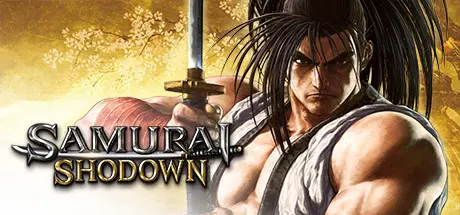
SAMURAI SHODOWN Free Download (Build 14948879 + ALL DLC)
Featured Replies

header.webp

Game Details

Release Name:ย SAMURAI SHODOWN

Game Version:ย Build 14948879

Release Date: 14 Jun, 2021

Publisher: SNK CORPORATION

Developer: SNK CORPORATION

Based On:ย CSF & Goldberg

SAMURAI SHODOWN Direct Download - Game Review

SAMURAI REBOOT!
A brand new SAMURAI SHODOWN game takes aim for the world stage!

SAMURAI SHODOWN has enjoyed worldwide success as a blade-wielding fighting game series since its first release in 1993. Ten years have passed since the last series installment, and it is now time for SAMURAI SHODOWN to return in a brand-new game featuring high-end visuals and gameplay! Faithfully reproducing the game mechanics and atmosphere that contributed to the success of the series, SAMURAI SHODOWN includes a revolutionary feature that learns playersโ€™ game actions and patterns in order to create CPU-controlled โ€œghostโ€ characters. With its story set one year before the very first installment, warriors and combatants from various backgrounds and with their own goals are about to battle to fulfill their destinies!

โ– Carrying on the Legacy
The new game aims to bring the same tense and exhilarating battles that the series is known for. Intense and epic battles are back!

โ– Evolving the Presentation
Using the power of UNREALยฎ ENGINE 4, the series is able to achieve a level of detail never before seen for a totally new visual experience!

โ– A Revolutionary new AI system
Using revolutionary Deep Learning AI, the game will learn from player tactics and create Ghost characters which players around the globe can share and fight against.


Game Screenshots

screenshot screenshot screenshot screenshot


Game Trailer


System Requirements

Minimum Requirements

Recommended Requirements

OS

Windows 7

Windows 10

Processor

Intel Core i5

Intel Core i7

Memory

8 GB RAM

16 GB RAM

Graphics

Nvidia GeForce GTX 770 2GB / AMD Radeon R9 280 3GB

Nvidia GeForce GTX 1060 6GB / AMD Radeon RX 480 4GB

DirectX

Version 11

Version 11

Storage

35 GB available space

35 GB available space


Installation Guide

  1. No Installation Needed: The game is pre-installed. Just download and extract.

  2. Extract: Right-click the .zip or .rar file and select "Extract Here" or "Extract to folder".

  3. Run: Find SAMURAISHODOWN.exe inside the folder and run it.

Game Data & Settings

  • Change Language: Edit the file located at steam_settings/Configs.user.ini

  • Save Data Location: %USERPROFILE%/AppData/Local/SamuraiShodown\Saved\SaveGames

Important Notes

DLC List

Added DLCs

SAMURAI SHODOWN - DLC CHARACTER "BAIKEN"

SAMURAI SHODOWN - DLC CHARACTER "SHIRO TOKISADA AMAKUSA"

SAMURAI SHODOWN - DLC CHARACTER "HIBIKI TAKANE"

SAMURAI SHODOWN - DLC CHARACTER "CHAM CHAM"

SAMURAI SHODOWN - DLC CHARACTER "WARDEN"

SAMURAI SHODOWN - DLC CHARACTER "IROHA"

SAMURAI SHODOWN - DLC CHARACTER "SOGETSU KAZAMA"

SAMURAI SHODOWN - DLC CHARACTER "MINA MAJIKINA"

SAMURAI SHODOWN - DLC CHARACTER "WAN-FU"

SAMURAI SHODOWN - DLC CHARACTER "KAZUKI KAZAMA"

SAMURAI SHODOWN - DLC CHARACTER "BASARA"

SAMURAI SHODOWN - DLC CHARACTER "RIMURURU"

๐Ÿ”ฅDOWNLOAD AREA๐Ÿ”ฅ

๐Ÿ”น31.41 GB๐Ÿ”น

Select the server you want to download with ZeiLink.

Download

  • Views 658
  • Created
  • Last Reply

Posted Images

Create an account or sign in to comment

Recently Browsing 0

  • No registered users viewing this page.

Account

Navigation

Search

Search

๐Ÿ”Ž Search Tip
For exact results, search using "game name" .
Without quotes, results may include unrelated titles.

Configure browser push notifications

Chrome (Android)
  1. Tap the lock icon next to the address bar.
  2. Tap Permissions โ†’ Notifications.
  3. Adjust your preference.
Chrome (Desktop)
  1. Click the padlock icon in the address bar.
  2. Select Site settings.
  3. Find Notifications and adjust your preference.
