



Skip to content
View in the app

A better way to browse. Learn more.

ZeiGames

A full-screen app on your home screen with push notifications, badges and more.

To install this app on iOS and iPadOS
  1. Tap the Share icon in Safari
  2. Scroll the menu and tap Add to Home Screen.
  3. Tap Add in the top-right corner.
To install this app on Android
  1. Tap the 3-dot menu (โ‹ฎ) in the top-right corner of the browser.
  2. Tap Add to Home screen or Install app.
  3. Confirm by tapping Install.

Goblin Vyke: The Thief Tycoon Free Download (v1.0.5)
Featured Replies

header.webp

Game Details

Release Name:ย Goblin Vyke: The Thief Tycoon

Game Version:ย v1.0.5 | Build 23055784

Release Date: 30 Apr, 2026

Publisher: Art Thieves

Developer: Art Thieves

Based On:ย CSF & Goldberg

Goblin Vyke: The Thief Tycoon Direct Download - Game Review

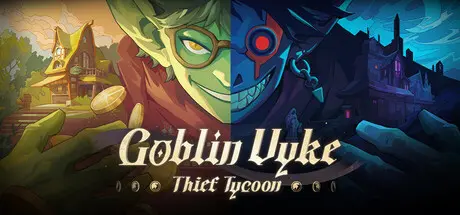
Run your very own goblin shop in a medieval world.ย Goblin Vyke is a 2D side-scrolling game that blends stealth heist gameplay with shop management. You are Vyke the Goblin, a thief who infiltrates dungeons to steal treasures by night, and a merchant who sells the loot for massive profits by day. You shall master your stealth skills, cheat death to snatch the Demon King's secrets, while simultaneously recruiting employees and expanding your franchise to grow your business. Ultimately, rise from a penniless, poor goblin to an influential black market tycoon!

The Gold Dungeon is fraught with danger, and as a small, frail goblin, you cannot win a straight fight against any foe โ€“ but you have other choices. Throw a Coinbeetle disguised as a bell to lure enemies; Set Nap Traps to put guards soundly to sleep; Use Smoke Mimic to cover your escape. Utilize various skills and items to outsmart and "kite" your enemies.

Deadly dungeon traps? Turn the tables by leading enemies into the traps, leading them to a "Deadly Hide and Seek". Explore hidden areas and discover untold secret treasures. Every path might lead to an unexpected surprise โ€“ or fatal danger. Steal weapons right from enemies' hands, grab the goodies from treasure chests, and complete a magnificent heist right under the nose of the Grim Reaper!

Upgrading your talent tree doesn't just enhance your exploration and survival abilities; it also unlocks different playstyle builds! Go for the Agile Rogue Build: Use Grappling Hook skills to flee pursuits and Shadow Rewind for rapid repositioning, leaving enemies utterly confused. Prefer the Cunning Trickster Build: Toss coinbeetles to manipulate the enemy's position or play dead until the coast is clear. Or choose the Aggressive Brute Build: Leap from heights to Stun enemies, use an Over-the-Shoulder Throw to knock out a group, or even stand in front of a guard and grab their treasure right before they attack!

Backpack space is limited, with various items and loot occupying different-sized slots. Will you use the item to boost your survival, or leave it intact to sell for profit? Manage your inventory wisely, explore item combos, and make crucial choices between risk and reward.


Game Screenshots

screenshot screenshot screenshot screenshot


Game Trailer


System Requirements

Minimum Requirements

Recommended Requirements

OS

Windows 7 64 bit

Windows 10 64 bit

Processor

Intel Core i3 Dual Core

Intel Core i5 -i7 Quad core

Memory

8 GB RAM

16 GB RAM

Graphics

NVIDIA Geforce GTs 450 /AMD Radeon HD5570

NVIDIA Geforce GTX 750Ti/ AMD Radeon R9 270x

DirectX

Version 11

Version 11

Storage

1 GB available space

5 GB available space


Installation Guide

  1. No Installation Needed: The game is pre-installed. Just download and extract.

  2. Extract: Right-click the .zip or .rar file and select "Extract Here" or "Extract to folder".

  3. Run: Find GoblinVyke.exe inside the folder and run it.

Game Data & Settings

  • Change Language: Edit the file located at steam_settings/Configs.user.ini

  • Save Data Location: %USERPROFILE%/AppData/LocalLow/ArtThieves/GoblinVyke

Important Notes

๐Ÿ”ฅDOWNLOAD AREA๐Ÿ”ฅ

๐Ÿ”น277 MB๐Ÿ”น

Select the server you want to download with ZeiLink.

Download

  • Views 766
  • Created
  • Last Reply

Posted Images

Create an account or sign in to comment

Recently Browsing 0

  • No registered users viewing this page.

Account

Navigation

Search

Search

๐Ÿ”Ž Search Tip
For exact results, search using "game name" .
Without quotes, results may include unrelated titles.

Configure browser push notifications

Chrome (Android)
  1. Tap the lock icon next to the address bar.
  2. Tap Permissions โ†’ Notifications.
  3. Adjust your preference.
Chrome (Desktop)
  1. Click the padlock icon in the address bar.
  2. Select Site settings.
  3. Find Notifications and adjust your preference.
