



Skip to content
View in the app

A better way to browse. Learn more.

ZeiGames

A full-screen app on your home screen with push notifications, badges and more.

To install this app on iOS and iPadOS
  1. Tap the Share icon in Safari
  2. Scroll the menu and tap Add to Home Screen.
  3. Tap Add in the top-right corner.
To install this app on Android
  1. Tap the 3-dot menu (⋮) in the top-right corner of the browser.
  2. Tap Add to Home screen or Install app.
  3. Confirm by tapping Install.

Aphelion Free Download (v1.03.1628077 + Artbook + Cosmetic Pack DLC)
Featured Replies

header.webp

Game Details

Release Name: Aphelion

Game Version: v1.03.1628077 | Build 22817886

Release Date: 28 Apr, 2026

Publisher: DON'T NOD

Developer: DON'T NOD

Based On: CSF & Goldberg

Aphelion Direct Download - Game Review

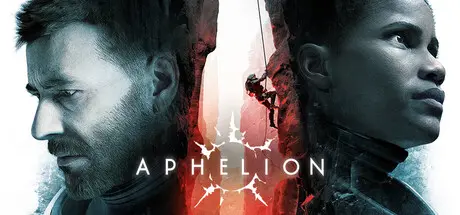
By 2060, Earth will be uninhabitable. The discovery of a 9th planet – Persephone – at the edge of the solar system, is humanity's best hope. The European Space Agency is dispatching the Hope-01 scientific mission, consisting of 2 of their accomplished astronauts, Ariane and Thomas. Their mission: to survey the planet and determine whether humanity can prosper anew here.

Your adventure begins in chaos, as the crash landing of their ship scatters them across the planet, launching them on a desperate quest to find one another. 

Aphelion is a cinematic third-person action-adventure set on the planet Persephone, an uncharted, frozen world. Stranded and isolated, you must survive the truly unknown, find each other, and complete the mission. Traverse stunning alien landscapes, avoid lurking threats, and discover the haunting secrets buried beneath the ice.  

Explore the surreal beauty of Persephone, a vast frozen world shaped by deadly weather and ever-changing terrain.

Armed only with your explorational tools – pathfinder, oxygen tank, grappling hook, and more – you must face the unknown, traverse treacherous terrain, and gather clues about the strange, reality-bending phenomenon threatening your existence. 

Ariane must persevere and push forward to save Thomas. Her Pathfinder tool helps her find the way through the shifting expanse. She faces desperate swings over dark chasms and tricky climbs up melting ice – risking her life with every step. Thomas, injured in the crash, must rely on ingenuity and observation, piecing together what surrounds him to survive. As both characters explore and investigate, they will uncover secrets and clues as to the planet’s strange conditions and what caused the crash of their ship.   


Game Screenshots

screenshot screenshot screenshot screenshot


Game Trailer


System Requirements

Minimum Requirements

Recommended Requirements

OS

Windows 10

Windows 11

Processor

Intel Core i7-8700K / AMD Ryzen 5 1600X

Intel Core i7-12700K / AMD Ryzen 7 5800X

Memory

8 GB RAM

16 GB RAM

Graphics

NVIDIA GeForce GTX 1060 6 GB / AMD Radeon RX 5600 XT 6 GB / Intel Arc A380 6 GB

NVIDIA GeForce RTX 3060 Ti 8 GB / AMD Radeon RX 6800 XT 16 GB

DirectX

Version 12

Version 12

Storage

55 GB available space

55 GB available space


Installation Guide

  1. No Installation Needed: The game is pre-installed. Just download and extract.

  2. Extract: Right-click the .zip or .rar file and select "Extract Here" or "Extract to folder".

  3. Run: Find PIO\Binaries\Win64\PIO-Win64-Shipping.exe inside the folder and run it.

Game Data & Settings

  • Change Language: Edit the file located at steam_settings/Configs.user.ini

  • Save Data Location: %USERPROFILE%/AppData/Local/PIO/Saved/SaveGames

Important Notes

DLC List

Added DLCs

Aphelion - Artbook + Cosmetic Pack

🔥DOWNLOAD AREA🔥

🔹24.81 GB🔹

Select the server you want to download with ZeiLink.

Download

  • Views 654
  • Created
  • Last Reply

Posted Images

Create an account or sign in to comment

Recently Browsing 0

  • No registered users viewing this page.

Account

Navigation

Search

Search

🔎 Search Tip
For exact results, search using "game name" .
Without quotes, results may include unrelated titles.

Configure browser push notifications

Chrome (Android)
  1. Tap the lock icon next to the address bar.
  2. Tap Permissions → Notifications.
  3. Adjust your preference.
Chrome (Desktop)
  1. Click the padlock icon in the address bar.
  2. Select Site settings.
  3. Find Notifications and adjust your preference.
