



Skip to content
View in the app

A better way to browse. Learn more.

ZeiGames

A full-screen app on your home screen with push notifications, badges and more.

To install this app on iOS and iPadOS
  1. Tap the Share icon in Safari
  2. Scroll the menu and tap Add to Home Screen.
  3. Tap Add in the top-right corner.
To install this app on Android
  1. Tap the 3-dot menu (โ‹ฎ) in the top-right corner of the browser.
  2. Tap Add to Home screen or Install app.
  3. Confirm by tapping Install.

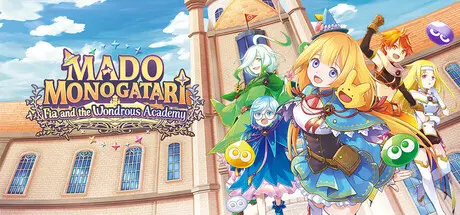
MADO MONOGATARI: Fia and the Wondrous Academy Free Download (Build 21126847 + ALL DLC)
Featured Replies

header.webp

Game Details

Release Name:ย MADO MONOGATARI: Fia and the Wondrous Academy

Game Version:ย Build 21126847

Release Date: 25 Mar, 2026

Publisher: Idea Factory International

Developer: Idea Factory, Compile Heart, STING

Based On:ย CSF & Goldberg

MADO MONOGATARI: Fia and the Wondrous Academy Direct Download - Game Review

The Ancient Magic Academy.

An academy with a long, storied past, known as the place where The Great Mage learned and graduated. Students study here to become Mages themselves.

A girl named Fia, wanting to enroll in the Academy, makes a long arduous journey from her hometown, and manages to get in through her own luck.

She now tries her best to get through the many challenges of schoolwork, strict professors, and mysterious happenings, all in pursuit of her goal to become a Great Mage herself, while also making friends with other students in her class.

Embark on an adventure with Fia and her classmates as they explore the mysteries of the Ancient Magic Academy and uncover the legends of The Great Mage.

Crawl through randomly generated dungeons and engage in real-time, turn-based battles to help Fia level up. Use Magic Artes and collect Elemental Orbs to fill up your gauge and unleash Great Magic Artes. Manage your inventory and stats as you traverse floor after floor of wondrous treasures and magical monstersโ€”including Puyo, Skeleton T, and others!

Keep track of unlocked abilities with the Grimoire, which logs Fia's Magic Artes. Complete Assignments, Help Quests, and earn Learning Points that can be used to unlock nodes in the Grimoire for Fia to learn new Magic Artes.

Take a break from dungeon crawling and explore the school grounds where Fia can check out the Bulletin Board for unlocked mini-games, interact with classmates, grow ingredients, cook curry for in-dungeon boosts, and more! Find out what other goings on await Fia along her journey!

In the Storage Room of the school grounds, use items found in dungeons to synthesize into new equipment for Fia. Better synthesis items can later be unlocked via the Grimoire.


Game Screenshots

screenshot screenshot screenshot screenshot


Game Trailer


System Requirements

Minimum Requirements

Recommended Requirements

OS

Windows 10

Windows 11

Processor

Windows 10

Windows 11

Memory

4 GB RAM

8 GB RAM

Graphics

Dedicated GPU with 2GB of VRAM

GeForce GTX 970 or AMD RX 560 2GB equivalent

DirectX

Version 11

-

Storage

2 GB available space

3 GB available space


Installation Guide

  1. No Installation Needed: The game is pre-installed. Just download and extract.

  2. Extract: Right-click the .zip or .rar file and select "Extract Here" or "Extract to folder".

  3. Run: Find MADO MONOGATARI: Fia and the Wondrous Academy.exe inside the folder and run it.

Game Data & Settings

  • Change Language: Edit the file located at steam_settings/Configs.user.ini

  • Save Data Location: %USERPROFILE%/AppData/LocalLow/Idea Factory International, Inc/MADO MONOGATARI Fia and the Wondrous Academy/SaveData

Important Notes

DLC List

Added DLCs

MADO MONOGATARI: Fia and the Wondrous Academy - Deluxe Pack

MADO MONOGATARI: Fia and the Wondrous Academy - Apprentice Mage Enrollment Set

๐Ÿ”ฅDOWNLOAD AREA๐Ÿ”ฅ

๐Ÿ”น2.89 GB๐Ÿ”น

Select the server you want to download with ZeiLink.

Download

  • Replies 1
  • Views 815
  • Created
  • Last Reply

Top Posters In This Topic

Most Popular Posts

Posted Images

Create an account or sign in to comment

Recently Browsing 0

  • No registered users viewing this page.

Account

Navigation

Search

Search

๐Ÿ”Ž Search Tip
For exact results, search using "game name" .
Without quotes, results may include unrelated titles.

Configure browser push notifications

Chrome (Android)
  1. Tap the lock icon next to the address bar.
  2. Tap Permissions โ†’ Notifications.
  3. Adjust your preference.
Chrome (Desktop)
  1. Click the padlock icon in the address bar.
  2. Select Site settings.
  3. Find Notifications and adjust your preference.
