



Skip to content
View in the app

A better way to browse. Learn more.

ZeiGames

A full-screen app on your home screen with push notifications, badges and more.

To install this app on iOS and iPadOS
  1. Tap the Share icon in Safari
  2. Scroll the menu and tap Add to Home Screen.
  3. Tap Add in the top-right corner.
To install this app on Android
  1. Tap the 3-dot menu (โ‹ฎ) in the top-right corner of the browser.
  2. Tap Add to Home screen or Install app.
  3. Confirm by tapping Install.

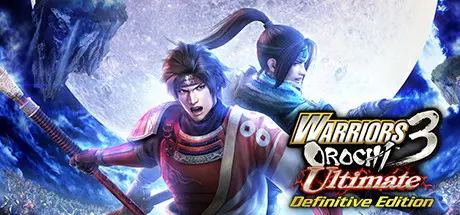
WARRIORS OROCHI 3 Ultimate Definitive Edition Free Download (v1.0.0.1)
Featured Replies

header.webp

Game Details

Release Name:ย WARRIORS OROCHI 3 Ultimate Definitive Edition

Game Version:ย v1.0.0.1 | Build 9422288

Release Date: 12 Jul, 2022

Publisher: KOEI TECMO GAMES CO., LTD.

Developer: KOEI TECMO GAMES CO., LTD.

Based On:ย CSF & Goldberg

WARRIORS OROCHI 3 Ultimate Definitive Edition Direct Download - Game Review

Set in a parallel universe created by the suddenly appearing Serpent King Orochi, the "WARRIORS OROCHI" series consists of tactical action games where heroes from both the "DYNASTY WARRIORS" series and "SAMURAI WARRIORS" series join the action.
This title offers all the content of "WARRIORS OROCHI 3", as well as new characters designed by popular illustrator Akihiro Yamada ("Beast of East - Touhou Memairoku" and "The Twelve Kingdoms" [binding and illustrations]) joining battles and new episodes, which will allow players to enjoy the story even more deeply.
In addition, it also includes numerous elements such as "Duel Mode", which fuses elements of versus battles and card battles, the new "Gauntlet Mode", which allows players to enjoy party battles, and a great number of DLC items that have already been released for other platforms!
Play the truly ultimate "WARRIORS OROCHI 3" on Steam!

A total of 145 characters! A hyper-dimensional volume of content
In addition to the heroes of "DYNASTY WARRIORS" and "SAMURAI WARRIORS", "Kyลซbi" and "Tamamo" characters designed by Akihiro Yamada, and more, the 145 unique heroes are a must-see!
An ensemble of characters across various titles join the spectacular battles, such as Kasumi from "DEAD OR ALIVE 5", Sterkenburg Cranach from the "Atelier of Arland" series, and Sophitia from the "SOULCALIBUR" series.

New episodes and sub-scenarios deepen the story!
A "Sequel Story" to the main story "The Slaying of the Hydra" is added. Also, the mystery of the parallel world is revealed in a "Prequel Story" that uncovers the secret of Orochi's birth. Sub-scenarios such as hypothetical battles and battles that unfold from different perspectives enrich the story, allowing players to enjoy the heroic drama of the world of "WARRIORS OROCHI 3" even more deeply.

Enjoy party battles with game modes such as "Gauntlet Mode"
"Gauntlet Mode" has been included, allowing players to form parties of 5 people and take part in thrilling battles. Other game modes include the 3-on-3 "Duel Mode", which fuses versus battles with card battles, as well as "Musou Battlefields" that provide players with more freedom.


Game Screenshots

screenshot screenshot screenshot screenshot


Game Trailer


System Requirements

Minimum Requirements

Recommended Requirements

OS

Windowsยฎ 10, Windowsยฎ 11, 64bit

Windowsยฎ 10, Windowsยฎ 11, 64bit

Processor

Intel Core i3-4170 or over

Intel Core i7 3770 or over, AMD Ryzen 3 1200 or over

Memory

4 GB RAM

8 GB RAM

Graphics

NVIDIA GeForce GTX 650 or over, Radeon HD 7750 or over

NVIDIA GeForce GTX 760 or over, Radeon RX 470 or over

DirectX

Version 11

Version 11

Storage

25 GB available space

25 GB available space


Installation Guide

  1. No Installation Needed: The game is pre-installed. Just download and extract.

  2. Extract: Right-click the .zip or .rar file and select "Extract Here" or "Extract to folder".

  3. Run: Find WO3U.exe inside the folder and run it.

Game Data & Settings

  • Change Language: Edit the file located at steam_settings/Configs.user.ini

  • Save Data Location: %USERPROFILE%/My Documents/KoeiTecmo\WARRIORS OROCHI 3 Ultimate

Important Notes

๐Ÿ”ฅDOWNLOAD AREA๐Ÿ”ฅ

๐Ÿ”น20.26 GB๐Ÿ”น

Select the server you want to download with ZeiLink.

Download

  • Replies 1
  • Views 759
  • Created
  • Last Reply

Top Posters In This Topic

Posted Images

Create an account or sign in to comment

Recently Browsing 0

  • No registered users viewing this page.

Account

Navigation

Search

Search

๐Ÿ”Ž Search Tip
For exact results, search using "game name" .
Without quotes, results may include unrelated titles.

Configure browser push notifications

Chrome (Android)
  1. Tap the lock icon next to the address bar.
  2. Tap Permissions โ†’ Notifications.
  3. Adjust your preference.
Chrome (Desktop)
  1. Click the padlock icon in the address bar.
  2. Select Site settings.
  3. Find Notifications and adjust your preference.
