



Skip to content
View in the app

A better way to browse. Learn more.

ZeiGames

A full-screen app on your home screen with push notifications, badges and more.

To install this app on iOS and iPadOS
  1. Tap the Share icon in Safari
  2. Scroll the menu and tap Add to Home Screen.
  3. Tap Add in the top-right corner.
To install this app on Android
  1. Tap the 3-dot menu (โ‹ฎ) in the top-right corner of the browser.
  2. Tap Add to Home screen or Install app.
  3. Confirm by tapping Install.

SNK VS. CAPCOM SVC CHAOS Free Download (Build 15722729 + Online)
Featured Replies

header.webp

Game Details

Release Name:ย SNK VS. CAPCOM SVC CHAOS

Game Version:ย Build 15722729

Publisher: SNK CORPORATION

Platform: PC

Based On:ย CSF & Goldberg

SNK VS. CAPCOM SVC CHAOS Direct Download - Game Review

SNK and CAPCOM legends clash in this star-studded crossover fighting game!

The 2003 arcade hit SVC CHAOS is back and better than ever!

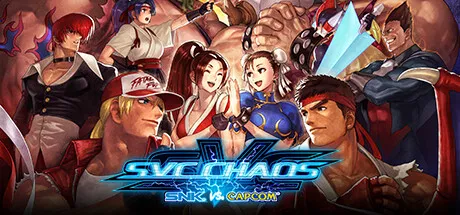
SVC CHAOSโ€”a dream match of epic proportions! Worlds collide as 36 iconic characters across various series from SNK (mainly THE KING OF FIGHTERS) and CAPCOM (mainly STREET FIGHTER) do battle in a frantic fight to the finish! Brand-new rollback netcode and tournament modes allow for fun, fast-paced online matchesโ€”all while still retaining the classic visuals and controls of the original fan favorite. Also comes with a hitbox viewer and a gallery mode! Rise up and throw down with players all around the world in this new evolution of the SVC CHAOS legacy!

โ–  36 characters from SNK and CAPCOM in a battle for the ages!
The SNK cohort sees fighting game staples like Kyo Kusanagi, Terry Bogard, and Mai Shiranui joined by Mars People, Athena, and other SNK iconsโ€”while battle-hardened CAPCOM combatants such as Ryu, Chun-Li, and Demitri stand tall with Zero, Red Arremer, and more! Play as a total of 36 characters from SNK and CAPCOMโ€™s storied legacies!

โ–  Highly enjoyable, highly exhilarating online matches!
Newly added rollback netcode and online lobbies (for up to nine players) bring SVC CHAOS into a new era of gaming. Play tournaments your way by choosing from single elimination, double elimination, and round-robin formats. Rise up and throw down with players all over the world!

โ–  Exciting extra features to perfect your SVC CHAOS experience!
A new hitbox viewer offers a detailed look at each characterโ€™s collision areas, while a comprehensive gallery mode of 89 artworks (key art, character portraits, and more) provides a veritable visual feast! Enjoy all this and more in the new and improved SVC CHAOS!


Game Screenshots

ss_c899aaeb8789c1d52e5a19bba32d9ee8744bbss_220c20bd75f1f0543d74c74adb666325de130ss_e6ad0d692e9f07fbade9e359442b4d11cedb3ss_e271b64ac4b0b256fe4bb7158dcaa3e044535


Game Trailer


System Requirements

OS

Windows 10

Processor

Dual Core with Hyper-Threading

Memory

2 GB

Graphics

Nvidia GeForce GTX 970 / AMD RX 480

DirectX

Version 11

Storage

1 GB


Installation Guide

  1. No Installation Needed: The game is pre-installed. Just download and extract.

  2. Extract: Right-click the .zip or .rar file and select "Extract Here" or "Extract to folder".

  3. Run: Find SVC Chaos.exe inside the folder and run it.

Multiplayer & Online (Optional)

  • Play Online: Download the Online Fix file and apply it to the game folder.

Game Data & Settings

  • Change Language: Edit the file located at steam_settings/Configs.user.ini

๐Ÿ”ฅDOWNLOAD AREA๐Ÿ”ฅ

๐Ÿ”น208 MB๐Ÿ”น

Select the server you want to download with ZeiLink.

Download

Online Fix - (RAR pass: rexagames.com)

  • Views 633
  • Created
  • Last Reply

Posted Images

Create an account or sign in to comment

Recently Browsing 0

  • No registered users viewing this page.

Account

Navigation

Search

Search

๐Ÿ”Ž Search Tip
For exact results, search using "game name" .
Without quotes, results may include unrelated titles.

Configure browser push notifications

Chrome (Android)
  1. Tap the lock icon next to the address bar.
  2. Tap Permissions โ†’ Notifications.
  3. Adjust your preference.
Chrome (Desktop)
  1. Click the padlock icon in the address bar.
  2. Select Site settings.
  3. Find Notifications and adjust your preference.
