



Skip to content
View in the app

A better way to browse. Learn more.

ZeiGames

A full-screen app on your home screen with push notifications, badges and more.

To install this app on iOS and iPadOS
  1. Tap the Share icon in Safari
  2. Scroll the menu and tap Add to Home Screen.
  3. Tap Add in the top-right corner.
To install this app on Android
  1. Tap the 3-dot menu (โ‹ฎ) in the top-right corner of the browser.
  2. Tap Add to Home screen or Install app.
  3. Confirm by tapping Install.

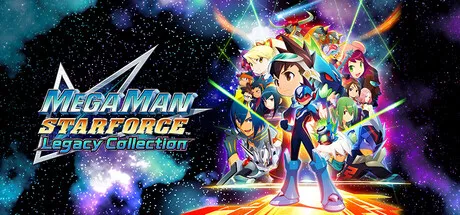
Mega Man Star Force Legacy Collection Free Download (Offline Activation)
Featured Replies

header.webp

Game Details

Release Name:ย Mega Man Star Force Legacy Collection

Game Version:ย Build 21859197

Genre: RPG, Action, Action RPG, Card Battler, Story Rich

Publisher: CAPCOM Co., Ltd.

Platform: PC

Based On:ย Anti Denuvo Sanctuary CSF

Download Mega Man Star Force Legacy Collection

The Mega Man Star Force series, which expanded into an anime, is back in the Mega Man Star Force Legacy Collection! This collection includes seven games and additional features like a gallery of illustrations and music! Online play is also supported!


Enhanced Graphics and Music
Enjoy smooth visuals with an optional graphics filter. Also rock out to the original soundtrack, or switch to the newly arranged soundtrack for battles!

Extensive Customization
From veterans of the original games to series newcomers, players can tune the game experience to their liking with customization features such as:
- Autosaving
- Camera Panning
- Speed Boost
- Screen Layout
- Encounter Rate
- Mega Buster Power
- Damage Reduction
- HP Recovery After Battle
...and more!

Boosted Fun with Bonus Cards
Included Bonus Cards previously obtainable from real-life events, toys, and other rare opportunities give players the power to unlock new fun in this collection of classics!

Note: Certain Bonus Cards not included.

Thrilling Online Matches
Battle players across the world in each game online! Compete for the top title in Ranked Matches, enjoy low-stakes brawls in Casual Matches, or fight for fun in Friend Matches!

Note: Cross-platform matches and cross-platform saves are not supported.

Grand Gallery
This package has it allโ€”featuring over one thousand rare pieces of artwork from across the Mega Man Star Force series, including official illustrations, design documents, drafts, and concept art! In addition, the entire original soundtrack and arranged soundtrack are available in the music player. But that's not allโ€”The images for every Battle Card and Bonus Card across the Mega Man Star Force series are included in this grand gallery!


The following titles are included in the collection:

Mega Man Star Force Pegasus
Mega Man Star Force Leo
Mega Man Star Force Dragon
Mega Man Star Force 2 Zerker x Ninja
Mega Man Star Force 2 Zerker x Saurian
Mega Man Star Force 3 Black Ace
Mega Man Star Force 3 Red Joker

It is the year 220X, and the world has seen rapid advancements in Wave technology. Our protagonist, 11-year-old Geo Stelar, refuses to go to school as he mourns the disappearance of his astronaut father.
One night, Geo is at the observatory gazing at stars as he usually does. Suddenly, his Transer picks up a signal from space and he is hit with a powerful electric shock!
When he finally comes to, an alien with an electromagnetic wave body called Omega-Xis is standing over him...

Note: The toy link features found in the original versions are not supported.


Screenshots

ss_376b58ae8221d8b4470b3ae2275e88a5b95bcss_b300a944231679c21cb5269d97e3589ee46f8ss_5b85695f561535a8a398ee736e037554789b9ss_7f31ccf790a33d6e82d81d8c1c53053fd43d0


Trailer


System Requirements

OS

Windows 11

Processor

Intelยฎ Coreโ„ขi3-9100F / AMD Ryzenโ„ข3 3200G

Memory

8 GB

Graphics

NVIDIAยฎ GeForceยฎ GTX 1660 / AMD Radeonโ„ข RX 5500 XT 8G

DirectX

Version 12

Storage

7 GB


Installation Guide

Step 1
  1. Download the Game Files and Join the Discord Server.

  2. Join the Anti-Denuvo Sanctuary Discord server using this link:ย [Click Here].

Step 2
  • New members will be assigned theย Newbieย role.

  • Wait forย 12 hours, and then you can take the quiz (which becomes available after the 12-hour period) to gain access to the request channels.

Step 3
  • To avoid being banned and to understand how everything works, make sure to read the following channels:

    • #Rules

    • #Guide

    • #F.A.Q.

  • For a list of useful commands, typeย !helpย inside the server. This will show you a list of useful commands that you can use. It also includes video tutorials on how activation works and other helpful guides.

Step 4
  • As mentioned in Step 1, download theย Steam clean files.

  • If you need additional tools, check theย #Resourcesย channel.

  • Important:ย Always double-check the game version. Using outdated versions can cause issues. Checkย SteamDBย for the latest version.

  • If youโ€™re onย Linux, notify the staff to get a role which gives you access to theย #Linux-Deckย channel. Refer to theย #Linux-Guidesย channel for instructions and consult the team first before submitting a game request.

Step 5

  • Takeย ONE screenshotย showing the following:

    • The contents of theย game folderย (just the root directory).

    • Theย Propertiesย of the game folder.

    • Windows Update Blocker (WUB)ย showing theย RED SHIELD.

Step 6
  • Self-Serveย :ย Request games for free here.

  • New-Donatorย :ย This category applies only to newly released games. After aboutย 1โ€“2 weeks, those games will move toย #Self-Serve, where everyone can access them. Donating is optional and provides early access to new releases.

    • Be sure to carefully read the instructions inside each ticket. There are time limits for each step, so follow through. If youโ€™re unsure, use the โ€œNeed Helpโ€ button available inside the ticket, and the team will guide you through the process.

๐Ÿ”ฅDOWNLOAD AREA๐Ÿ”ฅ

๐Ÿ”น4.56 GB๐Ÿ”น

Select a server to download the game.

Rootzย |ย Ranozย |ย 1fichierย |ย Akiraboxย |ย Vikingfileย |ย ALL Links

  • Views 518
  • Created
  • Last Reply

Posted Images

Create an account or sign in to comment

Recently Browsing 0

  • No registered users viewing this page.

Account

Navigation

Search

Search

๐Ÿ”Ž Search Tip
For exact results, search using "game name" .
Without quotes, results may include unrelated titles.

Configure browser push notifications

Chrome (Android)
  1. Tap the lock icon next to the address bar.
  2. Tap Permissions โ†’ Notifications.
  3. Adjust your preference.
Chrome (Desktop)
  1. Click the padlock icon in the address bar.
  2. Select Site settings.
  3. Find Notifications and adjust your preference.
