



Skip to content
View in the app

A better way to browse. Learn more.

ZeiGames

A full-screen app on your home screen with push notifications, badges and more.

To install this app on iOS and iPadOS
  1. Tap the Share icon in Safari
  2. Scroll the menu and tap Add to Home Screen.
  3. Tap Add in the top-right corner.
To install this app on Android
  1. Tap the 3-dot menu (โ‹ฎ) in the top-right corner of the browser.
  2. Tap Add to Home screen or Install app.
  3. Confirm by tapping Install.

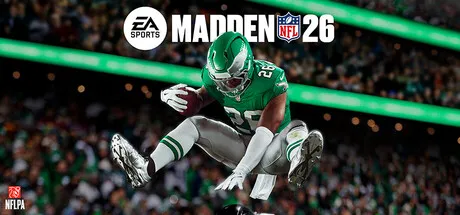
EA SPORTS Madden NFL 26 Free Download (Offline Activation)
Featured Replies

header.webp

Game Details

Release Name:ย EA SPORTS Madden NFL 26

Game Version:ย v1.0.131.53223 | Build 21872358

Genre: Simulation, Sports, Football (American), Competitive, Strategy

Publisher: Electronic Arts

Platform: PC

Based On:ย Anti Denuvo Sanctuary CSF

Download EA SPORTS Madden NFL 26

Step into the All-Madden legacy this season. Experience generational playmakers, unlock rewards, and celebrate footballโ€™s greatest coach.

Energize your team in EA SPORTSโ„ข Madden NFL 26 with the Goal Line Pack! Log in to Madden Ultimate Team in Madden NFL 26 and receive three 88 OVR BND to add to your lineup: LaDainian Tomlinson, TJ Watt, Jalen Ramsey

EA SPORTSโ„ข Madden NFL 26 leverages a new AI-powered machine learning system to convert thousands of plays from nearly a decade of real NFL data into more explosive gameplayโ€”with new player-specific traits, authentic play-styles, and adaptive counters that match on-field tendencies and strategies of NFL quarterbacks and coaches.

From the Skol chant in Minnesota to the light show in Baltimore, immerse yourself in new presentation across the NFL including game-impacting weather, team traditions, and dynamic halftime shows with Scott Hanson.

Built from Sundays. Real NFL data powers the realest Madden to date.

SIGNATURE QBS
Star NFL quarterbacks move, look, and feel more like the superstars they are.

EXPLOSIVE NFL GAMEPLAY
Explosive NFL action at your fingertips with improved player movement.

COACH DNA
Adaptive counters informed by real NFL coaching trends.

ROSTER MANAGEMENT
Modernized depth charts, new positional roles, and the Wear & Tear system add strategy and experimentation to roster management and game-planning.

FOOTBALL WEATHER
Depending on how extreme the conditions are, Football Weather can completely disrupt your original game plan. Adapt to new challenges like limited visibility downfield in heavy snow and fog, or wet conditions that will directly impact player movement, stamina, ball security, and more.

DEFENSIVE CONTROL & STRATEGY
Control your pass-coverage depth with new custom zones, and perfect your pass rush strategy with new stunts and twist options at the line.


This game includes optional in-game purchases of virtual currency that can be used to acquire virtual in-game items, including a random selection of virtual in-game items.


Screenshots

ss_37aaef7ed4ec527f61d7366493c5fc3f7a253ss_ebffde12d738a59b405fd79f502867dfef3cass_7444bbb675663e64be0b987d78cd0c0ca777fss_902edab9ecc225c1527bca94aa8f996959f31


Trailer


System Requirements

OS

Windows 10 - 64-Bit (Latest Update)

Processor

Intel Core i7-6700K (4-cores; 8-threads) or AMD Ryzen 5 1600

Memory

10 GB

Graphics

NVIDIA GeForce GTX 1050 Ti 4GB or AMD Radeon RX 570 4GB

DirectX

Version 12

Storage

65 GB


Installation Guide

Step 1
  1. Download the Game Files and Join the Discord Server.

  2. Join the Anti-Denuvo Sanctuary Discord server using this link:ย [Click Here].

Step 2
  • New members will be assigned theย Newbieย role.

  • Wait forย 12 hours, and then you can take the quiz (which becomes available after the 12-hour period) to gain access to the request channels.

Step 3
  • To avoid being banned and to understand how everything works, make sure to read the following channels:

    • #Rules

    • #Guide

    • #F.A.Q.

  • For a list of useful commands, typeย !helpย inside the server. This will show you a list of useful commands that you can use. It also includes video tutorials on how activation works and other helpful guides.

Step 4
  • As mentioned in Step 1, download theย Steam clean files.

  • If you need additional tools, check theย #Resourcesย channel.

  • Important:ย Always double-check the game version. Using outdated versions can cause issues. Checkย SteamDBย for the latest version.

  • If youโ€™re onย Linux, notify the staff to get a role which gives you access to theย #Linux-Deckย channel. Refer to theย #Linux-Guidesย channel for instructions and consult the team first before submitting a game request.

Step 5

  • Takeย ONE screenshotย showing the following:

    • The contents of theย game folderย (just the root directory).

    • Theย Propertiesย of the game folder.

    • Windows Update Blocker (WUB)ย showing theย RED SHIELD.

Step 6
  • Self-Serveย :ย Request games for free here.

  • New-Donatorย :ย This category applies only to newly released games. After aboutย 1โ€“2 weeks, those games will move toย #Self-Serve, where everyone can access them. Donating is optional and provides early access to new releases.

    • Be sure to carefully read the instructions inside each ticket. There are time limits for each step, so follow through. If youโ€™re unsure, use the โ€œNeed Helpโ€ button available inside the ticket, and the team will guide you through the process.

๐Ÿ”ฅDOWNLOAD AREA๐Ÿ”ฅ

๐Ÿ”น64.44 GB๐Ÿ”น

Select a server to download the game.

If the download links aren't working, try using a VPN or changing your DNS to 1.1.1.1

Rootzย |ย Ranozย |ย 1fichierย |ย Akiraboxย |ย Vikingfileย |ย ALL Links

  • Views 863
  • Created
  • Last Reply

Posted Images

Create an account or sign in to comment

Recently Browsing 0

  • No registered users viewing this page.

Account

Navigation

Search

Search

๐Ÿ”Ž Search Tip
For exact results, search using "game name" .
Without quotes, results may include unrelated titles.

Configure browser push notifications

Chrome (Android)
  1. Tap the lock icon next to the address bar.
  2. Tap Permissions โ†’ Notifications.
  3. Adjust your preference.
Chrome (Desktop)
  1. Click the padlock icon in the address bar.
  2. Select Site settings.
  3. Find Notifications and adjust your preference.
