



Skip to content
View in the app

A better way to browse. Learn more.

ZeiGames

A full-screen app on your home screen with push notifications, badges and more.

To install this app on iOS and iPadOS
  1. Tap the Share icon in Safari
  2. Scroll the menu and tap Add to Home Screen.
  3. Tap Add in the top-right corner.
To install this app on Android
  1. Tap the 3-dot menu (⋮) in the top-right corner of the browser.
  2. Tap Add to Home screen or Install app.
  3. Confirm by tapping Install.

REMNANT II Free Download (v453.438 + ALL DLC + Online)
Featured Replies

header.webp

Game Details

Release Name: REMNANT II®

Game Version: v453.438 | Build 16320528

Release Date: 25 Jul, 2023

Publisher: Arc Games, THQ Nordic

Developer: Gunfire Games

Based On: CSF & Goldberg

REMNANT II® Direct Download - Game Review

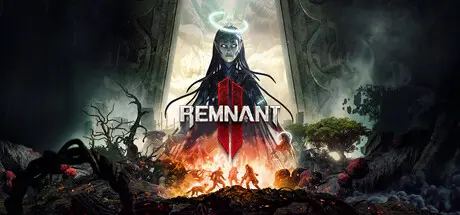
Remnant II® is the sequel to the best-selling game Remnant: From the Ashes that pits survivors of humanity against new deadly creatures and god-like bosses across terrifying worlds. Play solo or co-op with two other friends to explore the depths of the unknown to stop an evil from destroying reality itself. To succeed, players will need to rely on their own skills and those of their team to overcome the toughest challenges and to stave off humanity’s extinction.


A mix of methodical and frenetic ranged/melee combat returns with cunning enemies and large scale boss battles. Choose specific gear and weapons to optimize for the different biomes and battles ahead. Bosses will bring high-level players to team up to overcome the challenge and try to obtain the biggest rewards

Players can travel alone or with friends as a team through strange new worlds and beyond, overrun by mythical creatures and deadly foes while trying to stay alive. There are multiple worlds to explore with different types of creatures, weapons, and items. Utilize and upgrade discovered items to take on tougher challenges

Branching quest lines, augments, crafting, and loot rewards will test the resolve of even the most hardened players in dynamically generated dungeons and areas. Playthroughs will feel challenging, varied, and rewarding as players succeed against unrelenting odds. Various stories are woven throughout the different worlds, encouraging exploration and multiple revisits


Game Screenshots

screenshot screenshot screenshot screenshot


Game Trailer


System Requirements

Minimum Requirements

Recommended Requirements

OS

Win 10

Win 10

Processor

Intel Core i5-7600 / AMD Ryzen 5 2600

Intel i5-10600k / AMD R5 3600

Memory

16 GB RAM

16 GB RAM

Graphics

GeForce GTX 1650 / AMD Radeon RX 590

GeForce RTX 2060 / AMD Radeon RX 5700

DirectX

-

-

Storage

80 GB available space

80 GB available space


Installation Guide

  1. No Installation Needed: The game is pre-installed. Just download and extract.

  2. Extract: Right-click the .zip or .rar file and select "Extract Here" or "Extract to folder".

  3. Run: Find Remnant2.exe inside the folder and run it.

Multiplayer & Online (Optional)

  • Play Online: Download the Online Fix file and apply it to the game folder.

  • Please go to the online fix page and read the guide.

Game Data & Settings

  • Change Language: Edit the file located at steam_settings/Configs.user.ini

  • Save Data Location: %USERPROFILE%/Saved Games/Remnant2/Steam/

Important Notes

DLC List

Added DLCs

Remnant II - Deluxe Edition Items

Remnant II® - The Dark Horizon

Remnant II - The Forgotten Kingdom

Remnant 2 - The Awakened King (Remnant II® - The Awakened King)

Remnant II - Gunslinger Unlock

Remnant II - DLC Bundle

Remnant II - Survival Pack

🔥DOWNLOAD AREA🔥

🔹85.13 GB🔹

Select the server you want to download with ZeiLink.

Download

Online Fix - (RAR pass: rexagames.com)

  • DicDale changed the title to REMNANT II Free Download (v453.438 + ALL DLC + Online)

  • Views 3.2k
  • Created
  • Last Reply

Posted Images

Create an account or sign in to comment

Recently Browsing 0

  • No registered users viewing this page.

Account

Navigation

Search

Search

🔎 Search Tip
For exact results, search using "game name" .
Without quotes, results may include unrelated titles.

Configure browser push notifications

Chrome (Android)
  1. Tap the lock icon next to the address bar.
  2. Tap Permissions → Notifications.
  3. Adjust your preference.
Chrome (Desktop)
  1. Click the padlock icon in the address bar.
  2. Select Site settings.
  3. Find Notifications and adjust your preference.