



Skip to content
View in the app

A better way to browse. Learn more.

ZeiGames

A full-screen app on your home screen with push notifications, badges and more.

To install this app on iOS and iPadOS
  1. Tap the Share icon in Safari
  2. Scroll the menu and tap Add to Home Screen.
  3. Tap Add in the top-right corner.
To install this app on Android
  1. Tap the 3-dot menu (โ‹ฎ) in the top-right corner of the browser.
  2. Tap Add to Home screen or Install app.
  3. Confirm by tapping Install.

MARVEL Cosmic Invasion Free Download (v1.0.0.13170 + Cyclops & The Thing DLC + Online)
Featured Replies

header.webp

Game Details

Release Name:ย MARVEL Cosmic Invasion

Game Version:ย v1.0.0.13170 | Build 22930667

Release Date: 1 Dec, 2025

Publisher: Dotemu, Gamirror Games

Developer: Tribute Games Inc.

Based On:ย CSF & Goldberg

MARVEL Cosmic Invasion Direct Download - Game Review

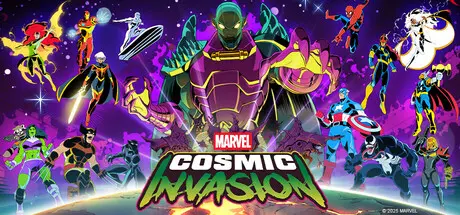
Tribute Games and Dotemu are teaming up again, in collaboration with Marvel Games, to craft an original, fresh beat 'em up. Featuring dynamic combat combos and dazzling pixel art, this planet-hopping adventure stands as a love letter to the Marvel Universe.

So swears Annihilus, the living death that walks!

After an unprecedented attack is launched across the galaxy, all life hangs in the balance.

From New York City to the depths of the Negative Zone, the future of the Universe will be fought for across the stars in MARVEL Cosmic Invasion!

Spider-Man, Wolverine, She-Hulk, Captain America, Phoenix, Black Panther, Storm and Iron Man, some of the most powerful earth-born Marvel Super Heroes, are ready to face the threat.

But they won't be alone! Galactic Super Heroes Rocket Raccoon, Beta Ray Bill, Venom, Cosmic Ghost Rider, Nova, Phyla-Vell and the Silver Surfer enter the battle as well to complete the relentless line-up.

All will join forces in a star-spanning brawling adventure against the deadly Annihilation Wave.

Whether youโ€™re an old-school expert or a first-time fan, youโ€™ll find familiar faces and discover new favorites in a captivating roster of characters from across the Marvel Universe!


Game Screenshots

screenshot screenshot screenshot screenshot


Game Trailer


System Requirements

Minimum Requirements

Recommended Requirements

OS

Windows 10

Windows 10

Processor

Intel Core 2 Duo E6550 or Athlon 64 X2 6400+

Intel Core i3-540 or AMD Phenom II X2 550

Memory

4 GB RAM

8 GB RAM

Graphics

NVIDIA GeForce GT 320, 1 GB or AMD Radeon HD 6570, 1 GB or Intel HD Graphics

NVIDIA GeForce GT 730, 2 GB or AMD Radeon R7 240, 2 GB or Intel HD Graphics

DirectX

-

-

Storage

1 GB available space

1 GB available space


Installation Guide

  1. No Installation Needed: The game is pre-installed. Just download and extract.

  2. Extract: Right-click the .zip or .rar file and select "Extract Here" or "Extract to folder".

  3. Run: Find Game.exe inside the folder and run it.

Multiplayer & Online (Optional)

  • Play Online: Download the Online Fix file and apply it to the game folder.

Game Data & Settings

  • Change Language: Edit the file located at steam_settings/Configs.user.ini

Important Notes

DLC List

Added DLCs

MARVEL Cosmic Invasion - Cyclops & The Thing

๐Ÿ”ฅDOWNLOAD AREA๐Ÿ”ฅ

๐Ÿ”น456 MB๐Ÿ”น

Select the server you want to download with ZeiLink.

Download

Online Fix - (RAR pass: rexagames.com)

  • Replies 3
  • Views 2.2k
  • Created
  • Last Reply

Top Posters In This Topic

Posted Images

  • 3 weeks later...

New DLC just came out

Absolutely appreciate all you do

Edited by BlackX

  • DicDale changed the title to MARVEL Cosmic Invasion Free Download (v1.0.0.13170 + Cyclops & The Thing DLC + Online)

Create an account or sign in to comment

Recently Browsing 0

  • No registered users viewing this page.

Account

Navigation

Search

Search

๐Ÿ”Ž Search Tip
For exact results, search using "game name" .
Without quotes, results may include unrelated titles.

Configure browser push notifications

Chrome (Android)
  1. Tap the lock icon next to the address bar.
  2. Tap Permissions โ†’ Notifications.
  3. Adjust your preference.
Chrome (Desktop)
  1. Click the padlock icon in the address bar.
  2. Select Site settings.
  3. Find Notifications and adjust your preference.