



Skip to content
View in the app

A better way to browse. Learn more.

ZeiGames

A full-screen app on your home screen with push notifications, badges and more.

To install this app on iOS and iPadOS
  1. Tap the Share icon in Safari
  2. Scroll the menu and tap Add to Home Screen.
  3. Tap Add in the top-right corner.
To install this app on Android
  1. Tap the 3-dot menu (โ‹ฎ) in the top-right corner of the browser.
  2. Tap Add to Home screen or Install app.
  3. Confirm by tapping Install.

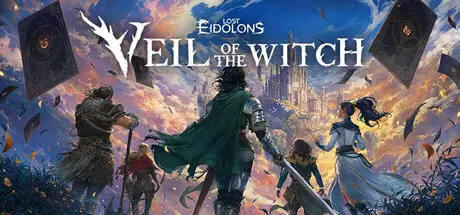
Lost Eidolons: Veil of the Witch Free Download (v1.0.11 + Main Character Skin Set)
Featured Replies

header.webp

Game Details

Release Name:ย Lost Eidolons: Veil of the Witch

Game Version:ย v1.0.11 | Build 20396273

Release Date: 9 Oct, 2025

Publisher: Ocean Drive Studio, Inc., Kakao Games

Developer: Ocean Drive Studio, Inc.

Based On:ย CSF & Goldberg

Lost Eidolons: Veil of the Witch Direct Download - Game Review

From the world of "Lost Eidolons" comes a tactical roguelite RPG, where death is just the beginning.

Shipwrecked and dying, you strike a deal with a mysterious witch for another chance. The price? Become her champion and vanquish her enemies.

As you awaken on a cursed island overrun by the dead, you have no memory and no way out - other than to forge ahead to fulfill the witch's bidding.

Engage in challenging grid-based battles where every move and combo demands precision. Leverage elemental effects to manipulate the battlefield - electrify soaked enemies, ignite flammable terrain, and exploit every opportunity. Account for enemy armor and strike with the right weapon to break through and gain the advantage. Build devastating skill synergies, control the flow of battles, or be outmaneuvered and crushed by foes.

Recruit allies and build a squad of 5 from 9 versatile characters - each blending multiple combat roles with unique skills, weapon sets, and personalities. As you level up, earn and upgrade over 200 skills to create deadly team compositions and game-winning builds. Experiment with different squads and strategies every run to find new ways of dominating the battlefield.

No two runs are the same. Choose your path across a winding map full of random events, hidden rewards, and dangerous encounters. Every step along the islandโ€™s forking paths will present new possibilities that can shift your entire strategy. Plan your path carefully, but be ready to adapt, as some choices can lead to powerful rewards, while others hide unplanned encounters. Take risks, claim winnings, and adapt your strategy to survive what comes next.

Failure isnโ€™t the end; itโ€™s part of the journey. Every death makes you stronger for the battles ahead. Spend your rewards at the base camp to permanently boost your stats. Promote characters to unlock powerful new skills. Deepen your bonds with allies to uncover their pasts and gain more tactical advantage on the field. When you're ready, dive back into the fight and push farther than ever before.


Game Screenshots

screenshot screenshot screenshot screenshot


Game Trailer


System Requirements

Minimum Requirements

Recommended Requirements

OS

Windows 10 x64

Windows 10 x64

Processor

Intel(R) Core(TM) i5-3570 or AMD equivalent

Intel(R) Core(TM) i5-9500 or AMD equivalent

Memory

8 GB RAM

16 GB RAM

Graphics

GeForce GTX 960 or AMD equivalent, 4 GB VRAM

GeForce GTX 1660 or AMD equivalent, 4 GB VRAM

DirectX

Version 11

Version 11

Storage

15 GB available space

15 GB available space


Installation Guide

  1. No Installation Needed: The game is pre-installed. Just download and extract.

  2. Extract: Right-click the .zip or .rar file and select "Extract Here" or "Extract to folder".

  3. Run: Find Launcher.bat inside the folder and run it.

Game Data & Settings

  • Change Language: Edit the file located at steam_settings/Configs.user.ini

  • Save Data Location: %USERPROFILE%/AppData/LocalLow/OceanDriveStudio/VOTW/Saves/Steam/

Important Notes

DLC List

Added DLCs

Lost Eidolons: Veil of the Witch - Main Character Skin Set

๐Ÿ”ฅDOWNLOAD AREA๐Ÿ”ฅ

๐Ÿ”น3.89 GB๐Ÿ”น

Select the server you want to download with ZeiLink.

Download

  • Views 1k
  • Created
  • Last Reply

Posted Images

Create an account or sign in to comment

Recently Browsing 0

  • No registered users viewing this page.

Account

Navigation

Search

Search

๐Ÿ”Ž Search Tip
For exact results, search using "game name" .
Without quotes, results may include unrelated titles.

Configure browser push notifications

Chrome (Android)
  1. Tap the lock icon next to the address bar.
  2. Tap Permissions โ†’ Notifications.
  3. Adjust your preference.
Chrome (Desktop)
  1. Click the padlock icon in the address bar.
  2. Select Site settings.
  3. Find Notifications and adjust your preference.
