



Skip to content
View in the app

A better way to browse. Learn more.

ZeiGames

A full-screen app on your home screen with push notifications, badges and more.

To install this app on iOS and iPadOS
  1. Tap the Share icon in Safari
  2. Scroll the menu and tap Add to Home Screen.
  3. Tap Add in the top-right corner.
To install this app on Android
  1. Tap the 3-dot menu (โ‹ฎ) in the top-right corner of the browser.
  2. Tap Add to Home screen or Install app.
  3. Confirm by tapping Install.

JR EAST Train Simulator Free Download (v1.0.1.719 + ALL DLC)
Featured Replies

header.webp

Game Details

Release Name:ย JR EAST Train Simulator

Game Version:ย v1.0.1.719 | Build 20395593

Release Date: 14 Nov, 2022

Publisher: EAST JAPAN RAILWAY TRADING CO., LTD.

Developer: ONGAKUKAN Co.,Ltd.

Based On:ย CSF & Goldberg

JR EAST Train Simulator Direct Download - Game Review

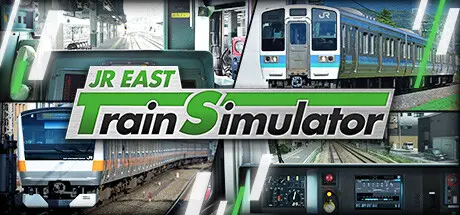
Ongakukan and EAST JAPAN RAILWAY TRADING have teamed up to bring you a simulator that has a wealth of experience in train driving simulators. You can experience the professional simulator actually used by JR East drivers for training at home.

  • High-definition images of JR East's train lines are captured in live-action. You can drive the train from the same perspective as the driver.

  • You can enjoy driving from the same point of view as the driver.

  • The sounds emitted from the trains and tracks in the simulator are recorded by JR East using actual trains, so you can experience the realistic running sounds that a driver would feel comfortable driving.

  • The instrument panel displays the speedometer and other data just like the actual vehicle, and operates faithfully according to driving operations, speed, etc. The sound and instrument panel display will switch to that of the vehicle when the type of vehicle being experienced is changed.


Game Screenshots

screenshot screenshot screenshot screenshot


Game Trailer


System Requirements

Minimum Requirements

Recommended Requirements

OS

64-bit Windows 11

64-bit Windows 11

Processor

Intel Core i5-8500 or AMD Ryzen 5 2600

Intel Core i5 12400 or AMD Ryzen 5 5500

Memory

16 GB RAM

16 GB RAM

Graphics

NVIDIA GeForce GTX 1060 (VRAM 6GB)

NVIDIA GeForce RTX 3060 (VRAM 8GB)

DirectX

Version 12

Version 12

Storage

60 GB available space

60 GB available space


Installation Guide

  1. No Installation Needed: The game is pre-installed. Just download and extract.

  2. Extract: Right-click the .zip or .rar file and select "Extract Here" or "Extract to folder".

  3. Run: Find JREAST_TrainSimulator.exe inside the folder and run it.

Game Data & Settings

  • Change Language: Edit the file located at steam_settings/Configs.user.ini

Important Notes

DLC List

Added DLCs

JR EAST Train Simulator: Yokohama Line (ลŒfuna to Hachiลji๏ผ‰ Series E233-6000

JR EAST Train Simulator: Shลnan-Shinjuku Line (ลŒmiya to Zushi) Series E233-3000

JR EAST Train Simulator: Tobu Railway (Kita-kasukabe to Kita-senju,Shiki to Ikebukuro) 10030 Series

JR East Train Simulator: Senzan Line(Sendai to Yamagata) E721 Series

Hachikล Line๏ผˆTakasaki to Komagawa๏ผ‰KIHA110-200 series (JR EAST Train Simulator: Hachikล Line๏ผˆTakasaki to Komagawa๏ผ‰KIHA110 - 200 series)

JR EAST Train Simulator: 185 series

JR EAST Train Simulator: Tokaido Freight Line (Nebukawa to Shinagawa,Tokyo๏ผ‰ E257-2000,5500 Series

JR EAST Train Simulator: Ome Line (Tachikawa to Okutama) E233-0 Series

JR EAST Train Simulator: Yokosuka Line (Kurihama to Tokyo) Series E217

JR EAST Train Simulator: Utsunomiya Line (Kuroiso to Tokyo) E233-3000 series

JR EAST Train Simulator: Narita Line (Choshi to Chiba) 209-2100 series Kashima Line (Kashima-Soccer Stadium to Sawara) 209-2100 series

JR EAST Train Simulator: Oga Line (Akita to Oga) EV-E801 series

JR EAST Train Simulator: Rumoi Line (Fukagawa to Rumoi) Kiha 54-500 series

JR EAST Train Simulator: Takasaki Line (Ueno to Takasaki) E233-3000 series

JR EAST Train Simulator: Koumi Line (Kobuchizawa to Komoro) Kiha E200 series

JR EAST Train Simulator: Sobu Line Rapid Service (Tokyo to Narita Airport Terminal 1) E217 series

JR EAST Train Simulator: Nambu Line (Kawasaki to Tachikawa) E233-8000 series Tsurumi Line (Tsurumi to Ogimachi,Okawa,Umishibaura) 205-1100 series (JR EAST Train Simulator: Nambu Line (Kawasaki to Tachikawa) E233-8000 series Nambu Branchi Line (Hamakawasaki to Shitte) 205-1000 series Tsurumi Line (Tsurumi to Ogimachi,Okawa,Umi-Shibaura) 205-1100 series)

JR EAST Train Simulator: Hachinohe Line (Hachinohe to Kuji) Kiha E130-500 series

JR EAST Train Simulator: Shin-etsu Line (Naoetsu to Niigata) E129 series

JR EAST Train Simulator: Joban Line (Shinagawa to Katsuta) E531-0 series

JR EAST Train Simulator: Yamanote Line (Osaki to Osaki) E235-0 series

JR EAST Train Simulator: Keiyo Line (Soga to Tokyo) E233-5000 series

JR EAST Train Simulator: Senseki Line (Aobadori to Ishinomaki) 205-3100 series

JR EAST Train Simulator: Saikyo-Kawagoe Line (Osaki to Kawagoe) E233-7000 series

JR EAST Train Simulator: Oito Line (Matsumoto to Minami-Otari) 211 series

JR EAST Train Simulator: Chuo Line Rapid Service (Takao to Tokyo) E233-0 series

JR EAST Train Simulator: Tokaido Line (Tokyo to Atami) E233-3000 series

๐Ÿ”ฅDOWNLOAD AREA๐Ÿ”ฅ

๐Ÿ”น530.32 GB๐Ÿ”น

Select the server you want to download with ZeiLink.

Download

  • Replies 4
  • Views 4.3k
  • Created
  • Last Reply

Top Posters In This Topic

Posted Images

Thank you for uploading. I only need the base v1.0.1.719 and Shonan Shinjuku Line DLC, but I only need the base v1.0.1.719 file for update out of 500g files. (I have all the other DLC movies) Can you just upload the base file separately? This was written using a translator

  • 5 weeks later...

Could you please update this game to the latest version? Thank you for sharing these archives!

  • 2 months later...

Can I split file?

It keeps getting canceled while downloading.

  • 3 months later...

Hi,
Is it possible to have a download link with ONLY the base game? Those DLC's make up a huge file to download.
Thanks

Create an account or sign in to comment

Recently Browsing 0

  • No registered users viewing this page.

Account

Navigation

Search

Search

๐Ÿ”Ž Search Tip
For exact results, search using "game name" .
Without quotes, results may include unrelated titles.

Configure browser push notifications

Chrome (Android)
  1. Tap the lock icon next to the address bar.
  2. Tap Permissions โ†’ Notifications.
  3. Adjust your preference.
Chrome (Desktop)
  1. Click the padlock icon in the address bar.
  2. Select Site settings.
  3. Find Notifications and adjust your preference.
