



Skip to content
View in the app

A better way to browse. Learn more.

ZeiGames

A full-screen app on your home screen with push notifications, badges and more.

To install this app on iOS and iPadOS
  1. Tap the Share icon in Safari
  2. Scroll the menu and tap Add to Home Screen.
  3. Tap Add in the top-right corner.
To install this app on Android
  1. Tap the 3-dot menu (โ‹ฎ) in the top-right corner of the browser.
  2. Tap Add to Home screen or Install app.
  3. Confirm by tapping Install.

Gamestonk Simulator: Gone Rogue Free Download (v0.3.282)
Featured Replies

header.webp

Game Details

Release Name:ย Gamestonk Simulator: Gone Rogue

Game Version:ย v0.3.282 | Build 22019462

Release Date: 21 May, 2026

Publisher: simsum, Vsoo Games

Developer: simsum

Based On:ย CSF & Goldberg

Gamestonk Simulator: Gone Rogue Direct Download - Game Review

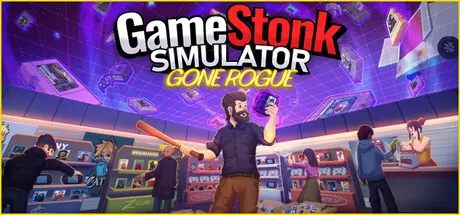
Gamestonk is the first roguelite shop simulator, blending management, strategy, and chaos into one pixel-packed package. Each day presents new challenges, new customers, and new opportunities to surviveโ€”or fail spectacularly. Adapt to the ever-changing market, or get crushed by it.

Discover and collect a massive library of retro gamesโ€”each with unique traits, rarities, and collector-grade properties. From humble plastic cartridges to ultra-rare Galactic editions, every retro title you find could change the course of your shop. Look out for sealed copies, complete-in-box treasures, signed editions, and imports straight from Japanโ€”just like the real-world grading fantasy. And best of all? Retros never reset. No matter how your run ends, your retro collection stays with you, growing stronger with every playthrough. Build the ultimate archive and flex your shelves with prideโ€”because retros are forever.

Help your customers on the checkout counter, make sure your shop is well stocked and that you serve them on time, otherwise they'll lose patience and leave..

As your business grows, so does your store! Expand to fit more shelves, attract more customers, and reorganize your layout to maximize efficiency. Show off your management skills and prove you can run the biggest, best game store in town!

Every morning, The Truck arrives with offers: bonuses for some genres, discounts for others, store rating accelerations, loot amplification, and many others. Anticipate your needs wisely and purchase them strategically.

Youโ€™ve just inherited your grandfatherโ€™s dusty, chaotic video game shopโ€”the last one standing in a world dominated by faceless online megacorps. Can you turn this retro wreck into a thriving business before the digital tide wipes you out?

  • Employees: Hire employees and let them run your shop for you. No work, no worrys.

  • Thieves: Watch out for thieves, use your trusty bat and slippers to catch thieves, the better the weapon, the higher a chance they'll drop something nice.

  • Special orders: Low on money? a product isn't selling well? go to the streets and check if a passersby's looking to buy some games. You'll get a surprise suitcase when you deliver what they want.

  • Power ups: Think that the last run was too hard? you're in luck! use the retros you got during survivor mode to permanently power up.

  • Retros are forever: All the retros you have in your collection before losing in survivor mode will carry with you to your next run

  • Tycoon mode: If youโ€™d rather build the ultimate gaming empire without the pressure of permadeath, switch to Endless Mode. In this laid-back tycoon experience, thereโ€™s no game overโ€”just pure shop management bliss. Expand at your own pace, hire your dream team, and chase profits without limits.


Game Screenshots

screenshot screenshot screenshot screenshot


Game Trailer


System Requirements

Minimum Requirements

Recommended Requirements

OS

Windows (64-bit) 10

Windows (64-bit) 10

Processor

Intel Core i5-3550

Intel Core i5-6400

Memory

8 GB RAM

8 GB RAM

Graphics

NVidia GeForce GTX 1050

NVidia GeForce GTX 1070

DirectX

Version 11

Version 11

Storage

5 GB available space

5 GB available space


Installation Guide

  1. No Installation Needed: The game is pre-installed. Just download and extract.

  2. Extract: Right-click the .zip or .rar file and select "Extract Here" or "Extract to folder".

  3. Run: Find Gamestonk Simulator Gone Rogue.exe inside the folder and run it.

Game Data & Settings

  • Change Language: Edit the file located at steam_settings/Configs.user.ini

  • Save Data Location: %USERPROFILE%/AppData/LocalLow/Simsum/GameStonkSim

Important Notes

๐Ÿ”ฅDOWNLOAD AREA๐Ÿ”ฅ

๐Ÿ”น502 MB๐Ÿ”น

Select the server you want to download with ZeiLink.

Download

  • Replies 2
  • Views 2.5k
  • Created
  • Last Reply

Top Posters In This Topic

Posted Images

  • 1 month later...

there are a new major update for gamestonk simulator gone rogue version 0.3

  • DicDale changed the title to Gamestonk Simulator: Gone Rogue Free Download (v0.3.282)

Create an account or sign in to comment

Recently Browsing 0

  • No registered users viewing this page.

Account

Navigation

Search

Search

๐Ÿ”Ž Search Tip
For exact results, search using "game name" .
Without quotes, results may include unrelated titles.

Configure browser push notifications

Chrome (Android)
  1. Tap the lock icon next to the address bar.
  2. Tap Permissions โ†’ Notifications.
  3. Adjust your preference.
Chrome (Desktop)
  1. Click the padlock icon in the address bar.
  2. Select Site settings.
  3. Find Notifications and adjust your preference.