



Skip to content
View in the app

A better way to browse. Learn more.

ZeiGames

A full-screen app on your home screen with push notifications, badges and more.

To install this app on iOS and iPadOS
  1. Tap the Share icon in Safari
  2. Scroll the menu and tap Add to Home Screen.
  3. Tap Add in the top-right corner.
To install this app on Android
  1. Tap the 3-dot menu (โ‹ฎ) in the top-right corner of the browser.
  2. Tap Add to Home screen or Install app.
  3. Confirm by tapping Install.

Little Nightmares II Free Download (Build 7836543 + ALL DLC)
Featured Replies

header.webp

Game Details

Release Name:ย Little Nightmares II

Game Version:ย Build 7836543

Release Date: 10 Feb, 2021

Publisher: BANDAI NAMCO Entertainment

Developer: Tarsier Studios

Based On:ย CSF & Goldberg

Little Nightmares II Direct Download - Game Review

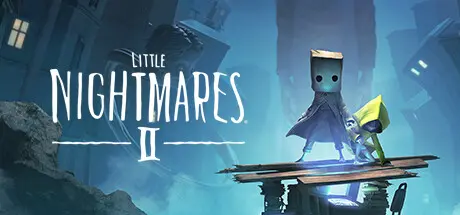
A boy wakes up alone in the woods surrounded by the husks of burnt-out televisions. After stumbling through traps and pitfalls in the wilderness, he finds a girl locked in the basement of a dark and terrible house with only a music box to keep her company.

This is their story.

You play as Mono, the boy traveling with Six, his enigmatic companion. Although they never knew each other before their story began, they must find a way to cooperate as they try to survive the terrors and secrets of the Pale City.

Mono can call Six to summon her, but she is also quite independent and observant. Pay attention to her cues and work together to open hidden trapdoors, climb giant furniture, and, if youโ€™re feeling a little scared, hold hands as you both navigate a world never meant for children.

The Residents of the Nowhere are enormous, implacable adults like the Teacher or the Hunter who stalk any child Visitor foolish enough to catch their attention. When theyโ€™re around, itโ€™s vital to remain quiet and out of sight, or your end will be quick and unpleasant.

At times, hiding wonโ€™t be enough. If a Resident is chasing you, youโ€™ll have to run as fast as you can, clambering over any obstacles in your way. Maybe youโ€™ll be able to stay alive long enough to find a place where the danger canโ€™t reach youโ€ฆ for now.


Game Screenshots

screenshot screenshot screenshot screenshot


Game Trailer


System Requirements

Minimum Requirements

Recommended Requirements

OS

Windows 10

Windows 10

Processor

Intel Core i5-2300 | AMD FX-4350

Intel Core i7-3770 | AMD FX-8350

Memory

4 GB RAM

4 GB RAM

Graphics

Nvidia GeForce GTX 570, 1 GB | AMD Radeon HD 7850, 2 GB

Nvidia GeForce GTX 760, 2 GB | AMD Radeon HD 7870, 2 GB

DirectX

Version 11

Version 11

Storage

-

-


Installation Guide

  1. No Installation Needed: The game is pre-installed. Just download and extract.

  2. Extract: Right-click the .zip or .rar file and select "Extract Here" or "Extract to folder".

  3. Run: Find Helios\Binaries\Win64\Little Nightmares II.exe OR EnhancedEdition\Little_Nightmares_II_Enhanced.exe inside the folder and run it.

Game Data & Settings

  • Change Language: Edit the file located at steam_settings/Configs.user.ini

  • Save Data Location: %USERPROFILE%/AppData/Local/Helios/Saved/SaveGames

Important Notes

DLC List

Added DLCs

Little Nightmares II Enhanced Edition

Little Nightmares II โ€“ The Nomeโ€™s Attic

Little Nightmares II Digital Content Bundle

Little Nightmares II โ€“ Mokujin Hat

๐Ÿ”ฅDOWNLOAD AREA๐Ÿ”ฅ

๐Ÿ”น11.34 GB๐Ÿ”น

Select the server you want to download with ZeiLink.

Download

  • DicDale changed the title to Little Nightmares II Free Download (Build 7836543 + ALL DLC)

  • Views 1.2k
  • Created
  • Last Reply

Posted Images

Create an account or sign in to comment

Recently Browsing 0

  • No registered users viewing this page.

Account

Navigation

Search

Search

๐Ÿ”Ž Search Tip
For exact results, search using "game name" .
Without quotes, results may include unrelated titles.

Configure browser push notifications

Chrome (Android)
  1. Tap the lock icon next to the address bar.
  2. Tap Permissions โ†’ Notifications.
  3. Adjust your preference.
Chrome (Desktop)
  1. Click the padlock icon in the address bar.
  2. Select Site settings.
  3. Find Notifications and adjust your preference.