



Skip to content
View in the app

A better way to browse. Learn more.

ZeiGames

A full-screen app on your home screen with push notifications, badges and more.

To install this app on iOS and iPadOS
  1. Tap the Share icon in Safari
  2. Scroll the menu and tap Add to Home Screen.
  3. Tap Add in the top-right corner.
To install this app on Android
  1. Tap the 3-dot menu (⋮) in the top-right corner of the browser.
  2. Tap Add to Home screen or Install app.
  3. Confirm by tapping Install.

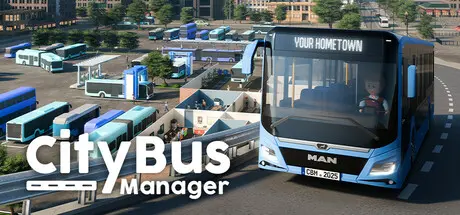
City Bus Manager Free Download (v2.4.14 + ALL DLC)
Featured Replies

header.webp

Game Details

Release Name: City Bus Manager

Game Version: v2.4.14 | Build 21205000

Release Date: 25 Jun, 2024

Publisher: Aerosoft GmbH

Developer: PeDePe GbR

Based On: CSF & Goldberg

City Bus Manager Direct Download - Game Review

Build your own depot from scratch and create your personal bus routes in City Bus Manager. Play in your own hometown or any famous city in the world. Recreate the official bus network or change it completely to your preference.

Did you ever think your local bus schedule sucks? This is your chance to show that you can step it up. Connect all the Points of Interest and see your passenger numbers grow. Buy new buses and hire staff to make sure you can keep up with your schedule.

Take care of your buses in the repair and washing stations to make sure they meet your customers' demands. Build a Service Center to sell tickets directly at your depot and engage with your clients. Get the best passenger reviews and lead your bus company to a prosperous future!
Whether its your home town or any world-famous city - it's in the game. 100% based on actual OpenStreetMap data including all the specific Points of Interests. The passenger simulation and bus route travel time is also based on real data. Recreate the existing lines or come up with completely new set-ups, it's all up to you!

Build everything that a good running bus depot needs. Parking slots, garages, warehouses, maintenance and washing stations are needed to take care of your vehicle fleet. But you also need offices, restrooms and a kitchen to take care of your staff. Also don't forget about the Service Center to sell tickets and connect with your customers. Choose from different environmental objects and furniture to match the depot to your style.
Clean and secure buses are mandatory for the future success of your company. Make sure your buses match the customers' expectations. Buy spare parts to repair your buses and make sure to schedule your maintenance work wisely between shifts to keep your vehicle fleet fit for service and to reduce downtimes to a minimum.

City Bus Manager arrives with more than 30 different bus models to offer the most realistic experience and allow you to adjust your bus fleet to your liking. Also completely new bus models can be created by players and be uploaded to the Steam Workshop (more than 400+ models till today). All buses can also be repainted either in-game or via an external graphic tool.

With the most recent updates players are now also able to share their own scenarios and/or bus networks via the workshop allowing players to create iconic custom-made scenarios for everyone to explore. Set yourself up for the challenge and succeed in City Bus Manager's most advanced scenarios.
Hire drivers, mechanics, office workers, ticket inspectors and many more to keep your company running. Take care of their needs so they can work efficiently and keep your costs in mind to scale up your business. Make the right choices and always keep the big picture in mind to set yourself up for success.


Game Screenshots

screenshot screenshot screenshot screenshot


Game Trailer


System Requirements

Minimum Requirements

Recommended Requirements

OS

Win 7 / 8.1 / 10 / 11 (64Bit)

Win 10 / 11 (64Bit)

Processor

Prozessor Quad Core CPU with min 2.6 GHZ

AMD / Intel quad-core processor running at 3.5 GHz (AMD Athlon X4 950 series or Intel Core i5 3000 series or newer architectures are recommended)

Memory

8 GB RAM

16 GB RAM

Graphics

Geforce 760 or similar

AMD/NVIDIA dedicated graphic card, with at least 2048 / 4096MB of dedicated VRAM (or more) and Shader Model 5.1 support. ATI/AMD Radeon HD 7870 and NVIDIA GeForce GTX 1050 Ti or newer architectures are recommended.

DirectX

-

-

Storage

5 GB available space

15 GB available space


Installation Guide

  1. No Installation Needed: The game is pre-installed. Just download and extract.

  2. Extract: Right-click the .zip or .rar file and select "Extract Here" or "Extract to folder".

  3. Run: Find CBM.exe inside the folder and run it.

Game Data & Settings

  • Change Language: Edit the file located at steam_settings/Configs.user.ini

  • Save Data Location: %USERPROFILE%/AppData/LocalLow/PeDePe GbR/City Bus Manager/

Important Notes

DLC List

Added DLCs

City Bus Manager - School Bus & Student Transportation

City Bus Manager - International Bus Pack

City Bus Manager - Holiday Resorts & Sightseeing Buses

City Bus Manager - E-Bus & Green Energy

City Bus Manager - Asia

City Bus Manager - Russia

City Bus Manager - Northern Europe

City Bus Manager - Africa

City Bus Manager - North America

City Bus Manager - Eastern Europe

City Bus Manager - Southern Europe

City Bus Manager - South America

City Bus Manager - Australia and Oceania

City Bus Manager - Central America

🔥DOWNLOAD AREA🔥

🔹39.94 GB🔹

Select the server you want to download with ZeiLink.

Download

  • 3 weeks later...
  • Replies 4
  • Views 5.2k
  • Created
  • Last Reply

Top Posters In This Topic

Most Popular Posts

Posted Images

The game doesn't start, it just says that an update is available and then the game closes it by itself.

  • 1 month later...
  • 3 months later...

Good evening. Another update is required!

Thanks in advance!

Cheers!

  • DicDale changed the title to City Bus Manager Free Download (v2.4.14 + ALL DLC)

On 2/3/2026 at 11:32 AM, DicDale said:

Game Updated v2.4.14 | Build 21205000

Thanks for the great job!

Create an account or sign in to comment

Recently Browsing 0

  • No registered users viewing this page.

Account

Navigation

Search

Search

🔎 Search Tip
For exact results, search using "game name" .
Without quotes, results may include unrelated titles.

Configure browser push notifications

Chrome (Android)
  1. Tap the lock icon next to the address bar.
  2. Tap Permissions → Notifications.
  3. Adjust your preference.
Chrome (Desktop)
  1. Click the padlock icon in the address bar.
  2. Select Site settings.
  3. Find Notifications and adjust your preference.