



Skip to content
View in the app

A better way to browse. Learn more.

ZeiGames

A full-screen app on your home screen with push notifications, badges and more.

To install this app on iOS and iPadOS
  1. Tap the Share icon in Safari
  2. Scroll the menu and tap Add to Home Screen.
  3. Tap Add in the top-right corner.
To install this app on Android
  1. Tap the 3-dot menu (โ‹ฎ) in the top-right corner of the browser.
  2. Tap Add to Home screen or Install app.
  3. Confirm by tapping Install.

The Long Drive Free Download (v2024.11.26b + Online)
Featured Replies

header.webp

Game Details

Release Name:ย The Long Drive

Game Version:ย v2024.11.26b | Build 16539689

Release Date: 25 Sep, 2019

Publisher: Genesz

Developer: Genesz

Based On:ย CSF & Goldberg

The Long Drive Direct Download - Game Review

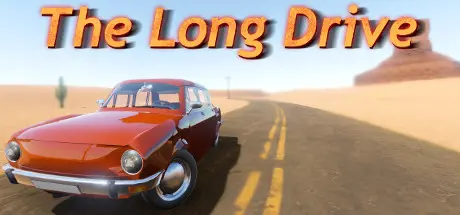
This is a road trip game in an almost infinite random generated desert. The focus is on freedom, driving, exploration and immersion. It has minimal car maintenance and survival elements.
There are no invisible walls or unable to jump over small fences, or blinking red "wrong direction" signs on the hud. The car won't need 10-20 liter fuel over just only a few hundred meters, with a full tank, you could go approximately 500 kilometers. If you see a distant big mountain, you can go there and if you are capable, you can climb it. If you don't like where the mirrors are facing you can adjust them however you want or throw them away while driving at full speed. If you want to lean out of the car, or closer to the radio or near anything, you can.


Game Screenshots

screenshot screenshot screenshot screenshot


Game Trailer


System Requirements

Minimum Requirements

Recommended Requirements

OS

Windows 10 64bit

Windows 10 64bit or higher

Processor

+3 GHZ dual core processor

+3 GHZ quad core processor or higher

Memory

4 GB RAM

8 GB RAM

Graphics

Nvidia GTX 650 TI or AMD equivalent

Nvidia GTX 1050 TI or AMD equivalent or higher

DirectX

-

-

Storage

700 MB available space

700 MB available space


Installation Guide

  1. No Installation Needed: The game is pre-installed. Just download and extract.

  2. Extract: Right-click the .zip or .rar file and select "Extract Here" or "Extract to folder".

  3. Run: Find TheLongDrive.exe inside the folder and run it.

Multiplayer & Online (Optional)

  • Play Online: Download the Online Fix file and apply it to the game folder.

  • Please go to the online fix page and read the guide.

Game Data & Settings

  • Change Language: Edit the file located at steam_settings/Configs.user.ini

Important Notes

๐Ÿ”ฅDOWNLOAD AREA๐Ÿ”ฅ

๐Ÿ”น344 MB๐Ÿ”น

Select the server you want to download with ZeiLink.

Download

Online Fix - (RAR pass: zeigames.com)

  • 3 months later...
  • Replies 3
  • Views 3.4k
  • Created
  • Last Reply

Top Posters In This Topic

Posted Images

  • 1 month later...

Create an account or sign in to comment

Recently Browsing 0

  • No registered users viewing this page.

Account

Navigation

Search

Search

๐Ÿ”Ž Search Tip
For exact results, search using "game name" .
Without quotes, results may include unrelated titles.

Configure browser push notifications

Chrome (Android)
  1. Tap the lock icon next to the address bar.
  2. Tap Permissions โ†’ Notifications.
  3. Adjust your preference.
Chrome (Desktop)
  1. Click the padlock icon in the address bar.
  2. Select Site settings.
  3. Find Notifications and adjust your preference.
