



Skip to content
View in the app

A better way to browse. Learn more.

ZeiGames

A full-screen app on your home screen with push notifications, badges and more.

To install this app on iOS and iPadOS
  1. Tap the Share icon in Safari
  2. Scroll the menu and tap Add to Home Screen.
  3. Tap Add in the top-right corner.
To install this app on Android
  1. Tap the 3-dot menu (โ‹ฎ) in the top-right corner of the browser.
  2. Tap Add to Home screen or Install app.
  3. Confirm by tapping Install.

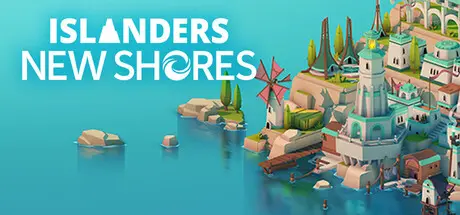
ISLANDERS: New Shores Free Download (Build 20970575 + Filters DLC)
Featured Replies

header.webp

Game Details

Release Name:ย ISLANDERS: New Shores

Game Version:ย Build 20970575

Release Date: 10 Jul, 2025

Publisher: Coatsink, Thunderful Publishing

Developer: The Station

Based On:ย CSF & Goldberg

ISLANDERS: New Shores Direct Download - Game Review

The next chapter in the beloved minimalist city-building franchise is here. ISLANDERS: New Shores invites you back to a world of tranquil creativity, now reimagined with expanded gameplay, stunning visuals, and a host of fresh features that build on the charm of the original.

Whether you're a longtime fan or a newcomer, prepare to explore, build, and strategise like never before.

Explore over 44 building types across 6 diverse biomes, each available in 4 vibrant colour variations, letting you customise your strategy and create truly unique cities.

Choose your mode of play; High Score Mode for those who love a competitive twist, or Sandbox Mode to let your creativity run wild.

Photo Mode - Capture and share your stunning island creations with customisable filters and a turntable camera.

Expanded Soundtrack - Enjoy 75 minutes of original music that sets the perfect mood for your building adventures.

Dynamic Scoring Systems - Master innovative scoring methods - such as line of sight, distance bonuses, and inter-island strategies - to enhance your gameplay.

Boons - Unlock single-use power-ups that give you unique tactical advantages as you progress.

Twitch Integration - Streamers can now engage their audiences directly with interactive features built into the game.

With a complete reimagining of the minimalist aesthetic, ISLANDERS: New Shores delivers a visual feast that complements its deep, strategic gameplay. Whether youโ€™re here to relax or to challenge your building skills, every new shore offers a fresh canvas for creativity.

- Two modes: High Score and Sandbox (with separate saves)
- 44 unique building types and 7 island properties
- 50 dynamic island generators offering endless variety
- Photo Mode with filters and a turntable camera
- 75 minutes of original, immersive music
- Boons: new one-time power-ups for strategic gameplay
- Advanced scoring systems that reward clever tactics
- Twitch integration for an interactive streaming experience


Game Screenshots

screenshot screenshot screenshot screenshot


Game Trailer


System Requirements

Minimum Requirements

Recommended Requirements

OS

Windows 10 64-bit

Windows 10 64-bit

Processor

Intel Corei7 4770K

Intel Core i5 8400

Memory

4 GB RAM

8 GB RAM

Graphics

Nvidia GeForce GTX 950

Nvidia GeForce GTX 1050

DirectX

Version 11

Version 11

Storage

4 GB available space

4 GB available space


Installation Guide

  1. No Installation Needed: The game is pre-installed. Just download and extract.

  2. Extract: Right-click the .zip or .rar file and select "Extract Here" or "Extract to folder".

  3. Run: Find ISLANDERS: New Shores.exe inside the folder and run it.

Game Data & Settings

  • Change Language: Edit the file located at steam_settings/Configs.user.ini

Important Notes

DLC List

Added DLCs

Filters DLC (Photo Filter Pack)

๐Ÿ”ฅDOWNLOAD AREA๐Ÿ”ฅ

๐Ÿ”น321 MB๐Ÿ”น

Select the server you want to download with ZeiLink.

Download

  • DicDale changed the title to ISLANDERS: New Shores Free Download ( + Filters DLC)
  • DicDale changed the title to ISLANDERS: New Shores Free Download (Build 20970575 + Filters DLC)

  • Views 643
  • Created
  • Last Reply

Posted Images

Create an account or sign in to comment

Recently Browsing 0

  • No registered users viewing this page.

Account

Navigation

Search

Search

๐Ÿ”Ž Search Tip
For exact results, search using "game name" .
Without quotes, results may include unrelated titles.

Configure browser push notifications

Chrome (Android)
  1. Tap the lock icon next to the address bar.
  2. Tap Permissions โ†’ Notifications.
  3. Adjust your preference.
Chrome (Desktop)
  1. Click the padlock icon in the address bar.
  2. Select Site settings.
  3. Find Notifications and adjust your preference.