



Skip to content
View in the app

A better way to browse. Learn more.

ZeiGames

A full-screen app on your home screen with push notifications, badges and more.

To install this app on iOS and iPadOS
  1. Tap the Share icon in Safari
  2. Scroll the menu and tap Add to Home Screen.
  3. Tap Add in the top-right corner.
To install this app on Android
  1. Tap the 3-dot menu (โ‹ฎ) in the top-right corner of the browser.
  2. Tap Add to Home screen or Install app.
  3. Confirm by tapping Install.

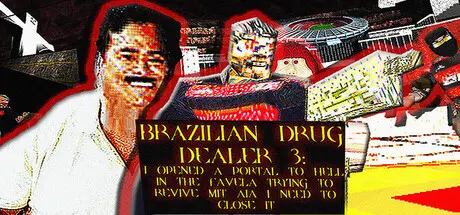
BRAZILIAN DRUG DEALER 3: I OPENED A PORTAL TO HELL IN THE FAVELA TRYING TO REVIVE MIT AIA I NEED TO CLOSE IT Free Download (Build 17944075)

Featured Replies

header.webp

Game Details

Release Name:ย BRAZILIAN DRUG DEALER 3: I OPENED A PORTAL TO HELL IN THE FAVELA TRYING TO REVIVE MIT AIA I NEED TO CLOSE IT

Game Version:ย Build 17944075

Release Date: 17 Sep, 2025

Publisher: Joeveno, NoQuarter

Developer: Joeveno

Based On:ย CSF & Goldberg

BRAZILIAN DRUG DEALER 3: I OPENED A PORTAL TO HELL IN THE FAVELA TRYING TO REVIVE MIT AIA I NEED TO CLOSE IT Direct Download - Game Review

BRAZILIAN DRUG DEALER 3 is a fast-paced ultraviolent BRAZILIAN old school FPS heavily inspired by the first Quake, and using the same engine as the game (ID TECH2). It is A TRIBUTE TO THE BRAZILIAN MODS OF THE 2000S, THE BRAZILIAN BOOTLEG GAMES OF THE 2000S, BRAZILIAN MUSIC AND THE KING OF BRAZILIAN MUSIC, MIT AIA!

YOU ARE A MIT AIA FAN, A LEGEND OF BRAZILIAN 70S FUNK MUSIC, AND YOU TRIED TO REVIVE HIM IN THE FAVELA WHERE YOU LIVE WITH A PENTAGRAM, THINGS TOOK A BAD TURN AND YOU OPENED A PORTAL TO HELL! ALL THE PEOPLE IN THE STATE OF RIO DE JANEIRO GOT POSSEEESSED! IT'S UP TO YOU TO FIND A WAY TO STOP THE HELL INVASION!

  • Use your quake-ish movement abilities to stay mobile and avoid the relentless attacks of the dead, demons and other BRAZILIAN POSSESSED.

  • ALMOST EVERY WEAPON IN THE GAME IS BATHED IN GOLD AND ALSO THE ROCKET LAUNCHER HAS THE COLORS OF YOUR FAVORITE BRAZILIAN TEAM, FLAFLAMENCO!

  • CRAZY WEAPONS LIKE BERIMBAU, PAYPHONE THAT SHOOTS COCONUTS AND MONEY PAPER AIRPLANE GUN!!

  • A BUNCH OF ENEMIES GOING FROM ARMED DEMONS TO ZOMBIES, BRAZILIAN TRUCK CLOWNS AND EVEN POSSESSED BRAZILIAN SINGERS!

  • 56 STAGES GOING THROUGH THE ENTIRE STATE OF RIO DE JANEIRO, PARTS OF SรƒO PAULO, AMAZONIA, SPACE, HELL AND EVEN HEAVEN! SAVE RIO AND SAVE MIT AIA! (29 CAMPAIGN STAGES, 21 HORDE MAPS, 3 GOBLIN MODE MAPS AND 3 DM MAPS!) (wow what happened! the game had 18 maps in the day early access launched, things change fast, it's TRIPLE the size lol)

  • LOTS OF SECRET AREAS ON EACH LEVEL!

  • -COOPERATIVE AND DEATHMATCH ON ALL CAMPAIGN MAPS

  • -EAT PASTEL AND DRINK CANE BROTH TO GAIN HEALTH! IT'S SCATTERED ON THE MAPS!

  • REPLAY THE GAME WITH ROCKET JUMPING TO FIND EXCLUSIVE ROCKET JUMP SECRET AREAS! OLD SCHOOL 90S STYLE!


Game Screenshots

screenshot screenshot screenshot screenshot


Game Trailer


System Requirements

Minimum Requirements

Recommended Requirements

OS

Windows 10

-

Processor

Intel Core i3 3110M

-

Memory

4 GB RAM

-

Graphics

Intel HD Graphics 4000

-

DirectX

Version 11

-

Storage

700 MB available space

-


Installation Guide

  1. No Installation Needed: The game is pre-installed. Just download and extract.

  2. Extract: Right-click the .zip or .rar file and select "Extract Here" or "Extract to folder".

  3. Run: Find AVIAO3.exe inside the folder and run it.

Game Data & Settings

  • Change Language: Edit the file located at steam_settings/Configs.user.ini

Important Notes

๐Ÿ”ฅDOWNLOAD AREA๐Ÿ”ฅ

๐Ÿ”น158 MB๐Ÿ”น

Select the server you want to download with ZeiLink.

Download

  • 4 months later...
  • Replies 1
  • Views 1.3k
  • Created
  • Last Reply

Top Posters In This Topic

Posted Images

When i open the game, the resolution size is to small, i cant do anything, some help please

  • DicDale changed the title to BRAZILIAN DRUG DEALER 3: I OPENED A PORTAL TO HELL IN THE FAVELA TRYING TO REVIVE MIT AIA I NEED TO CLOSE IT Free Download (Build 17944075)

Create an account or sign in to comment

Recently Browsing 0

  • No registered users viewing this page.

Account

Navigation

Search

Search

๐Ÿ”Ž Search Tip
For exact results, search using "game name" .
Without quotes, results may include unrelated titles.

Configure browser push notifications

Chrome (Android)
  1. Tap the lock icon next to the address bar.
  2. Tap Permissions โ†’ Notifications.
  3. Adjust your preference.
Chrome (Desktop)
  1. Click the padlock icon in the address bar.
  2. Select Site settings.
  3. Find Notifications and adjust your preference.