



Skip to content
View in the app

A better way to browse. Learn more.

ZeiGames

A full-screen app on your home screen with push notifications, badges and more.

To install this app on iOS and iPadOS
  1. Tap the Share icon in Safari
  2. Scroll the menu and tap Add to Home Screen.
  3. Tap Add in the top-right corner.
To install this app on Android
  1. Tap the 3-dot menu (โ‹ฎ) in the top-right corner of the browser.
  2. Tap Add to Home screen or Install app.
  3. Confirm by tapping Install.

Len's Island Free Download (v1.0.3 + ALL DLC + Online)
Featured Replies

header.webp

Game Details

Release Name:ย Len's Island

Game Version:ย v1.0.3 | Build 18970778

Release Date: 19 Jun, 2025

Publisher: Flow Studio, Fireshine Games

Developer: Flow Studio

Based On:ย CSF & Goldberg

Len's Island Direct Download - Game Review

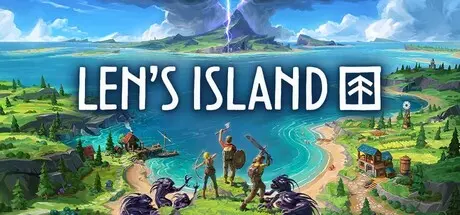
With only the tools in your backpack and a can-do attitude, begin a new life on a mysterious archipelago of islands. As you explore uncharted lands, you are free to choose your path and shape your own journey.

Embark on your journey solo or team up with up to 7 friends in seamless online co-op. Lenโ€™s Island is carefully balanced for both singleplayer and multiplayer, offering a rewarding experience whether you're building alone or battling alongside others.

Whether you're a fearless warrior, creative builder, or skilled farmer, your choices shape your adventure. Explore the world at your own pace, refine your skillset, and advance through a flexible progression system guided by your preferred playstyle.

From peaceful to hardcore, select the difficulty that fits your style, or fully personalize your game by adjusting the world settings to unlock infinite possibilities.

Master the art of crafting and enchanting to create powerful weapons, sturdy armor, and essential survival tools. Gather resources from the environment, refine them, and combine them in endless ways to suit your playstyle. Prepare food, brew potions, and upgrade your gear as you progress, ensuring you are ready to take on the next great challenge.

Descend into dangerous dungeons to defeat challenging bosses and unlock valuable loot. Each run is a test of skill and preparation, where strategy and perseverance determine success. Uncover hidden lore, complete unique quests, and earn powerful upgrades that will aid you in both combat and survival. The further you go, the greater the risks and the rewards.


Game Screenshots

screenshot screenshot screenshot screenshot


Game Trailer


System Requirements

Minimum Requirements

Recommended Requirements

OS

Windows 7 or higher (64-bit)

Windows 10 (64-bit)

Processor

2.4 Ghz Dual Core CPU

2.8 Ghz QuadCore CPU or faster

Memory

8 GB RAM

16 GB RAM

Graphics

2 GB Dedicated Memory

4+ GB Dedicated Memory

DirectX

Version 11

Version 11

Storage

8 GB available space

8 GB available space


Installation Guide

  1. No Installation Needed: The game is pre-installed. Just download and extract.

  2. Extract: Right-click the .zip or .rar file and select "Extract Here" or "Extract to folder".

  3. Run: First start Crackfix.bat. Find Len's Island.exe inside the folder and run it.

Game Data & Settings

  • Change Language: Edit the file located at steam_settings/Configs.user.ini

  • Save Data Location: %USERPROFILE%/AppData/LocalLow/Flow Studio/Len's Island/Steam/

Important Notes

DLC List

Added DLCs

Len's Island - Supporter Pack

Len's Island - Gothic Building Style

๐Ÿ”ฅDOWNLOAD AREA๐Ÿ”ฅ

๐Ÿ”น3.25 GB๐Ÿ”น

Select the server you want to download with ZeiLink.

Download

  • DicDale changed the title to Len's Island Free Download (v1.0.3 + ALL DLC + Online)

  • Views 1.3k
  • Created
  • Last Reply

Posted Images

Create an account or sign in to comment

Recently Browsing 0

  • No registered users viewing this page.

Account

Navigation

Search

Search

๐Ÿ”Ž Search Tip
For exact results, search using "game name" .
Without quotes, results may include unrelated titles.

Configure browser push notifications

Chrome (Android)
  1. Tap the lock icon next to the address bar.
  2. Tap Permissions โ†’ Notifications.
  3. Adjust your preference.
Chrome (Desktop)
  1. Click the padlock icon in the address bar.
  2. Select Site settings.
  3. Find Notifications and adjust your preference.