



Skip to content
View in the app

A better way to browse. Learn more.

ZeiGames

A full-screen app on your home screen with push notifications, badges and more.

To install this app on iOS and iPadOS
  1. Tap the Share icon in Safari
  2. Scroll the menu and tap Add to Home Screen.
  3. Tap Add in the top-right corner.
To install this app on Android
  1. Tap the 3-dot menu (โ‹ฎ) in the top-right corner of the browser.
  2. Tap Add to Home screen or Install app.
  3. Confirm by tapping Install.

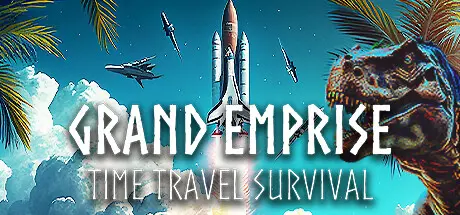
Grand Emprise: Time Travel Survival Free Download (Build 11901905)
Featured Replies

header.webp

Game Details

Release Name:ย Grand Emprise: Time Travel Survival

Game Version:ย Build 11901905

Release Date: 27 Jul, 2023

Publisher: Tbjbu2

Developer: Tbjbu2

Based On:ย CSF & Goldberg

Grand Emprise: Time Travel Survival Direct Download - Game Review

Ride dinosaurs, forge tools, sail dunes, build a colony, siege castles, automate and fly, mine underground, launch to the moon, build a dyson sphere!

An insane, unforgettable and revolutionary survival crafting base building open world adventure.

  • This game constantly introduces completely new features to create an exciting time travel adventure with a focus on high gameplay variety.

  • Each time era is intentionally short to keep the game constantly exciting, similar to games like It Takes Two and Spore.

  • This game follows a mostly linear tech tree and does not have modular building so you CANNOT create custom buildings. Don't expect a sandbox experience.

  • Fight, tame, and ride dinosaurs & explore an ancient temple.

  • Forge iron tools as you make a primitive base and fight primal animals & caveman.

  • Sail desert dunes, face giant primal worms, and fight humans across multiple different times.

  • Build and manage a human tribe colony, explore an ice cave, discover waterwheel power, and take down a hostile colony.

  • Glide through landscapes, break into an ancient castle as you build siege weapons and battle soldiers, then explore a modern day museum.

  • Automate by building machines and generating electricity, produce plastic, fly a hot air balloon, and battle with tanks.

  • Construct and sail an industrial ship and aircrafts, then mine underground and build a rocket to launch to the moon.

  • Unlock a futuristic way to automate on the moon, drill the moon using your own rover, fight mechs on Future Earth, and build a Dyson Sphere!

  • Take off into space to discover and take control of a powerful alien artificial intelligence to go beyond this universe.


Game Screenshots

screenshot screenshot screenshot screenshot


Game Trailer


System Requirements

Minimum Requirements

Recommended Requirements

OS

Windows 10+

-

Processor

Intel Core i5-7400 @ 3.3 GHz or AMD Ryzen 3 3300X

-

Memory

8 GB RAM

16 GB RAM

Graphics

NVIDIA GeForce GTX 1060 / AMD Radeon RX 580

-

DirectX

-

-

Storage

40 GB available space

-


Installation Guide

  1. No Installation Needed: The game is pre-installed. Just download and extract.

  2. Extract: Right-click the .zip or .rar file and select "Extract Here" or "Extract to folder".

  3. Run: Find NewKaragon.exe inside the folder and run it.

Game Data & Settings

  • Change Language: Edit the file located at steam_settings/Configs.user.ini

  • Save Data Location: %USERPROFILE%/Saved Games/Grand Emprise/

Important Notes

๐Ÿ”ฅDOWNLOAD AREA๐Ÿ”ฅ

๐Ÿ”น33.62 GB๐Ÿ”น

Select the server you want to download with ZeiLink.

Download

  • DicDale changed the title to Grand Emprise: Time Travel Survival Free Download (Build 11901905)

  • Views 1.1k
  • Created
  • Last Reply

Posted Images

Create an account or sign in to comment

Recently Browsing 0

  • No registered users viewing this page.

Account

Navigation

Search

Search

๐Ÿ”Ž Search Tip
For exact results, search using "game name" .
Without quotes, results may include unrelated titles.

Configure browser push notifications

Chrome (Android)
  1. Tap the lock icon next to the address bar.
  2. Tap Permissions โ†’ Notifications.
  3. Adjust your preference.
Chrome (Desktop)
  1. Click the padlock icon in the address bar.
  2. Select Site settings.
  3. Find Notifications and adjust your preference.