



Theme
Language

Layout
Skip to content
View in the app

A better way to browse. Learn more.

ZeiGames

A full-screen app on your home screen with push notifications, badges and more.

To install this app on iOS and iPadOS
  1. Tap the Share icon in Safari
  2. Scroll the menu and tap Add to Home Screen.
  3. Tap Add in the top-right corner.
To install this app on Android
  1. Tap the 3-dot menu (โ‹ฎ) in the top-right corner of the browser.
  2. Tap Add to Home screen or Install app.
  3. Confirm by tapping Install.

Paper Bride 6 Nightmare Direct Download (Build 24484374 + ALL DLC)
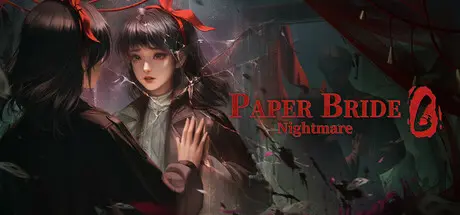
Paper Bride 6 Nightmare Direct Download

Featured Replies

Paper Bride 6 Nightmare cover art

Paper Bride 6 Nightmare Game Details

Release Name:ย Paper Bride 6 Nightmare

Game Version:ย Build 24484374

Release Date: 19 Dec, 2024

Publisher: HeartBeat Plus

Developer: HeartBeat Plus

Based On:ย CSF & RUNE

Paper Bride 6 Nightmare Direct Download - Game Overview

Millennia pass like dreams; seas turn to fields, yet the nightmare lingers.

Returning to the ruins, a glance reveals the terror that remains.

The boundaries between heaven and earth, between self and other, become blurred.

Who are we, and where do we belong in this enigmatic world?

โ€œPaper Bride 6 Nightmareโ€ is the sixth work to the Paper Bride series. Dive into a bewitching dream and immerse yourself in yet another immersive Chinese horror puzzle game!

In this chapter, we will transcend time and trace nightmares back to their origins. How will our protagonists prepare themselves for the ancient horrors that confront them, and unravel this timeless mystery? The Paper Bride series continues to evolve in this new and thrilling work!

[Refined Deep Research]

As always, we delve deep into the intricacies and provenance of Chinese folklore to ensure a professional and authentic experience. Newcomers may not be familiar with this, but we thrive on extensive researchโ€”it wouldnโ€™t feel right otherwise.. For fans of our series, we continue to deliver on an immersive experience steeped in traditional culture, without compromise.

[Improved Visuals]

Eerie and otherworldly backdrops, a vibrant outfit system (really?!), and top-tier artwork with stunning visuals.

[Even More Heart-pounding Thrills]

Just a *little* scarier than the previous chapters. Just a little. Still makes for the perfect bedtime story.


Paper Bride 6 Nightmare Screenshots

Paper Bride 6 Nightmare screenshot 1 Paper Bride 6 Nightmare screenshot 2 Paper Bride 6 Nightmare screenshot 3 Paper Bride 6 Nightmare screenshot 4


Paper Bride 6 Nightmare Trailer


Paper Bride 6 Nightmare System Requirements

Minimum Requirements

Recommended Requirements

OS

Windows 7sp1 or Windows 10

Windows 7sp1 or Windows 10

Processor

Intel Core2 Duo E6550 or AMD equivalent or above

I3 or AMD equivalent or above

Memory

-

8 GB RAM

Graphics

NVIDIA Geforce GT440๏ผˆ512M๏ผ‰or AMD Radeon equivalent or above

NVIDIA Geforce GTX560se or AMD Radeon equivalent or above

DirectX

Version 9.0

Version 9.0

Storage

1 GB available space

1 GB available space


How to Install Paper Bride 6 Nightmare

  1. No Installation Needed: The game is pre-installed. Just download and extract.

  2. Extract: Right-click the .zip or .rar file and select "Extract Here" or "Extract to folder".

  3. Run: Find qqy.exe inside the folder and run it.

Game Data & Settings

  • Change Language: Edit the file located at steam_emu.ini

Important Notes

DLC List

Added DLCs

Paper Bride 6 Nightmare - Original Artwork & Concept Art

Paper Bride 6 Nightmare - Original Soundtrack

๐Ÿ”ฅDOWNLOAD AREA๐Ÿ”ฅ

๐Ÿ”น1 GB๐Ÿ”น

Select the server you want to download with ZeiLink.

Download

  • Views 228
  • Created
  • Last Reply

Posted Images

Create an account or sign in to comment

Recently Browsing 0

  • No registered users viewing this page.

Account

Navigation

Search

Search

๐Ÿ”Ž Search Tip
For exact results, search using "game name" .
Without quotes, results may include unrelated titles.

Configure browser push notifications

Chrome (Android)
  1. Tap the lock icon next to the address bar.
  2. Tap Permissions โ†’ Notifications.
  3. Adjust your preference.
Chrome (Desktop)
  1. Click the padlock icon in the address bar.
  2. Select Site settings.
  3. Find Notifications and adjust your preference.
