



Theme
Language

Layout
Skip to content
View in the app

A better way to browse. Learn more.

ZeiGames

A full-screen app on your home screen with push notifications, badges and more.

To install this app on iOS and iPadOS
  1. Tap the Share icon in Safari
  2. Scroll the menu and tap Add to Home Screen.
  3. Tap Add in the top-right corner.
To install this app on Android
  1. Tap the 3-dot menu (โ‹ฎ) in the top-right corner of the browser.
  2. Tap Add to Home screen or Install app.
  3. Confirm by tapping Install.

Paper Bride 3 Unresolved Love Direct Download (Build 24195999 + ALL DLC)
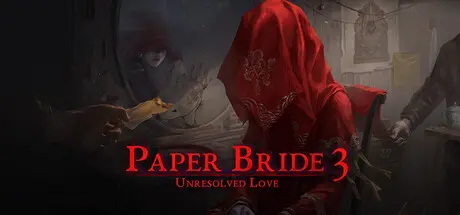
Paper Bride 3 Unresolved Love Direct Download

Featured Replies

Paper Bride 3 Unresolved Love cover art

Paper Bride 3 Unresolved Love Game Details

Release Name:ย Paper Bride 3 Unresolved Love

Game Version:ย Build 24195999

Release Date: 28 Sep, 2022

Publisher: HeartBeat Plus

Developer: HeartBeat Plus

Based On:ย CSF & RUNE

Paper Bride 3 Unresolved Love Free Download - Game Overview

The blue sky fades to dusk; absent are Yin and Yang. A procession of white robes accompanies the swaying red palanquin. Incense unbroken foretells the enduring matrimony. A joyous celebration welcomes the paper bride's return... Paper Bride3 is a Chinese Horror Puzzle Game. This is our team's third horror puzzle game. The story takes place in the village of Moshui, which is close to the village of Zangling, and in the nearby small town named Fulu. Someone says that do not to marry a woman from Zangling Village, and do not to return to this place again. But is it the way to avoid the shadow of Zangling Village? Guess what? Compared to its predecessor Paper Bride2 Zangling Village, the new story has more attractions: Expression upgrade: More picturesque, more dynamic performance. Plot performance upgrade: Minor roles will also have different expressions. Heartbeat upgrade: Some players feel that the predecessor is not exciting enough, so we decided to use 80% of horror power (If we use 100% full power, we can't be released for sure). This story will be 2.44 times scarier than its predecessor, heart patients do not enter.


Paper Bride 3 Unresolved Love Screenshots

Paper Bride 3 Unresolved Love screenshot 1 Paper Bride 3 Unresolved Love screenshot 2 Paper Bride 3 Unresolved Love screenshot 3 Paper Bride 3 Unresolved Love screenshot 4


Paper Bride 3 Unresolved Love Trailer


Paper Bride 3 Unresolved Love System Requirements

Minimum Requirements

Recommended Requirements

OS

Windows 7sp1 or Windows 10

Windows 7sp1 or Windows 10

Processor

Intel Core2 Duo E6550 or AMD equivalent or above

I3 or AMD equivalent or above

Memory

2 GB RAM

8 GB RAM

Graphics

NVIDIA Geforce GT440๏ผˆ512M๏ผ‰or AMD Radeon equivalent or above

NVIDIA Geforce GTX560se or AMD Radeon equivalent or above

DirectX

Version 9.0

Version 9.0a

Storage

1 GB available space

1 GB available space


How to Install Paper Bride 3 Unresolved Love

  1. No Installation Needed: The game is pre-installed. Just download and extract.

  2. Extract: Right-click the .zip or .rar file and select "Extract Here" or "Extract to folder".

  3. Run: Find yyz.exe inside the folder and run it.

Game Data & Settings

  • Change Language: Edit the file located at steam_emu.ini

  • Save Data Location: %USERPROFILE%/AppData/Roaming/yyz/Local Storage/leveldb

Important Notes

DLC List

Added DLCs

Paper Bride 3 Unresolved Love-Sound Track

Paper Bride 3 Unresolved Love Painting&Setting Collections

๐Ÿ”ฅDOWNLOAD AREA๐Ÿ”ฅ

๐Ÿ”น492 MB๐Ÿ”น

Select the server you want to download with ZeiLink.

Download

  • Views 121
  • Created
  • Last Reply

Posted Images

Create an account or sign in to comment

Recently Browsing 0

  • No registered users viewing this page.

Account

Navigation

Search

Search

๐Ÿ”Ž Search Tip
For exact results, search using "game name" .
Without quotes, results may include unrelated titles.

Configure browser push notifications

Chrome (Android)
  1. Tap the lock icon next to the address bar.
  2. Tap Permissions โ†’ Notifications.
  3. Adjust your preference.
Chrome (Desktop)
  1. Click the padlock icon in the address bar.
  2. Select Site settings.
  3. Find Notifications and adjust your preference.
