



Theme
Language

Layout
Skip to content
View in the app

A better way to browse. Learn more.

ZeiGames

A full-screen app on your home screen with push notifications, badges and more.

To install this app on iOS and iPadOS
  1. Tap the Share icon in Safari
  2. Scroll the menu and tap Add to Home Screen.
  3. Tap Add in the top-right corner.
To install this app on Android
  1. Tap the 3-dot menu (โ‹ฎ) in the top-right corner of the browser.
  2. Tap Add to Home screen or Install app.
  3. Confirm by tapping Install.

Paper Bride 2 Zangling Village Direct Download (Build 24309017 + ALL DLC)
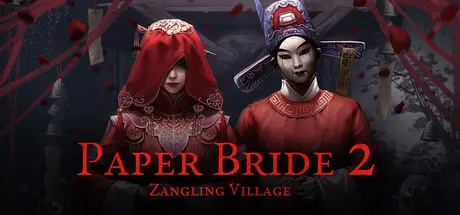
Paper Bride 2 Zangling Village Direct Download

Featured Replies

Paper Bride 2 Zangling Village cover art

Paper Bride 2 Zangling Village Game Details

Release Name:ย Paper Bride 2 Zangling Village

Game Version:ย Build 24309017

Release Date: 5 May, 2022

Publisher: HeartBeat Plus

Developer: HeartBeat Plus

Based On:ย CSF & RUNE

Paper Bride 2 Zangling Village Direct Download - Game Overview

Midsummer bride in a gown of paper;
Torn from her groom and lost forever.

Hello, everyone! Our team is excited to announce our second mystery horror game, "Paper Bride 2 Zangling Village"!
You guessed it! This is the sequel to our Paper Bride series based on Chinese folklore.
This story takes place in Zangling Village, where players must explore a village shrouded in occult mystery to uncover the secret origins of this haunted village.

Compared with the previous "Paper Bride", we have added the following new features:
โ˜  Improved Graphics - Picturesque scenery with more dynamic expression.
โ˜  Enriched Story - More story clues and dialogue. Now the protagonist is illustrated with dialog audio for an even more engaging performance.
โ˜  Added Suspense - Think carefully to overcome your fear and avoid the living dead. This story is not for the feint of heart!
โ˜  In-depth Clues - Added more detailed clues, making the puzzle game more accessible to new players.

We hope to shock players with an all new heart-pounded horror adventure!


Paper Bride 2 Zangling Village Screenshots

Paper Bride 2 Zangling Village screenshot 1 Paper Bride 2 Zangling Village screenshot 2 Paper Bride 2 Zangling Village screenshot 3 Paper Bride 2 Zangling Village screenshot 4


Paper Bride 2 Zangling Village Trailer


Paper Bride 2 Zangling Village System Requirements

Minimum Requirements

Recommended Requirements

OS

Windows 7sp1 or Windows 10

Windows 7sp1 or Windows 10

Processor

Intel Core2 Duo E6550 or AMD equivalent or above

I3 or AMD equivalent or above

Memory

2 GB RAM

8 GB RAM

Graphics

NVIDIA Geforce GT440๏ผˆ512M๏ผ‰or AMD Radeon equivalent or above

NVIDIA Geforce GTX560se or AMD Radeon equivalent or above

DirectX

Version 9.0

Version 9.0

Storage

1 GB available space

1 GB available space


How to Install Paper Bride 2 Zangling Village

  1. No Installation Needed: The game is pre-installed. Just download and extract.

  2. Extract: Right-click the .zip or .rar file and select "Extract Here" or "Extract to folder".

  3. Run: Find zlc.exe inside the folder and run it.

Game Data & Settings

  • Change Language: Edit the file located at steam_emu.ini

Important Notes

DLC List

Added DLCs

Paper Bride2 Zangling Village-Sound Track

Paper Bride 2-Original Painting&Setting Collections

๐Ÿ”ฅDOWNLOAD AREA๐Ÿ”ฅ

๐Ÿ”น430 MB๐Ÿ”น

Select the server you want to download with ZeiLink.

Download

  • DicDale changed the title to Paper Bride 2 Zangling Village Direct Download (Build 24309017 + ALL DLC)

  • Views 246
  • Created
  • Last Reply

Posted Images

Create an account or sign in to comment

Recently Browsing 0

  • No registered users viewing this page.

Account

Navigation

Search

Search

๐Ÿ”Ž Search Tip
For exact results, search using "game name" .
Without quotes, results may include unrelated titles.

Configure browser push notifications

Chrome (Android)
  1. Tap the lock icon next to the address bar.
  2. Tap Permissions โ†’ Notifications.
  3. Adjust your preference.
Chrome (Desktop)
  1. Click the padlock icon in the address bar.
  2. Select Site settings.
  3. Find Notifications and adjust your preference.