



Theme
Language

Layout
Skip to content
View in the app

A better way to browse. Learn more.

ZeiGames

A full-screen app on your home screen with push notifications, badges and more.

To install this app on iOS and iPadOS
  1. Tap the Share icon in Safari
  2. Scroll the menu and tap Add to Home Screen.
  3. Tap Add in the top-right corner.
To install this app on Android
  1. Tap the 3-dot menu (โ‹ฎ) in the top-right corner of the browser.
  2. Tap Add to Home screen or Install app.
  3. Confirm by tapping Install.

Onimusha: Way of the Sword (Build 24769601 + ALL DLC)
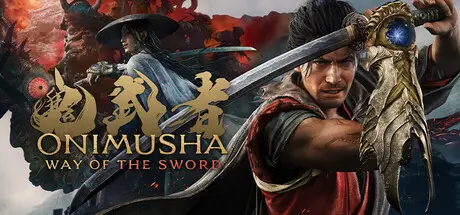
Onimusha: Way of the Sword

Featured Replies

Onimusha: Way of the Sword cover art

Onimusha: Way of the Sword Game Details

Release Name:ย Onimusha: Way of the Sword

Game Version:ย v1.0 | Build 24769601

Release Date: 3 Sep, 2026

Publisher: CAPCOM Co., Ltd.

Developer: CAPCOM Co., Ltd.

Based On:ย CSF & DenuvOwO

Onimusha: Way of the Sword Direct Download - Game Overview

Fight through bloodstained battlefields of intense swordplay action. Explore the historic Japanese capital of Edo-period Kyoto, twisted by malevolent clouds of Malice.
With every stage cloaked in mystery, danger and intrigue. Battle against monstrosities from the underworld known as Genma in a tale of dark fantasy.
Follow the tale of a samurai who wields the Oni Gauntlet, a mystical artifact that grants its bearer the power to slay Genma.
Through gritty, blood-soaked brawls, he searches for his reason to fight. What fate awaits at the end of his path?


An ardent samurai who arrives in Kyoto looking to prove that he is unmatched in the way of the sword. However, the path before him takes a strange and unexpected turn.

The protagonist of this game is a fierce young samurai, constantly moving from one bloody and gritty fight to the next. To cement this image of a striking samurai, Capcom has turned to none other than the late, iconic Japanese samurai movie legend Toshiro Mifune to star as the face model for this rendition of Miyamoto Musashi.


Equipped with an Oni Gauntlet, Musashi is granted power beyond human limits. Besides giving him the strength needed to cut down the Genma, it also holds numerous other abilities, such as being able to absorb Genma souls and convert them into a power source to further enhance its wearer. But who is behind the voice that rings out from the gauntlet?


Usually found dwelling in the lowest depths of hell, the Malice enveloping Kyoto has brought these fiends into the world of the living. Their ceaseless atrocities have plunged the capital into a state of dread and panic.


In his battle against the Genma threat, Musashi will face powerful opponents whose martial prowess rivals his own. Will he triumph, or die trying? Bloody duels to the death await in the capital.


Onimusha: Way of the Sword Screenshots

Onimusha: Way of the Sword screenshot 1 Onimusha: Way of the Sword screenshot 2 Onimusha: Way of the Sword screenshot 3 Onimusha: Way of the Sword screenshot 4


Onimusha: Way of the Sword Trailer


Onimusha: Way of the Sword System Requirements

Minimum Requirements

Recommended Requirements

OS

Windows 11

Windows 11

Processor

Intel Core i5-8400 / AMD Ryzen 3 3100

Intel Core i5-10400 / AMD Ryzen 5 3600

Memory

16 GB RAM

16 GB RAM

Graphics

GeForce GTX 1660(6GB) / Radeon RX 5500 XT(8GB)

GeForce RTX 2060 Super (8GB) / Radeon RX 6600(8GB)

DirectX

Version 12

Version 12

Storage

50 GB available space

50 GB available space


How to Install Onimusha: Way of the Sword

  1. Copy the contents of the DenuvOwO folder to the game folder.

  2. Hypervisor releases require specific system features to be disabled.

  3. To prepare your system, run VBS.cmd and follow its instructions.

  4. Launch the game from its executable after proceeding with VBS.cmd.

  5. Once you are done playing, it is recommended to revert the changes.

Game Data & Settings

  • Change Language: Edit the file located at steam_settings/Configs.user.ini

Important Notes

DLC List

Added DLCs

Onimusha: WotS - Charm: Lion Dog

Onimusha: WotS - Charm: Little Dancer

Onimusha: WotS - Charm: Mentor

Onimusha: WotS - Charm: Oni Lady

Onimusha: WotS - Charm: White Monkey

Onimusha: WotS - Cloudbiter Haori

Onimusha: WotS - Hellfire Haori

Onimusha: WotS - In-Game Mini Digital Soundtrack

Onimusha: WotS - Materials Pack: Enhancements III

Onimusha: WotS - Materials Pack: Personal Effects I

Onimusha: WotS - Materials Pack: Red Souls I

Onimusha: WotS - Materials Pack: Red Souls II

Onimusha: WotS - Moonlight Haori

Onimusha: WotS - Oni Gauntlet: Crimson Lotus

Onimusha: WotS - Outfit for Musashi: Red Armor

Onimusha: WotS - Outfit for Okuni: Flower Dance

Onimusha: WotS - Outfit for Okuni: Goldfish Dance

Onimusha: WotS - Outfit for Okuni: Oni Dance

Onimusha: WotS - Outfit for the Oni Lady: Bird Call

Onimusha: WotS - Outfit for the Oni Lady: Elegance

Onimusha: WotS - Outfit for the Oni Lady: Snow Camellia

Onimusha: WotS - Sword Appearance: Bamboo & Panda

Onimusha: WotS - Sword Appearance: Enryuu

Onimusha: WotS - Sword Appearance: Raizan

Onimusha: WotS - Sword Appearance: Sealed Curse

Onimusha: WotS - Sword Appearance: White Lion

Onimusha: WotS - Sword Appearance: Whittled Oar

๐Ÿ”ฅDOWNLOAD AREA๐Ÿ”ฅ

๐Ÿ”น54.78 GB๐Ÿ”น

Select the server you want to download with ZeiLink.

Download

  • Views 604
  • Created
  • Last Reply

Posted Images

Create an account or sign in to comment

Recently Browsing 0

  • No registered users viewing this page.

Account

Navigation

Search

Search

๐Ÿ”Ž Search Tip
For exact results, search using "game name" .
Without quotes, results may include unrelated titles.

Configure browser push notifications

Chrome (Android)
  1. Tap the lock icon next to the address bar.
  2. Tap Permissions โ†’ Notifications.
  3. Adjust your preference.
Chrome (Desktop)
  1. Click the padlock icon in the address bar.
  2. Select Site settings.
  3. Find Notifications and adjust your preference.
