



Theme
Language

Layout
Skip to content
View in the app

A better way to browse. Learn more.

ZeiGames

A full-screen app on your home screen with push notifications, badges and more.

To install this app on iOS and iPadOS
  1. Tap the Share icon in Safari
  2. Scroll the menu and tap Add to Home Screen.
  3. Tap Add in the top-right corner.
To install this app on Android
  1. Tap the 3-dot menu (โ‹ฎ) in the top-right corner of the browser.
  2. Tap Add to Home screen or Install app.
  3. Confirm by tapping Install.

Crimson Moon (v1.0.0.1 + Deluxe Edition Upgrade DLC + Online)
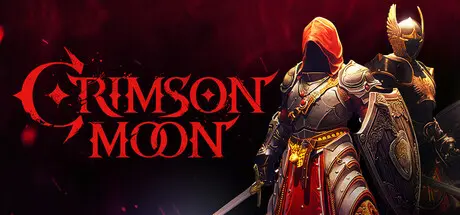
Crimson Moon

Featured Replies

Crimson Moon cover art

Crimson Moon Game Details

Release Name:ย Crimson Moon

Game Version:ย v1.0.0.1 | Build 25091239

Release Date: 1 Sep, 2026

Publisher: ProbablyMonsters

Developer: ProbablyMonsters

Based On:ย CSF & Goldberg

Crimson Moon Direct Download - Game Overview

The city of Gildenarch has fallen. Once a holy jewel, it is overrun by demons, undead, vampires, and Hellgrowth abominations. Humanity's last hope is the Order of the Crimson Moon, and its most feared weapon is you.

Whether you crusade alone or slay together in co-op, the prophecy is yours to fulfill.

Embody a Nephilim, a human-angel hybrid forged to defend the world from Hell. Master supernatural powers, weapons, melรฉe combat, and angelic transformations to fight through brutal missions and survive boss encounters with the Dead Gods.

  • Blood-soaked Melรฉe Combat - Fight hordes of abominations with relentless, visceral combat

  • Single Player or Co-Op - Crusade solo or slay together

  • High Risk, High Reward Missions - Every successful run presents new missions, modifiers, and skill achievements

  • Upgrade to Superhuman - Evolving Nephilim powers bestow temporary abilities for devastating attacks

  • Seek Sanctuary Between Runs - The Church is your home base for upgrades, NPC interactions, and War Table planning

  • Set Your Difficulty - Dynamic difficulty scaling allows every mission to match your skill - but with higher difficulties come greater rewards


Crimson Moon Screenshots

Crimson Moon screenshot 1 Crimson Moon screenshot 2 Crimson Moon screenshot 3 Crimson Moon screenshot 4


Crimson Moon Trailer


Crimson Moon System Requirements

Minimum Requirements

Recommended Requirements

OS

Windows 11

Windows 11

Processor

Intel Core i5-8400 / AMD Ryzen 5 2600

Intel Core i7-10700K / AMD Ryzen 5 5600X

Memory

16 GB RAM

32 GB RAM

Graphics

Nvidia GeForce GTX 1070 / AMD Radeon RX 5700 / Intel Arc A580

Nvidia GeForce RTX 3070 / AMD Radeon RX 6700 XT / Intel Arc A770

DirectX

Version 12

Version 12

Storage

50 GB available space

50 GB available space


How to Install Crimson Moon

  1. No Installation Needed: The game is pre-installed. Just download and extract.

  2. Extract: Right-click the .zip or .rar file and select "Extract Here" or "Extract to folder".

  3. Run: Find CrimsonMoonNG.exe inside the folder and run it.

Multiplayer & Online (Optional)

  • Play Online: Download the Online Fix file and apply it to the game folder.

  • Please go to the online fix page and read the guide.

Game Data & Settings

  • Change Language: Edit the file located at steam_settings/Configs.user.ini

  • Save Data Location: %USERPROFILE%/AppData/Local/\CrimsonMoonNG\Saved\SaveGames

Important Notes

DLC List

Added DLCs

Crimson Moon: Deluxe Edition Upgrade

๐Ÿ”ฅDOWNLOAD AREA๐Ÿ”ฅ

๐Ÿ”น31.07 GB๐Ÿ”น

Select the server you want to download with ZeiLink.

Download

Online Fix

  • Replies 4
  • Views 1.6k
  • Created
  • Last Reply

Top Posters In This Topic

Most Popular Posts

Posted Images

49 minutes ago, DicDale said:

Did you test? its work or not?

Yeah Work from

online-fix .me

  • DicDale changed the title to Crimson Moon (v1.0.0.1 + Deluxe Edition Upgrade DLC + Online)

Create an account or sign in to comment

Recently Browsing 0

  • No registered users viewing this page.

Account

Navigation

Search

Search

๐Ÿ”Ž Search Tip
For exact results, search using "game name" .
Without quotes, results may include unrelated titles.

Configure browser push notifications

Chrome (Android)
  1. Tap the lock icon next to the address bar.
  2. Tap Permissions โ†’ Notifications.
  3. Adjust your preference.
Chrome (Desktop)
  1. Click the padlock icon in the address bar.
  2. Select Site settings.
  3. Find Notifications and adjust your preference.