



Theme
Language

Layout
Skip to content
View in the app

A better way to browse. Learn more.

ZeiGames

A full-screen app on your home screen with push notifications, badges and more.

To install this app on iOS and iPadOS
  1. Tap the Share icon in Safari
  2. Scroll the menu and tap Add to Home Screen.
  3. Tap Add in the top-right corner.
To install this app on Android
  1. Tap the 3-dot menu (โ‹ฎ) in the top-right corner of the browser.
  2. Tap Add to Home screen or Install app.
  3. Confirm by tapping Install.

Drive Thru Miami - Restaurant Simulator (Build 19283456)
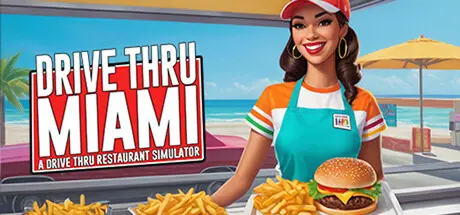
Drive Thru Miami - Restaurant Simulator

Featured Replies

Drive Thru Miami - Restaurant Simulator cover art

Drive Thru Miami - Restaurant Simulator Game Details

Release Name:ย Drive Thru Miami - Restaurant Simulator

Game Version:ย Build 19283456

Release Date: 28 Oct, 2024

Publisher: Alkame Games

Developer: Alkame Games

Based On:ย CSF & Goldberg

Drive Thru Miami - Restaurant Simulator Direct Download - Game Overview

Dive into the fast-paced world of Drive Thru Miamiโ€”a vibrant restaurant simulator where you become the ultimate drive-thru chef. Take orders, prepare drinks and meals, manage inventory, customize your shop, and grow your food empire in sunny Miami. Perfect for fans of cooking games, restaurant management, and simulation strategy.

A simulation of running and expanding a drive-thru shop where players take orders, prepare various beverages and foods, manage supplies, and serve customers efficiently.

1. Order Taking:
- Receive and input customer orders for both beverages and foods.
2. Preparation:

- Choose the correct cup size and shape for beverages.

- Prepare food items as requested.
3. Customization:
- Customize your shop and prices

4. Payment System:
- Process payments using cash, credit cards, or mobile payments.

- Input amounts, provide correct change, and complete transactions accurately.

5. Supply Management:

- Monitor inventory and restock supplies to keep the shop well-stocked.

6. Growth and Expansion:

- Improve and expand the shop by upgrading equipment, adding new menu items, and opening new locations.
- Invest profits wisely to enhance the shop's reputation and attract more customers.

Objective:

Efficiently manage and grow the drive-thru, accurately fulfill orders, maintain adequate supplies, and build a positive reputation for your shop.

This game offers a dynamic and realistic experience of operating and expanding a drive-thru, managing a wide range of beverages and foods, handling diverse payment transactions, and ensuring a steady supply of goods.


Drive Thru Miami - Restaurant Simulator Screenshots

Drive Thru Miami - Restaurant Simulator screenshot 1 Drive Thru Miami - Restaurant Simulator screenshot 2 Drive Thru Miami - Restaurant Simulator screenshot 3 Drive Thru Miami - Restaurant Simulator screenshot 4


Drive Thru Miami - Restaurant Simulator Trailer


Drive Thru Miami - Restaurant Simulator System Requirements

Minimum Requirements

Recommended Requirements

OS

Win 10

-

Processor

-

-

Memory

-

-

Graphics

-

-

DirectX

-

-

Storage

-

-


How to Install Drive Thru Miami - Restaurant Simulator

  1. No Installation Needed: The game is pre-installed. Just download and extract.

  2. Extract: Right-click the .zip or .rar file and select "Extract Here" or "Extract to folder".

  3. Run: Find Drive_Thru.exe inside the folder and run it.

Game Data & Settings

  • Change Language: Edit the file located at steam_settings/Configs.user.ini

Important Notes

๐Ÿ”ฅDOWNLOAD AREA๐Ÿ”ฅ

๐Ÿ”น1.04 GB๐Ÿ”น

Select the server you want to download with ZeiLink.

Download

  • DicDale changed the title to Drive Thru Miami - Restaurant Simulator (Build 19283456)

  • Views 495
  • Created
  • Last Reply

Posted Images

Create an account or sign in to comment

Recently Browsing 0

  • No registered users viewing this page.

Account

Navigation

Search

Search

๐Ÿ”Ž Search Tip
For exact results, search using "game name" .
Without quotes, results may include unrelated titles.

Configure browser push notifications

Chrome (Android)
  1. Tap the lock icon next to the address bar.
  2. Tap Permissions โ†’ Notifications.
  3. Adjust your preference.
Chrome (Desktop)
  1. Click the padlock icon in the address bar.
  2. Select Site settings.
  3. Find Notifications and adjust your preference.