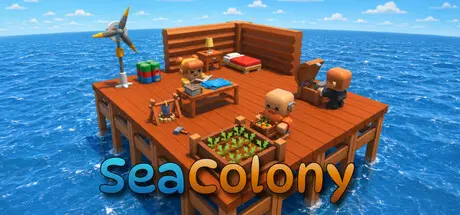
August 29Aug 29 SeaColony Game DetailsRelease Name: SeaColonyGame Version: v0.5.16 | Build 24973401Release Date: 25 Aug, 2026Publisher: EmindevDeveloper: EmindevBased On: CSF & GoldbergSeaColony Direct Download - Game OverviewSeaColony is a survival colony-builder set on the open sea. Build and expand a floating settlement, manage your colonists, develop production systems, and survive the challenges of life far from land.Start with limited space and resources, then gradually turn your small platform into a self-sustaining colony. Every expansion matters as you balance food, water, power, production, storage, and the needs of your colonists.Research new technologies, establish farms and fishing systems, trade with passing merchant ships, and prepare your colony for pirate raids, fires, harsh weather, and other unexpected events.Expand your floating platform and design a colony that can support a growing population. Plan where you place housing, production buildings, storage, farms, and essential infrastructure.Assign work priorities and manage the daily needs of your colonists. Keep them fed, hydrated, rested, and productive as your settlement grows.Gather resources and build production systems to create food, water, materials, medicine, and other supplies your colony needs to survive.Grow crops and harvest food from the sea. Combine farming, fishing, and other food sources to maintain a reliable supply for your colony.Unlock new buildings, equipment, production methods, and power systems through research as your colony develops.Generate and manage electricity using different power sources. Build batteries and balance energy production and consumption as your infrastructure expands.Trade surplus resources with passing merchant ships and obtain materials that may be difficult to produce on your own.Face changing weather, fires, pirate raids, resource shortages, and other events that can threaten the stability of your colony.Balance resource production, storage, consumption, and expansion. Every new colonist and every new structure puts additional pressure on your colony's systems.SeaColony Screenshots SeaColony TrailerSeaColony System RequirementsMinimum RequirementsRecommended RequirementsOSWindows 10 64-bit-ProcessorIntel Core i3 / AMD Ryzen 3 or equivalent-Memory8 GB RAM-GraphicsNVIDIA GeForce GTX 750 Ti / AMD Radeon R7 260X-DirectXVersion 11-Storage1 GB available space-How to Install SeaColonyNo Installation Needed: The game is pre-installed. Just download and extract.Extract: Right-click the .zip or .rar file and select "Extract Here" or "Extract to folder".Run: Find SeaColony.exe inside the folder and run it.Game Data & SettingsChange Language: Edit the file located at steam_settings/Configs.user.iniSave Data Location: %USERPROFILE%/AppData/LocalLow/Emindev/SeaColonyImportant NotesTo support the Game Developer, Get It On Steam.🔥DOWNLOAD AREA🔥🔹106 MB🔹Select the server you want to download with ZeiLink.Download





Create an account or sign in to comment