



Theme
Language

Layout
Skip to content
View in the app

A better way to browse. Learn more.

ZeiGames

A full-screen app on your home screen with push notifications, badges and more.

To install this app on iOS and iPadOS
  1. Tap the Share icon in Safari
  2. Scroll the menu and tap Add to Home Screen.
  3. Tap Add in the top-right corner.
To install this app on Android
  1. Tap the 3-dot menu (โ‹ฎ) in the top-right corner of the browser.
  2. Tap Add to Home screen or Install app.
  3. Confirm by tapping Install.

The Scouring Free Download (v26.08.05 + Gold Dev Supporter Pack DLC + Online)
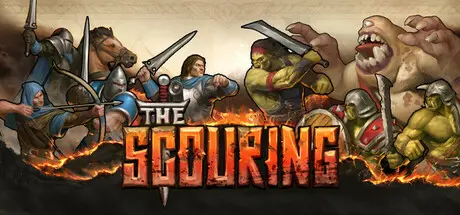
The Scouring

Featured Replies

The Scouring cover art

The Scouring Game Details

Release Name:ย The Scouring

Game Version:ย v26.08.05 | Build 24569233

Release Date: 12 Aug, 2025

Publisher: Orc Group

Developer: Orc Group

Based On:ย CSF & Goldberg

The Scouring Direct Download - Game Overview

Build bases, manage resources, and lead armies. Wield magic, unleash cannons, and outsmart foes in dynamic battles. Defend from waves of undead at night! Sounds familiar?

In a unique mode of The Scouring, become a powerful hero, crushing foes with devastating skills. Gain experience, collect items, and customize your playstyle, blending action RPG combat with strategic army control. Shape battles with spells, weapons, and tactics to claim victory. Enter dungeons to look for precious items. BE THE HERO. Control the battlefield.

The Scouring delivers epic multiplayer battles with team skirmishes, and free-for-alls for up to 8 players. ะกustomize matches, and test your skill in dynamic modes. Forge alliances or dominate foes in the ultimate multiplayer RTS experience.

The Scouring unlocks endless creativity with Steam Workshop integration. Download custom maps, modes, and AI scripts or create and share your own. With powerful tools and a vibrant community, every game offers fresh challenges and infinite variety.

The Scouring introduces a new genre: Action RPG Strategy. Customize your hero, equip gear, and unleash powerful abilities in fast-paced combat. While you dominate the battlefield, AI manages your army, resources, and bases, blending action and strategy seamlessly.

The Scouring started as a solo developerโ€™s dream to create the ultimate RTS. Inspired by classics and built with passion, it thrives on community feedback. Join our Discord, follow and read X, get in touch on Reddit! Together, weโ€™ll refine, expand, and create something special. Thank you for being part of this journey.

  • Attention to Detail: Immerse yourself in richly detailed, visually striking environments. Watch battles unfold with dynamic destruction, lifelike unit movement, and spell effects.

  • Smooth Gameplay: Fluid and polished controls that allow you to fully utilize your skills.

  • Action RPG Strategy: New gameplay experience and new genre. You control a powerful hero while AI manages your army.

  • Multiplayer Modes: Engage in ranked matches, free-for-alls, or team battles with custom games.

  • User-Generated Content: Explore and share maps and modes via Steam Workshop. Create AI scripts to automate strategies and watch them play in real-time.

  • Community-Driven Development: Shaped by players and their feedback.


The Scouring Screenshots

The Scouring screenshot 1 The Scouring screenshot 2 The Scouring screenshot 3 The Scouring screenshot 4


The Scouring Trailer


The Scouring System Requirements

Minimum Requirements

Recommended Requirements

OS

Windows Vista/7/8/10 (64-bit)

Windows Vista/7/8/10 (64-bit)

Processor

Intelยฎ Pentium Dual Core 2.0GHz or equivalent

Intelยฎ Core 2 Duo 2.5GHz or equivalent

Memory

2 GB RAM

4 GB RAM

Graphics

NVIDIA GeForce GT 430 or equivalent

NVIDIA GeForce GTX 470 or equivalent

DirectX

-

-

Storage

1 GB available space

1 GB available space


How to Install The Scouring

  1. No Installation Needed: The game is pre-installed. Just download and extract.

  2. Extract: Right-click the .zip or .rar file and select "Extract Here" or "Extract to folder".

  3. Run: Find TheScouring.exe inside the folder and run it.

Multiplayer & Online (Optional)

  • Play Online: Download the Online Fix file and apply it to the game folder.

  • Please go to the online fix page and read the guide.

Game Data & Settings

  • Change Language: Edit the file located at steam_settings/Configs.user.ini

  • Save Data Location: %USERPROFILE%/AppData/Roaming/TheScouring/UserSaves

Important Notes

DLC List

Added DLCs

The Scouring - Gold Dev Supporter Pack

๐Ÿ”ฅDOWNLOAD AREA๐Ÿ”ฅ

๐Ÿ”น958 MB๐Ÿ”น

Select the server you want to download with ZeiLink.

Download

Online Fix - (RAR pass: zeigames.com)

  • Views 539
  • Created
  • Last Reply

Posted Images

Create an account or sign in to comment

Recently Browsing 0

  • No registered users viewing this page.

Account

Navigation

Search

Search

๐Ÿ”Ž Search Tip
For exact results, search using "game name" .
Without quotes, results may include unrelated titles.

Configure browser push notifications

Chrome (Android)
  1. Tap the lock icon next to the address bar.
  2. Tap Permissions โ†’ Notifications.
  3. Adjust your preference.
Chrome (Desktop)
  1. Click the padlock icon in the address bar.
  2. Select Site settings.
  3. Find Notifications and adjust your preference.
