



Theme
Language

Layout
Skip to content
View in the app

A better way to browse. Learn more.

ZeiGames

A full-screen app on your home screen with push notifications, badges and more.

To install this app on iOS and iPadOS
  1. Tap the Share icon in Safari
  2. Scroll the menu and tap Add to Home Screen.
  3. Tap Add in the top-right corner.
To install this app on Android
  1. Tap the 3-dot menu (⋮) in the top-right corner of the browser.
  2. Tap Add to Home screen or Install app.
  3. Confirm by tapping Install.

Nordic Ashes: Survivors of Ragnarok Free Download (v3.2.1 + ALL DLC)
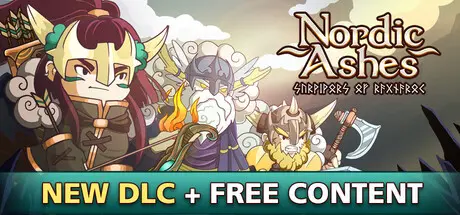
Nordic Ashes: Survivors of Ragnarok

Featured Replies

Nordic Ashes: Survivors of Ragnarok cover art

Nordic Ashes: Survivors of Ragnarok Game Details

Release Name: Nordic Ashes: Survivors of Ragnarok

Game Version: v3.2.1 | Build 24025658

Release Date: 26 Apr, 2024

Publisher: Noxfall Studios

Developer: Noxfall Studios

Based On: CSF & Goldberg

Nordic Ashes: Survivors of Ragnarok Direct Download - Game Overview

Nordic Ashes: Survivors of Ragnarok, is a challenging Norse inspired roguelite-survivor game, where you’ll have to survive hordes of creatures that come your way.

Unlock new weapons and abilities as you battle. Upgrade your characters’ stats with Constellation Ability Trees, equip yourself with powerful relics and slay your enemies before they surround you, or it may be too late…

During Ragnarok, Yggdrasil, the Tree of Life, lost almost all of its energy to sustain the Nine Realms. Only a few heroes will be able to survive the End of the World. Play as Axeldör, a Viking warrior; Thyra, a fierce ranger; or Hafgrim, master of the elements, among many other charismatic survivors.

  • 9 maps, inspired by each realm of Norse mythology.

  • 10+ characters, with exclusive skills and weapons.

  • Skill tree in the form of character constellations, to improve the stats of each survivor.

  • Yggdrasil as a meta-progress tree to boost different features that will make you feel more powerful in your adventure.

  • Character Masteries to upgrade your characters to their maximum potential.

  • 5 game modes: Adventure, Ragnarok, Daily Challenge, Custom and Nightmare.

  • Very replayable.

  • Alternative character skins for every character.

  • Elites and Bosses with their own behaviors to make battles more epic.

  • Reward Shrines scattered throughout the realm to always have quests or challenges to complete during a run.

  • Ascensions of each character's relics to boost them even more.

  • 150+ Relics.

  • 150+ Achievements.

  • Secrets.

  • Twitch integration to make streamings more fun.

  • Ready for PC, Mac, Linux and Steamdeck.


Nordic Ashes: Survivors of Ragnarok Screenshots

Nordic Ashes: Survivors of Ragnarok screenshot 1 Nordic Ashes: Survivors of Ragnarok screenshot 2 Nordic Ashes: Survivors of Ragnarok screenshot 3 Nordic Ashes: Survivors of Ragnarok screenshot 4


Nordic Ashes: Survivors of Ragnarok Trailer


Nordic Ashes: Survivors of Ragnarok System Requirements

Minimum Requirements

Recommended Requirements

OS

Windows 7

Windows 10

Processor

AMD FX-6300 / 3rd or 4th gen i3

i5 6600 +

Memory

4 GB RAM

8 GB RAM

Graphics

GTX 660 Ti / HD 7870

GTX 970

DirectX

-

-

Storage

530 MB available space

530 MB available space


How to Install Nordic Ashes: Survivors of Ragnarok

  1. No Installation Needed: The game is pre-installed. Just download and extract.

  2. Extract: Right-click the .zip or .rar file and select "Extract Here" or "Extract to folder".

  3. Run: Find Nordic Ashes.exe inside the folder and run it.

Game Data & Settings

  • Change Language: Edit the file located at steam_settings/Configs.user.ini

  • Save Data Location: %USERPROFILE%/AppData/LocalLow/Noxfall Studios/Nordic Ashes/

Important Notes

DLC List

Added DLCs

Nordic Ashes Twilight of Yggdrasil

Nordic Ashes Remnants of Corruption

Nordic Ashes Dark Knights

Nordic Ashes Digital Artbook

🔥DOWNLOAD AREA🔥

🔹786 MB🔹

Select the server you want to download with ZeiLink.

Download

  • Views 40
  • Created
  • Last Reply

Posted Images

Create an account or sign in to comment

Recently Browsing 0

  • No registered users viewing this page.

Account

Navigation

Search

Search

🔎 Search Tip
For exact results, search using "game name" .
Without quotes, results may include unrelated titles.

Configure browser push notifications

Chrome (Android)
  1. Tap the lock icon next to the address bar.
  2. Tap Permissions → Notifications.
  3. Adjust your preference.
Chrome (Desktop)
  1. Click the padlock icon in the address bar.
  2. Select Site settings.
  3. Find Notifications and adjust your preference.
