



Theme
Language

Layout
Skip to content
View in the app

A better way to browse. Learn more.

ZeiGames

A full-screen app on your home screen with push notifications, badges and more.

To install this app on iOS and iPadOS
  1. Tap the Share icon in Safari
  2. Scroll the menu and tap Add to Home Screen.
  3. Tap Add in the top-right corner.
To install this app on Android
  1. Tap the 3-dot menu (โ‹ฎ) in the top-right corner of the browser.
  2. Tap Add to Home screen or Install app.
  3. Confirm by tapping Install.

ArkCraft: The Rebirth of the World Free Download (Build 18756101)
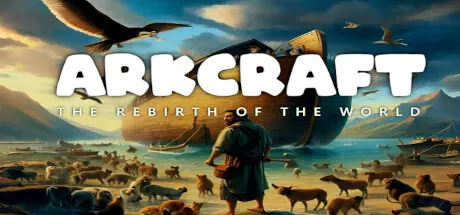
ArkCraft: The Rebirth of the World

Featured Replies

ArkCraft: The Rebirth of the World cover art

ArkCraft: The Rebirth of the World Game Details

Release Name:ย ArkCraft: The Rebirth of the World

Game Version:ย Build 18756101

Release Date: 22 Oct, 2024

Publisher: ZD Yazilim

Developer: ZD Yazilim

Based On:ย CSF & Goldberg

ArkCraft: The Rebirth of the World Direct Download - Game Overview

Welcome to ArkCraft: The Rebirth of the World

Experience a unique crafting and building game that takes you on an epic journey through antiquity. Take on the role of a pioneer in a world threatened by an impending flood, and build the legendary Ark to save humanity and the animal kingdom.

Build the Ark of your dreams: Utilize your crafting skills to construct the Ark and populate it with a variety of animals and plants. Customize your Ark to your liking and create a home for yourself and your community.

Explore a vibrant world: Immerse yourself in a rich and dynamic world full of adventure and discovery. Explore different biomes, from dense forests to rugged mountains, and encounter a variety of wild animals and mysterious ruins.

Survive and thrive: Master the art of survival as you face the challenges of a changing world. Gather resources, craft tools and weapons, and learn to defend yourself against wild animals and natural disasters.

Research and evolve: Unlock new skills and technologies as you track your progress through Skill Trees and Tech Trees. Discover new agricultural and crafting techniques, upgrade your equipment to survive.

Build a completely new settlement after the flood to give mankind hope again. Protect your subjects against harsh conditions and mysterious creatures.

Are you ready to take on the challenge and reshape the world? Join the ArkCraft community today and become part of an epic adventure.


ArkCraft: The Rebirth of the World Screenshots

ArkCraft: The Rebirth of the World screenshot 1 ArkCraft: The Rebirth of the World screenshot 2 ArkCraft: The Rebirth of the World screenshot 3 ArkCraft: The Rebirth of the World screenshot 4


ArkCraft: The Rebirth of the World System Requirements

Minimum Requirements

Recommended Requirements

OS

Windows 10

Windows 11

Processor

Ryzen 3 3xxx

Ryzen 5 5xxx

Memory

8 GB RAM

16 GB RAM

Graphics

GTX 1070

RTX 2080

DirectX

Version 12

Version 12

Storage

9 GB available space

9 GB available space


How to Install ArkCraft: The Rebirth of the World

  1. No Installation Needed: The game is pre-installed. Just download and extract.

  2. Extract: Right-click the .zip or .rar file and select "Extract Here" or "Extract to folder".

  3. Run: Find ArkCraft.exe inside the folder and run it.

Game Data & Settings

  • Change Language: Edit the file located at steam_settings/Configs.user.ini

Important Notes

๐Ÿ”ฅDOWNLOAD AREA๐Ÿ”ฅ

๐Ÿ”น8.62 GB๐Ÿ”น

Select the server you want to download with ZeiLink.

Download

  • Replies 1
  • Views 125
  • Created
  • Last Reply

Top Posters In This Topic

Most Popular Posts

  • Maeriss
    Maeriss

    Oh nice. I have never heard of this game. Thanks Boss!

Posted Images

Create an account or sign in to comment

Recently Browsing 0

  • No registered users viewing this page.

Account

Navigation

Search

Search

๐Ÿ”Ž Search Tip
For exact results, search using "game name" .
Without quotes, results may include unrelated titles.

Configure browser push notifications

Chrome (Android)
  1. Tap the lock icon next to the address bar.
  2. Tap Permissions โ†’ Notifications.
  3. Adjust your preference.
Chrome (Desktop)
  1. Click the padlock icon in the address bar.
  2. Select Site settings.
  3. Find Notifications and adjust your preference.
