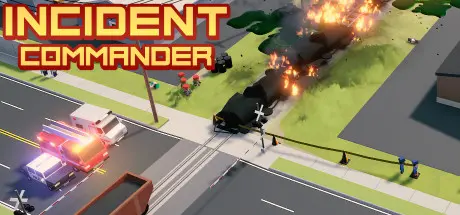
Saturday at 09:54 AM3 days Incident Commander Game DetailsRelease Name: Incident CommanderGame Version: Build 20535248Release Date: 16 Jul, 2020Publisher: BreakAway GamesDeveloper: BreakAway GamesBased On: CSF & GoldbergIncident Commander Direct Download - Game Overview A small town faces a big problem, and the crisis will only get worse unless you step in. As Incident Commander, you deploy and coordinate responder teams from multiple organizations to deal with a sudden threat to the town’s citizens and property.Incident Commander uses a light-hearted approach to the Incident Command System. The focus is on operations. Players control police, fire, EMS, air operations, school, CERT, and public works units in real-time to deal with the emerging disaster.The game supports one to four players. A tutorial and nine scenarios provide many types of challenges, including fires, chemical spills, electrical hazards, active shooter, casualty collection, and more. The town mayor will keep an eye on your progress and track Public Safety and Incident Budget. Are you up to the task, Commander?Bird’s-eye view of 3D world with animations and special effects such as damage from fires, toppled utility poles, chemical spills, and explosionsHigh quality sound effects and voice acting helps bring the action to life!Deploy and control police, fire crew, EMS and dozens of vehicles to contain and neutralize incidents over 9 unique missionsIncludes 20 different types of teams and their vehicles, from School Resource Officer to HAZMATCooperative multiplayer feature supports up to four playersGet a grip on the mayhem and keep the situation under control with Mission ObjectivesAccess and challenge your own best public safety and incident budget scores directly from the cloudIncident Commander Screenshots Incident Commander TrailerIncident Commander System RequirementsMinimum RequirementsRecommended RequirementsOSWindows 7Windows 10ProcessorIntel Core 2 Duo 2.4GHzIntel Core i5-2500 or betterMemory2 GB RAM4 GB RAMGraphicsShader Model 3.0 support with 512MB VRAMNVIDIA GeForce GTX 960 or betterDirectXVersion 9.0cVersion 11Storage2 GB available space2 GB available spaceHow to Install Incident CommanderNo Installation Needed: The game is pre-installed. Just download and extract.Extract: Right-click the .zip or .rar file and select "Extract Here" or "Extract to folder".Run: Find Incident Commander.exe inside the folder and run it.Game Data & SettingsChange Language: Edit the file located at steam_settings/Configs.user.iniImportant NotesTo support the Game Developer, Get It On Steam.🔥DOWNLOAD AREA🔥🔹130 MB🔹Select the server you want to download with ZeiLink.Download





Create an account or sign in to comment